'%3e%3cg%20clip-path='url(%23roundHexB)'%3e%3cpath%20fill='%236D5DFC'%20d='M256%2040%20443%20148%20443%20364%20256%20472%2069%20364%2069%20148Z'/%3e%3cpath%20fill='%239C93FB'%20d='M69%20148%20256%2040%20443%20148%20256%20256Z'/%3e%3cpath%20fill='%234A3FD1'%20d='M256%20256%20443%20148%20443%20364%20256%20472Z'/%3e%3c/g%3e%3c!--%20top%20face:%20filled%20round%20magnifier%20--%3e%3cg%20transform='matrix(0.8660254,-0.5,0.8660254,0.5,69,148)'%3e%3cg%20transform='matrix(0.935,0,0,0.935,7.02,7.02)'%3e%3ccircle%20cx='88'%20cy='88'%20r='52'%20fill='%23FFFFFF'/%3e%3ccircle%20cx='88'%20cy='88'%20r='28'%20fill='%239C93FB'/%3e%3cpath%20d='M124%20124%20164%20164'%20stroke='%23FFFFFF'%20stroke-width='26'%20stroke-linecap='round'/%3e%3c/g%3e%3c/g%3e%3cg%20transform='matrix(0.8660254,0.5,0,1,69,148)'%3e%3cpath%20d='M96.1,61.08%20L45.9,128.92%20Q34,145%2054,145%20L162,145%20Q182,145%20170.1,128.92%20L119.9,61.08%20Q108,45%2096.1,61.08%20Z'%20fill='%23FFFFFF'/%3e%3c/g%3e%3c!--%20right%20face:%20filled%20bubble%20--%3e%3cg%20transform='matrix(0.8660254,-0.5,0,1,256,256)'%3e%3cg%20transform='matrix(0.855,0,0,0.855,15.66,15.66)'%3e%3cpath%20d='M60%2042H156a28%2028%200%200%201%2028%2028V158Q184%20168%20174.47%20164.96L124.53%20149.04Q115%20146%20105%20146H60a28%2028%200%200%201-28-28V70a28%2028%200%200%201%2028-28Z'%20fill='%23FFFFFF'/%3e%3c/g%3e%3c/g%3e%3c/g%3e%3c/svg%3e)
 bender-dios
 Idiomas - VRChatワールド多言語ローカライズシステム (PC/Quest対応) / VRChat World Localization (PC & Quest)
상품 설명
━━━━━━━━━━━━━━━━━━━━━━━━
🌍 Idiomas - VRChatワールド多言語化システム
✅ PC + Quest対応 ✅ 完全無料 ✅ MITライセンス
━━━━━━━━━━━━━━━━━━━━━━━━
❓ これは何?
ワールドのUI (ボタン・メニュー・看板・説明文)を、
プレイヤーの言語に合わせて自動で切り替えるツールです。
例: 英語で作ったワールドを、日本人には日本語、
韓国人には韓国語で自動表示。プレイヤーは何もしなくても
自分の言語でワールドを楽しめます。
🎯 こんな人におすすめ
・海外プレイヤーにもワールドを楽しんでほしい
・カラオケ/ゲーム/ショップの説明文を多言語化したい
・翻訳を自動化したい (1クリックで完了)
・Questユーザーにも対応したい
・プログラミング不要で使いたい
⚙️ 使い方 (3ステップ)
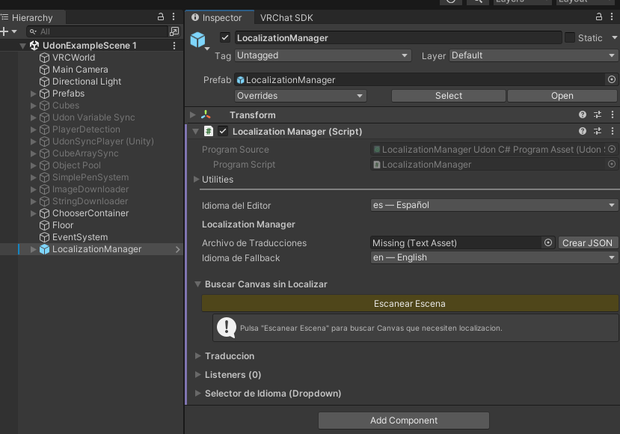
1. LocalizationManager プレハブをシーンに配置
2. Inspectorで「シーンをスキャン」
→ 全Canvasとテキストを自動検出
3. 「自動翻訳」ボタンで11言語に一括翻訳
言語選択ドロップダウンも付属。
✨ 主な機能
◆ Canvas丸ごと自動スキャン (TMP + Legacy Text)
◆ 11言語対応:
日本語 / English / 中文(簡/繁) / 한국어 /
Español / Français / Deutsch / Português /
Русский / Català
◆ プレイヤー言語の自動検出
(VRChat API → タイムゾーン200+ → フォールバック)
◆ 無料の自動翻訳 (MyMemory API・登録不要)
◆ CJK/キリル文字対応
(VRChat内蔵Noto Sansを使用・追加フォント不要)
◆ 動的パラメータ {0}{1}{2} (名前・スコア等)
◆ 複数形対応 (_zero/_one/_other)
◆ CSVエクスポート/インポート
(Google Sheetsで翻訳者と共同作業)
📱 PC + Quest 両対応
✅ PC VRChat 完全対応
✅ Quest VRChat 完全対応
✅ Android/Questのタイムゾーン検出を最適化
✅ 追加フォント不要 → Quest容量制限に優しい
✅ UdonSharpのみ → Questパフォーマンス対応
📦 動作環境
・Unity 2022.3.x
・VRChat SDK Worlds >= 3.8.1
・UdonSharp / TextMeshPro (SDK同梱)
・対応: PC (Windows) + Quest (Android)
🚀 インストール
【VCC推奨】Settings > Packages > Add Repository:
https://emerytheec.github.io/vpm-listing/index.json
【手動】同梱の .unitypackage をインポート
📖 マニュアル (スクリーンショット付き):
https://emerytheec.github.io/Idiomas-docs/
💰 完全無料 (0円)・MITライセンス・商用利用可
クレジット表記は任意です
🔗 GitHub: https://github.com/emerytheec/Idiomas
⚠️ 注意
・ワールド製作者向けツールです (アバター非対応)
・Unity Editor上ではCJKが□になりますが、
VRChatアップロード後は正常表示されます
━━━━━━━━━━━━━━━━━━━━━━━━
🌍 Idiomas - VRChat World Localization
✅ PC + Quest ✅ 100% Free ✅ MIT License
━━━━━━━━━━━━━━━━━━━━━━━━
❓ What is this?
Idiomas automatically translates your VRChat world UI
(buttons, menus, signs, descriptions) into the language
of every visitor.
Example: you built your world in English → Japanese
players see Japanese, Korean players see Korean, etc.
Zero effort from the player. Every visitor enjoys
your world in their own language, instantly.
🎯 Who is it for?
・World creators wanting international reach
・Karaoke / game / shop / museum worlds with UI text
・Creators who want to skip manual translation work
・Quest creators (fully supported)
・Non-programmers (no scripting required)
⚙️ How it works (3 steps)
1. Drop the LocalizationManager prefab in your scene
2. Click "Scan Scene" → auto-detects every Canvas/text
3. Click "Auto-Translate" → fills 11 languages at once
A language-selection dropdown is also included.
✨ Features
◆ Full-canvas auto-scan (TMP + Legacy Text)
◆ 11 languages:
English / 日本語 / 中文 (Simplified & Traditional) /
한국어 / Español / Français / Deutsch / Português /
Русский / Català
◆ Auto player-language detection
(VRChat API → 200+ timezones → fallback)
◆ Free auto-translation (MyMemory API, no signup)
◆ CJK + Cyrillic support via VRChat's built-in
Noto Sans fonts (no font setup, no size impact)
◆ Dynamic parameters {0}{1}{2} (name, score, etc.)
◆ Plural forms (_zero/_one/_other)
◆ CSV export/import (Google Sheets workflow)
📱 PC + Quest Support
✅ Fully supported on PC VRChat
✅ Fully supported on Quest VRChat
✅ Android/Quest timezone detection optimized
✅ Zero extra font assets → Quest-size friendly
✅ Pure UdonSharp → respects Quest limits
📦 Requirements
・Unity 2022.3.x
・VRChat SDK Worlds >= 3.8.1
・UdonSharp / TextMeshPro (bundled)
・Platforms: PC (Windows) + Quest (Android)
🚀 Installation
【VCC recommended】 Add repository:
https://emerytheec.github.io/vpm-listing/index.json
【Manual】 Import the included .unitypackage
📖 Documentation (with screenshots):
https://emerytheec.github.io/Idiomas-docs/
💰 100% Free · MIT License · Commercial use OK
Credit appreciated, not required
🔗 GitHub: https://github.com/emerytheec/Idiomas
⚠️ Notes
・World-creator tool (avatars not supported)
・CJK shows as □ in Unity Editor but renders
correctly once uploaded to VRChat
모든 리뷰
더보기리뷰 등록
리뷰를 작성하려면 로그인이 필요합니다.
로그인하고 리뷰 쓰기