'%3e%3cg%20clip-path='url(%23roundHexB)'%3e%3cpath%20fill='%236D5DFC'%20d='M256%2040%20443%20148%20443%20364%20256%20472%2069%20364%2069%20148Z'/%3e%3cpath%20fill='%239C93FB'%20d='M69%20148%20256%2040%20443%20148%20256%20256Z'/%3e%3cpath%20fill='%234A3FD1'%20d='M256%20256%20443%20148%20443%20364%20256%20472Z'/%3e%3c/g%3e%3c!--%20top%20face:%20filled%20round%20magnifier%20--%3e%3cg%20transform='matrix(0.8660254,-0.5,0.8660254,0.5,69,148)'%3e%3cg%20transform='matrix(0.935,0,0,0.935,7.02,7.02)'%3e%3ccircle%20cx='88'%20cy='88'%20r='52'%20fill='%23FFFFFF'/%3e%3ccircle%20cx='88'%20cy='88'%20r='28'%20fill='%239C93FB'/%3e%3cpath%20d='M124%20124%20164%20164'%20stroke='%23FFFFFF'%20stroke-width='26'%20stroke-linecap='round'/%3e%3c/g%3e%3c/g%3e%3cg%20transform='matrix(0.8660254,0.5,0,1,69,148)'%3e%3cpath%20d='M96.1,61.08%20L45.9,128.92%20Q34,145%2054,145%20L162,145%20Q182,145%20170.1,128.92%20L119.9,61.08%20Q108,45%2096.1,61.08%20Z'%20fill='%23FFFFFF'/%3e%3c/g%3e%3c!--%20right%20face:%20filled%20bubble%20--%3e%3cg%20transform='matrix(0.8660254,-0.5,0,1,256,256)'%3e%3cg%20transform='matrix(0.855,0,0,0.855,15.66,15.66)'%3e%3cpath%20d='M60%2042H156a28%2028%200%200%201%2028%2028V158Q184%20168%20174.47%20164.96L124.53%20149.04Q115%20146%20105%20146H60a28%2028%200%200%201-28-28V70a28%2028%200%200%201%2028-28Z'%20fill='%23FFFFFF'/%3e%3c/g%3e%3c/g%3e%3c/g%3e%3c/svg%3e)
 Kui Creations
상품 설명
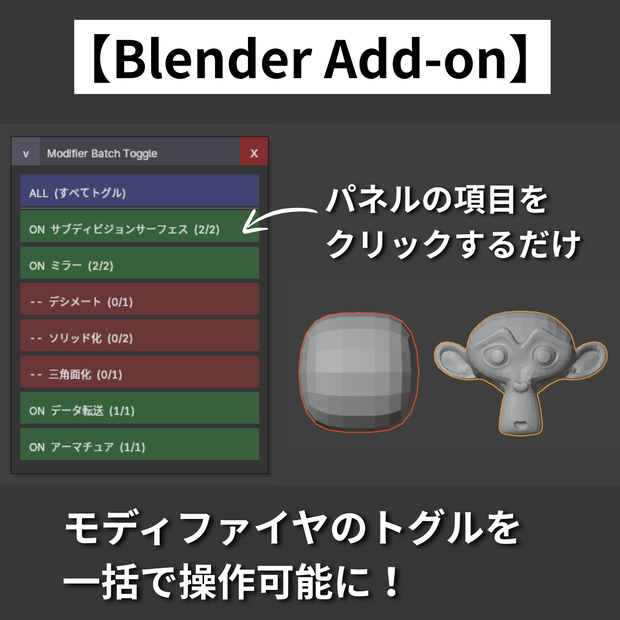
選択した複数のオブジェクトに対して、モディファイヤのトグルを、一括で操作することができます。
■主な機能
・選択中のすべてのオブジェクトに対して、モディファイアを一括トグル
・Subdivision Surface、Mirror など【タイプ別】に個別切り替えも可能
・編集モードでも使用可能
・パネルは画面上をドラッグして好きな位置に移動可能
・折りたたみボタンで邪魔なときはコンパクトに収納
■使い方
・オブジェクトモードでCtrl+E でパネルを表示
・トグルを切り替えるオブジェクトを選択
・一括トグルするモディファイヤをクリック
・× ボタンで非表示
■ 動作確認環境
Blender 4.5.8 LTS
■ インストール方法
1. 購入後、ZIPファイルをダウンロード
2. Blender → 編集 → プリファレンス → アドオン
3. 「ディスクからインストール」から ZIPファイルを選択
■禁止事項
・当データの自作発言、再配布・販売。
・その他、作者が不適切と判断した行為。
■免責事項
当データを使用した際に生じたいかなるトラブルの責任は負いかねます。
■ 更新履歴
v1.0.3 (2026-04-15)
・ワイヤーフレームのオン/オフ切り替えをパネルに追加
v1.0.2 (2026-04-15)
・パネルを開くたびにビューポート中央に表示されるよう変更
(パネルを見失ったときの対応のため)
v1.0.1 (2026-04-15)
・Ctrl+Spaceによるビューポート最大化時やマルチビューポート環境での
動作不具合を修正
v1.0.0 (2026-04-15)
・初版リリース
You can toggle modifiers for multiple selected objects all at once.
■ Key Features
・Batch toggle modifiers for all selected objects at once
・Individual toggle by modifier type (Subdivision Surface, Mirror, etc.)
・Drag the panel anywhere on screen
・Collapse the panel to save space when not in use
■ How to Use
・Press Ctrl+E in Object Mode to open the panel
・Select the objects you want to toggle
・Click the modifier button to batch toggle
・Click × to close the panel
■ Tested Environment
Blender 4.5.8 LTS
■ Installation
1. After purchase, download the ZIP file
2. Blender → Edit → Preferences → Add-ons
3. Click "Install from Disk" and select the ZIP file
■ Prohibited
・Claiming this work as your own, redistribution, or resale.
・Any other actions deemed inappropriate by the creator.
■ Disclaimer
The creator assumes no responsibility for any issues arising from the use of this data.
■ Changelog
v1.0.3 (2026-04-15)
・Added wireframe overlay toggle to the panel
v1.0.2 (2026-04-15)
・Panel now always appears at the center of the viewport when opened
(to help locate the panel if it becomes hidden)
v1.0.1 (2026-04-15)
・Fixed panel interaction issues when using Ctrl+Space fullscreen mode
or multiple viewport layouts
v1.0.0 (2026-04-15)
・Initial release
모든 리뷰
더보기리뷰 등록
리뷰를 작성하려면 로그인이 필요합니다.
로그인하고 리뷰 쓰기