'%3e%3cg%20clip-path='url(%23roundHexB)'%3e%3cpath%20fill='%236D5DFC'%20d='M256%2040%20443%20148%20443%20364%20256%20472%2069%20364%2069%20148Z'/%3e%3cpath%20fill='%239C93FB'%20d='M69%20148%20256%2040%20443%20148%20256%20256Z'/%3e%3cpath%20fill='%234A3FD1'%20d='M256%20256%20443%20148%20443%20364%20256%20472Z'/%3e%3c/g%3e%3c!--%20top%20face:%20filled%20round%20magnifier%20--%3e%3cg%20transform='matrix(0.8660254,-0.5,0.8660254,0.5,69,148)'%3e%3cg%20transform='matrix(0.935,0,0,0.935,7.02,7.02)'%3e%3ccircle%20cx='88'%20cy='88'%20r='52'%20fill='%23FFFFFF'/%3e%3ccircle%20cx='88'%20cy='88'%20r='28'%20fill='%239C93FB'/%3e%3cpath%20d='M124%20124%20164%20164'%20stroke='%23FFFFFF'%20stroke-width='26'%20stroke-linecap='round'/%3e%3c/g%3e%3c/g%3e%3cg%20transform='matrix(0.8660254,0.5,0,1,69,148)'%3e%3cpath%20d='M96.1,61.08%20L45.9,128.92%20Q34,145%2054,145%20L162,145%20Q182,145%20170.1,128.92%20L119.9,61.08%20Q108,45%2096.1,61.08%20Z'%20fill='%23FFFFFF'/%3e%3c/g%3e%3c!--%20right%20face:%20filled%20bubble%20--%3e%3cg%20transform='matrix(0.8660254,-0.5,0,1,256,256)'%3e%3cg%20transform='matrix(0.855,0,0,0.855,15.66,15.66)'%3e%3cpath%20d='M60%2042H156a28%2028%200%200%201%2028%2028V158Q184%20168%20174.47%20164.96L124.53%20149.04Q115%20146%20105%20146H60a28%2028%200%200%201-28-28V70a28%2028%200%200%201%2028-28Z'%20fill='%23FFFFFF'/%3e%3c/g%3e%3c/g%3e%3c/g%3e%3c/svg%3e)
 Kui Creations
상품 설명
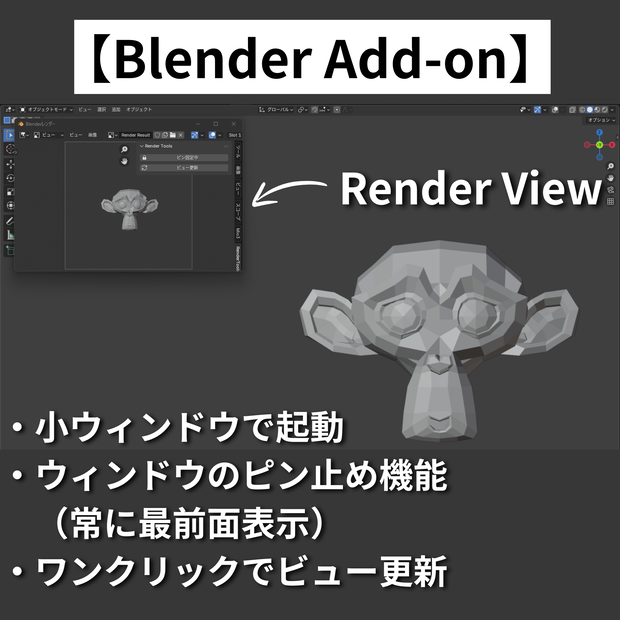
レンダーウィンドウを管理するアドオンです。
■主な機能
・レンダーウィンドウが開いた際に自動でコンパクトサイズへリサイズ
・レンダーウィンドウを常に最前面に固定するピン止め機能
・ボタン1つで現在のビューポートをレンダリング画像に更新
・レンダーウィンドウを開くと同時にサイドバーが自動で表示
■使い方
1.アドオンを有効化するだけで自動リサイズが機能します
2.画像エディターのパネルから「ビュー更新」ボタンで現在のビューをレンダリング
3.「ピン止め」ボタンでレンダーウィンドウを常に最前面に固定
4.3Dビューポートで作業しながらレンダー結果を横に置いて確認できます
⚠️ 自動リサイズ・ピン止めはWindowsのみ対応です
ビュー更新ボタンはWindows / Mac / Linux 全対応
■ 動作確認環境
Blender 4.5.8 LTS
■ インストール方法
1. 購入後、ZIPファイルをダウンロード
2. Blender → 編集 → プリファレンス → アドオン
3. 「ディスクからインストール」から ZIPファイルを選択
■禁止事項
・当データの自作発言、再配布・販売。
・その他、作者が不適切と判断した行為。
■免責事項
当データを使用した際に生じたいかなるトラブルの責任は負いかねます。
■ Features
・Automatically resizes the render window to a compact size when it opens
・Pin feature to keep the render window always on top
・Update the render image with the current viewport in one click
・Sidebar opens automatically when the render window appears
■ How to Use
・Auto-resize works as soon as the addon is enabled
・Click the "Update View" button in the Image Editor panel to render the current viewport
・Click the "Pin" button to keep the render window always on top
・Work in the 3D viewport while keeping the render result visible side by side
⚠️ Auto-resize and Pin are available on Windows only
Update View button is supported on Windows / Mac / Linux
■ Tested Environment
Blender 4.5.8 LTS
■ Installation
1. After purchase, download the ZIP file
2. Blender → Edit → Preferences → Add-ons
3. Click "Install from Disk" and select the ZIP file
■ Prohibited
・Claiming this work as your own, redistribution, or resale.
・Any other actions deemed inappropriate by the creator.
■ Disclaimer
The creator assumes no responsibility for any issues arising from the use of this data.
모든 리뷰
더보기리뷰 등록
리뷰를 작성하려면 로그인이 필요합니다.
로그인하고 리뷰 쓰기