'%3e%3cg%20clip-path='url(%23roundHexB)'%3e%3cpath%20fill='%236D5DFC'%20d='M256%2040%20443%20148%20443%20364%20256%20472%2069%20364%2069%20148Z'/%3e%3cpath%20fill='%239C93FB'%20d='M69%20148%20256%2040%20443%20148%20256%20256Z'/%3e%3cpath%20fill='%234A3FD1'%20d='M256%20256%20443%20148%20443%20364%20256%20472Z'/%3e%3c/g%3e%3c!--%20top%20face:%20filled%20round%20magnifier%20--%3e%3cg%20transform='matrix(0.8660254,-0.5,0.8660254,0.5,69,148)'%3e%3cg%20transform='matrix(0.935,0,0,0.935,7.02,7.02)'%3e%3ccircle%20cx='88'%20cy='88'%20r='52'%20fill='%23FFFFFF'/%3e%3ccircle%20cx='88'%20cy='88'%20r='28'%20fill='%239C93FB'/%3e%3cpath%20d='M124%20124%20164%20164'%20stroke='%23FFFFFF'%20stroke-width='26'%20stroke-linecap='round'/%3e%3c/g%3e%3c/g%3e%3cg%20transform='matrix(0.8660254,0.5,0,1,69,148)'%3e%3cpath%20d='M96.1,61.08%20L45.9,128.92%20Q34,145%2054,145%20L162,145%20Q182,145%20170.1,128.92%20L119.9,61.08%20Q108,45%2096.1,61.08%20Z'%20fill='%23FFFFFF'/%3e%3c/g%3e%3c!--%20right%20face:%20filled%20bubble%20--%3e%3cg%20transform='matrix(0.8660254,-0.5,0,1,256,256)'%3e%3cg%20transform='matrix(0.855,0,0,0.855,15.66,15.66)'%3e%3cpath%20d='M60%2042H156a28%2028%200%200%201%2028%2028V158Q184%20168%20174.47%20164.96L124.53%20149.04Q115%20146%20105%20146H60a28%2028%200%200%201-28-28V70a28%2028%200%200%201%2028-28Z'%20fill='%23FFFFFF'/%3e%3c/g%3e%3c/g%3e%3c/g%3e%3c/svg%3e)
 Kui Creations
상품 설명
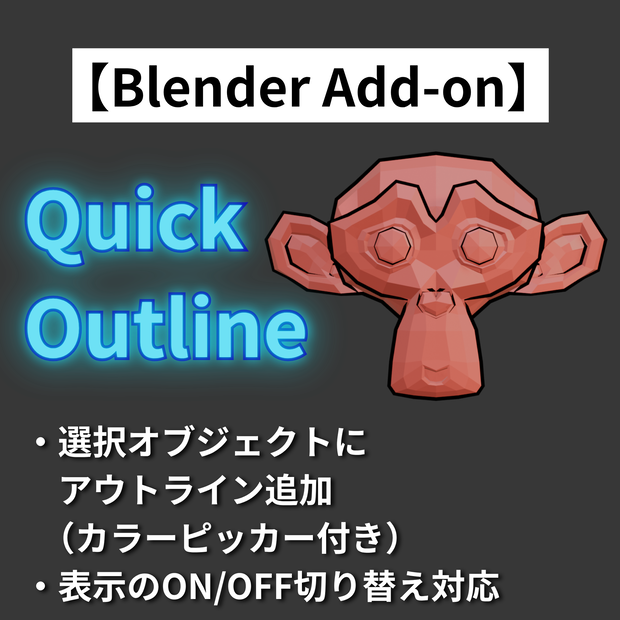
選択したメッシュオブジェクトに、ワンクリックでアウトラインの追加および表示・非表示の切り替え機能付き
■ 主な機能
・アウトラインの色・太さをパネルから簡単に設定
・Solidify モディファイア + Emission マテリアルによる実装
・裏面非表示(カメラ・影)で自然な仕上がり
・Toggle ボタンでアウトラインの表示 / 非表示を切り替え
・複数オブジェクトへの一括適用に対応
■ 使い方
1. アウトラインを追加したい/表示・非表示を切り替えたいオブジェクトを選択
2. メニューバー「Quick Outline」タブを開く
3. 追加する(置き換える場合):色・太さを設定して「Add Outline」を押すだけ
表示・非表示を切り替える場合:「Toggle Outline」を押すだけ
アドオンで実行されている内容については、実行内容としてメニューに記載してあります。
■ 動作確認環境
Blender 4.5.3 LTS
■ インストール方法
1. 購入後、ZIPファイルをダウンロード
2. Blender → 編集 → プリファレンス → アドオン
3. 「ディスクからインストール」から ZIPファイルを選択
■禁止事項
・当データの自作発言、再配布・販売。
・その他、作者が不適切と判断した行為。
■免責事項
当データを使用した際に生じたいかなるトラブルの責任は負いかねます。
Easily set outline color and thickness from the panel
Built with Solidify modifier + Emission material
Backface culling (Camera & Shadow) for a clean, natural look
Toggle outline visibility ON / OFF with the Toggle button
Supports batch application to multiple objects at once
■ How to Use
1. Select the object(s) you want to add an outline to, or toggle visibility on
2. Open the "Quick Outline" tab in the sidebar
3. To add (or replace): Set the color and thickness, then click "Add Outline"
To toggle visibility: Simply click "Toggle Outline"
Details about what the addon does are listed in the "Execution Details" section within the panel.
■ Tested Environment
Blender 4.5.3 LTS
■ Installation
1. After purchase, download the ZIP file
2. Blender → Edit → Preferences → Add-ons
3. Click "Install from Disk" and select the ZIP file
■ Prohibited
Claiming this work as your own, redistributing, or reselling.
Any other actions deemed inappropriate by the creator.
■ Disclaimer
The creator is not responsible for any issues arising from the use of this product.
모든 리뷰
더보기리뷰 등록
리뷰를 작성하려면 로그인이 필요합니다.
로그인하고 리뷰 쓰기