'%3e%3cg%20clip-path='url(%23roundHexB)'%3e%3cpath%20fill='%236D5DFC'%20d='M256%2040%20443%20148%20443%20364%20256%20472%2069%20364%2069%20148Z'/%3e%3cpath%20fill='%239C93FB'%20d='M69%20148%20256%2040%20443%20148%20256%20256Z'/%3e%3cpath%20fill='%234A3FD1'%20d='M256%20256%20443%20148%20443%20364%20256%20472Z'/%3e%3c/g%3e%3c!--%20top%20face:%20filled%20round%20magnifier%20--%3e%3cg%20transform='matrix(0.8660254,-0.5,0.8660254,0.5,69,148)'%3e%3cg%20transform='matrix(0.935,0,0,0.935,7.02,7.02)'%3e%3ccircle%20cx='88'%20cy='88'%20r='52'%20fill='%23FFFFFF'/%3e%3ccircle%20cx='88'%20cy='88'%20r='28'%20fill='%239C93FB'/%3e%3cpath%20d='M124%20124%20164%20164'%20stroke='%23FFFFFF'%20stroke-width='26'%20stroke-linecap='round'/%3e%3c/g%3e%3c/g%3e%3cg%20transform='matrix(0.8660254,0.5,0,1,69,148)'%3e%3cpath%20d='M96.1,61.08%20L45.9,128.92%20Q34,145%2054,145%20L162,145%20Q182,145%20170.1,128.92%20L119.9,61.08%20Q108,45%2096.1,61.08%20Z'%20fill='%23FFFFFF'/%3e%3c/g%3e%3c!--%20right%20face:%20filled%20bubble%20--%3e%3cg%20transform='matrix(0.8660254,-0.5,0,1,256,256)'%3e%3cg%20transform='matrix(0.855,0,0,0.855,15.66,15.66)'%3e%3cpath%20d='M60%2042H156a28%2028%200%200%201%2028%2028V158Q184%20168%20174.47%20164.96L124.53%20149.04Q115%20146%20105%20146H60a28%2028%200%200%201-28-28V70a28%2028%200%200%201%2028-28Z'%20fill='%23FFFFFF'/%3e%3c/g%3e%3c/g%3e%3c/g%3e%3c/svg%3e)
 Milpix™ Omiseyasan
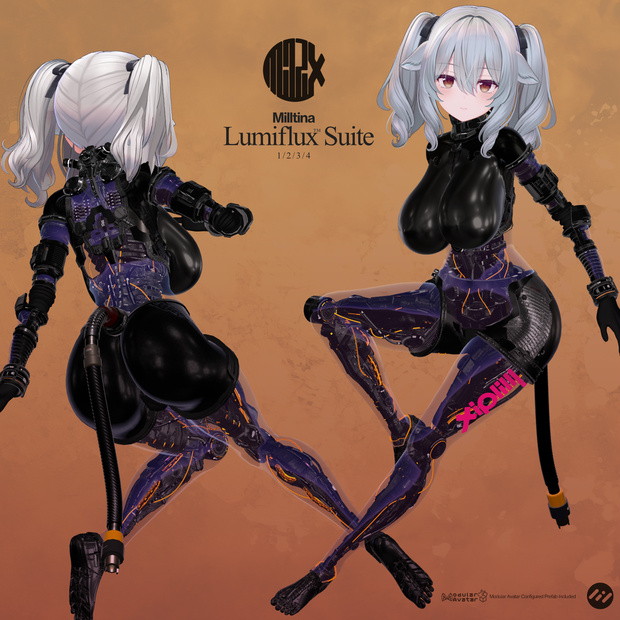
 Milltina Lumiflux Suite
상품 설명
ミルティナちゃん用のメカボディです。
発売済みのアセットを組み合わせて1つのPrefabに纏めたものです。Prefabをヒエラルキーのアバター下にドラッグ&ドロップするだけで、含まれている全アセットが装着できます。各アセットは分離されているので、必要に応じて取り除くことも可能です。
4種のグレードをご用意しました。それぞれ以下のアセットが含まれています。
This is a mechanical body for Milltina.
It's a combination of previously released assets bundled into a single Prefab. Simply drag and drop the Prefab under your avatar in the hierarchy, and all included assets will be equipped. Each asset is separate, so you can remove them as needed.
Four different grades are available. Each includes the following assets:
Suit1 (胴体) torso
Milltina Groin Protector Atlas1
UpperDorsal Housing
Milltina_MechPonpon1_LumiFlux
単品を個別に買うより300円お得
It's 300 yen cheaper than buying the items individually.
Suit2 (胴体/脚) torso/Legs
Milltina Groin Protector Atlas1
UpperDorsal Housing
Milltina_MechPonpon1_LumiFlux
Coller3_Milltina
Milltina_LucentFrameLegs
単品を個別に買うより500円お得
It's 500 yen cheaper than buying the items individually.
Suit3 (胴体/腕/脚) Torso/Arms/Legs
Milltina Groin Protector Atlas1
UpperDorsal Housing
Milltina_MechPonpon1_LumiFlux
Coller3_Milltina
Milltina_LucentFrameLegs
CervolinkDock2_Milltina
Sensor4
MilltinaMecharms4
単品を個別に買うより800円お得
It's 800 yen cheaper than buying the items individually.
Suit4 (胴体/腕/脚/尾/マテリアル) Torso/Arms/Legs/Tail/Material
Milltina Groin Protector Atlas1
UpperDorsal Housing
Milltina_MechPonpon1_LumiFlux
Coller3_Milltina
Milltina_LucentFrameLegs
CervolinkDock2_Milltina
Sensor4
MilltinaMecharms4
Sippo3
Bangle2
Bangle3
(Material) Milltina_AndroidBody
単品を個別に買うより1000円お得
It's 1000 yen cheaper than buying the items individually.
----------------------------------------------------------------------------------
シェーダーはLiltoonを使用しています。事前に導入しておいてください。
Liltoon is required for installation.
https://booth.pm/ja/items/3087170
----------------------------------------------------------------------------------
Modular Avatarを使用しています。事前に導入しておいてください。
Uses Modular Avatar. Please install it in advance.
https://modular-avatar.nadena.dev/ja
----------------------------------------------------------------------------------
導入方法:
1. Unitypackageをインポートします
2. Unitypackage内のPrefabを、Hierarchyのアバター下に配置してください
3. (Suit4のみ) Materialフォルダ内のマテリアルを、ビューポートのアバターのボディにドラッグ&ドロップして適用してください
How to install:
1. Import the Unitypackage
2. Place prefab in the Unitypackage under the avatar in the Hierarchy.
3. (Suit4 only) Drag and drop the material from the Material folder onto the avatar's body in the viewport to apply it.
----------------------------------------------------------------------------------
本シリーズのアセットは「可能な限り小さいサイズで最良のルックを実現する」ことに主眼をおいて制作しています。各アセット間でマテリアルを共用し、併用時にAAOで統合した場合、マテリアルスロット数/テクスチャを削減できるように作られています。ご利用の際はメッシュ/マテリアルの統合をお勧めします
The assets in this series are created with the primary goal of achieving the best possible look at the smallest possible size. They are designed to share materials between assets, and when combined using AAO (Advanced Augmentation), they reduce the number of material slots and textures. I recommend integrating meshes and materials when using these assets.
----------------------------------------------------------------------------------
ライセンス License:
本製品は、VN3ライセンス(https://www.vn3.org/)を採用しております。
本製品をご購入前に下記リンクから内容をご確認ください。
本製品を購入された時点で本利用規約に同意したものとさせて頂きます。
本規約は、あしやまひろこ(@hiroko_TB)氏が作成したVN3ライセンス( https://www.vn3.org/ )のテンプレートを使用しています。
This product uses the VN3 License (https://www.vn3.org/).
Please check the details at the link below before purchasing this product.
By purchasing this product, you agree to these terms of use.
These terms use the VN3 License (https://www.vn3.org/) template created by Ashiyama Hiroko (@hiroko_TB).
JP
https://drive.google.com/file/d/1LmjcT-6qalgKKV1ELzJqP0OhRAp28Nrf/view?usp=drive_link
EN
https://drive.google.com/file/d/1ezMeuMNrfduPJe0kAWBD9Q8ZWRVJNVEw/view?usp=drive_link
ZH
https://drive.google.com/file/d/1cz0tZqns4xzE-oFDYgwZkB2YQ9IVuZpR/view?usp=drive_link
KR
https://drive.google.com/file/d/16AgfFJTYEOREv3UTtqpBNTDbnb7ta82z/view?usp=drive_link
利用規約
更新履歴
모든 리뷰
더보기리뷰 등록
리뷰를 작성하려면 로그인이 필요합니다.
로그인하고 리뷰 쓰기