'%3e%3cg%20clip-path='url(%23roundHexB)'%3e%3cpath%20fill='%236D5DFC'%20d='M256%2040%20443%20148%20443%20364%20256%20472%2069%20364%2069%20148Z'/%3e%3cpath%20fill='%239C93FB'%20d='M69%20148%20256%2040%20443%20148%20256%20256Z'/%3e%3cpath%20fill='%234A3FD1'%20d='M256%20256%20443%20148%20443%20364%20256%20472Z'/%3e%3c/g%3e%3c!--%20top%20face:%20filled%20round%20magnifier%20--%3e%3cg%20transform='matrix(0.8660254,-0.5,0.8660254,0.5,69,148)'%3e%3cg%20transform='matrix(0.935,0,0,0.935,7.02,7.02)'%3e%3ccircle%20cx='88'%20cy='88'%20r='52'%20fill='%23FFFFFF'/%3e%3ccircle%20cx='88'%20cy='88'%20r='28'%20fill='%239C93FB'/%3e%3cpath%20d='M124%20124%20164%20164'%20stroke='%23FFFFFF'%20stroke-width='26'%20stroke-linecap='round'/%3e%3c/g%3e%3c/g%3e%3cg%20transform='matrix(0.8660254,0.5,0,1,69,148)'%3e%3cpath%20d='M96.1,61.08%20L45.9,128.92%20Q34,145%2054,145%20L162,145%20Q182,145%20170.1,128.92%20L119.9,61.08%20Q108,45%2096.1,61.08%20Z'%20fill='%23FFFFFF'/%3e%3c/g%3e%3c!--%20right%20face:%20filled%20bubble%20--%3e%3cg%20transform='matrix(0.8660254,-0.5,0,1,256,256)'%3e%3cg%20transform='matrix(0.855,0,0,0.855,15.66,15.66)'%3e%3cpath%20d='M60%2042H156a28%2028%200%200%201%2028%2028V158Q184%20168%20174.47%20164.96L124.53%20149.04Q115%20146%20105%20146H60a28%2028%200%200%201-28-28V70a28%2028%200%200%201%2028-28Z'%20fill='%23FFFFFF'/%3e%3c/g%3e%3c/g%3e%3c/g%3e%3c/svg%3e)
 Kui Creations
상품 설명
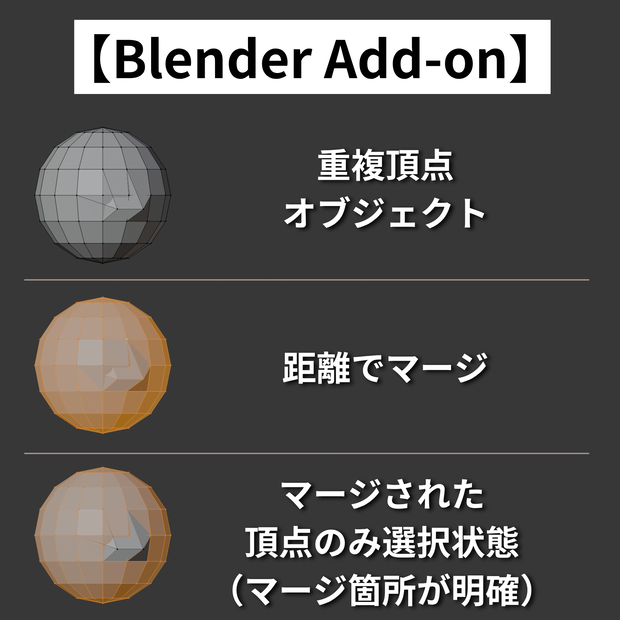
Blenderにおいて、頂点を距離でマージした際、
「どこがマージされたか」を一目で確認できるアドオンです。
マージ後、実際にマージされた頂点だけが選択状態(オレンジ色)で残り、
マージされなかった頂点は自動で選択解除されます。
■ 使い方
アドオンを有効にするだけで自動で動作します。
1. 頂点を選択
2. M キー(マージ) → 距離で(Merge by Distance)
3. マージされた頂点だけがオレンジ色で残る
■ 動作確認済み環境
・Blender 4.5.3 LTS
■ インストール方法
1. 購入後、ZIPファイルをダウンロード
2. Blender → 編集 → プリファレンス → アドオン
3. 「ディスクからインストール」から ZIPファイルを選択
■禁止事項
・当データの自作発言、再配布・販売。
・その他、作者が不適切と判断した行為。
■免責事項
当データを使用した際に生じたいかなるトラブルの責任は負いかねます。
When merging vertices by distance in Blender, this addon lets you instantly see which vertices were actually merged.
After merging, only the merged vertices remain selected (highlighted in orange), while all other vertices are automatically deselected.
■ How to Use
No special setup needed. Just enable the addon — it works automatically.
Select vertices
Press M → Merge by Distance
Only the merged vertices remain highlighted in orange
■ Tested Environment
・Blender 4.5.3 LTS
■ Installation
1. After purchase, download the ZIP file
2. Blender → Edit → Preferences → Add-ons
3. Click "Install from Disk" and select the ZIP file
■ Prohibited
・Claiming this work as your own, redistributing, or reselling.
・Any other actions deemed inappropriate by the author.
■ Disclaimer
The author is not responsible for any issues arising from the use of this data.
모든 리뷰
더보기리뷰 등록
리뷰를 작성하려면 로그인이 필요합니다.
로그인하고 리뷰 쓰기