'%3e%3cg%20clip-path='url(%23roundHexB)'%3e%3cpath%20fill='%236D5DFC'%20d='M256%2040%20443%20148%20443%20364%20256%20472%2069%20364%2069%20148Z'/%3e%3cpath%20fill='%239C93FB'%20d='M69%20148%20256%2040%20443%20148%20256%20256Z'/%3e%3cpath%20fill='%234A3FD1'%20d='M256%20256%20443%20148%20443%20364%20256%20472Z'/%3e%3c/g%3e%3c!--%20top%20face:%20filled%20round%20magnifier%20--%3e%3cg%20transform='matrix(0.8660254,-0.5,0.8660254,0.5,69,148)'%3e%3cg%20transform='matrix(0.935,0,0,0.935,7.02,7.02)'%3e%3ccircle%20cx='88'%20cy='88'%20r='52'%20fill='%23FFFFFF'/%3e%3ccircle%20cx='88'%20cy='88'%20r='28'%20fill='%239C93FB'/%3e%3cpath%20d='M124%20124%20164%20164'%20stroke='%23FFFFFF'%20stroke-width='26'%20stroke-linecap='round'/%3e%3c/g%3e%3c/g%3e%3cg%20transform='matrix(0.8660254,0.5,0,1,69,148)'%3e%3cpath%20d='M96.1,61.08%20L45.9,128.92%20Q34,145%2054,145%20L162,145%20Q182,145%20170.1,128.92%20L119.9,61.08%20Q108,45%2096.1,61.08%20Z'%20fill='%23FFFFFF'/%3e%3c/g%3e%3c!--%20right%20face:%20filled%20bubble%20--%3e%3cg%20transform='matrix(0.8660254,-0.5,0,1,256,256)'%3e%3cg%20transform='matrix(0.855,0,0,0.855,15.66,15.66)'%3e%3cpath%20d='M60%2042H156a28%2028%200%200%201%2028%2028V158Q184%20168%20174.47%20164.96L124.53%20149.04Q115%20146%20105%20146H60a28%2028%200%200%201-28-28V70a28%2028%200%200%201%2028-28Z'%20fill='%23FFFFFF'/%3e%3c/g%3e%3c/g%3e%3c/g%3e%3c/svg%3e)
 MetaCreatorsTYO EN
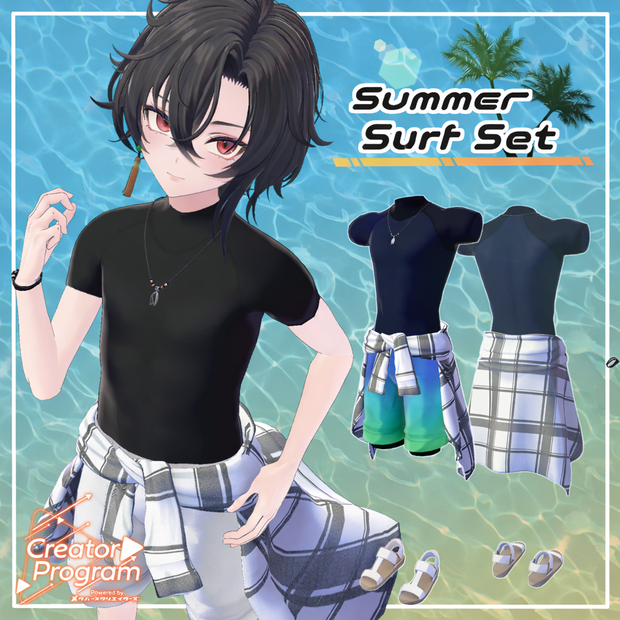
 Summer Surf Set - VRChat Men's Clothing/ CP5
상품 설명
◆Summer Surf Set ◆
Creator: Awa Ritsushita (Kara no Atelier)
Flavor Text
A wetsuit-style swimsuit paired with beach pants.
A waist-tied shirt is added as a stylish accent.
It’s still hot in August—shall we head to the beach?
⚠️ Important Notes
This product is a clothing model for avatars. The avatar base model is not included.
Due to the nature of downloadable products, returns and refunds are not available.
Please review the product description and terms of use before purchasing.
◆ Item Overview
● Contents
Su_suit_[AvatarName].Unitypackage
FBX
Textures
PSD file for modification
ReadMe.txt
● Required Shader
liltoon
https://lilxyzw.booth.pm/items/3087170
● Required Asset
Modular Avatar
https://modular-avatar.nadena.dev/ja/docs/intro
● Model Data
Total Polygon Count: 23,847
Bracelet: 3,260
Necklace: 3,688
Sandals: 3,540
Waist Wear: 5,827
Pants: 3,528
Wetsuit: 4,004
Mesh Count: 6
Material Count: 3
PB Components: 4
Import Folder
Assets > MetaverseCreators_CP > Empty-atelier > Su_suit
◆ Compatible Avatars
Minase #Minase3D
https://booth.pm/ja/items/4013951
Komano
https://booth.pm/ja/items/5260363
Kuuta #Kuuta3D
https://booth.pm/ja/items/4897493
Renshin (Chinhan-tei Common Body)
https://booth.pm/ja/items/5498540
Bokusei (PlusHead Body)
https://booth.pm/ja/items/5727810
Hyakko (by Niyami)
https://booth.pm/ja/items/6328134
⚠️ When equipping the outfit, shapekeys are used to hide the avatar body (making it thinner to prevent clipping).
◆ Installation Instructions
Set up the latest VRC SDK in VCC
Install required assets (liltoon, Modular Avatar) via VCC
Import the latest avatar package
Import this package
Drag and drop the avatar (or dressing/modification prefab) into the Scene Hierarchy
Disable unnecessary clothing (default outfits, underwear, etc.) or set them to Editor Only
Drag and drop “Su_suit_[AvatarName].Prefab” under the avatar
Upload via the VRC SDK
⚠️ This outfit uses Modular Avatar’s “MA Shape Changer” and “MA Bone Proxy.”
When placed under the avatar, body shapekeys are automatically enabled to prevent clipping.
If not needed, you may remove the configured components.
⚠️ For +Head avatars, mesh name differences may prevent proper function.
Adjust mesh names or shapekeys manually if necessary.
⚠️ If parts of the avatar appear unintentionally thin after dressing, reset the corresponding shapekey to 0.
◆ Color Customization
Replace materials from:
Common > Material
You can also customize colors using the included PSD or CLIP files.
⚠️ Note:
The top layer of the PSD file is a black dummy layer for file size reduction.
Please hide it before editing.
◆ Terms of Use
https://drive.google.com/drive/folders/1qRMXoIxM1ZgacBPfwOigQRtXP1vCbNMn?usp=sharing
Please also follow the terms of use of the base avatar.
◆ Production Environment
Modeling: Blender Ver3.6.1
Texturing: CLIP STUDIO PAINT
Setup: Unity Ver2022.3.22f1
VRChat SDK - Avatars Ver3.8.0 (VCC)
liltoon 1.10.3
ModularAvatar 1.12.4
◆ Credits
Creator: Awa Ritsushita
X: @Aw_ritsushitA
BOOTH (Kara no Atelier):
https://kara-no-atelier.booth.pm/
Support / Inquiries
모든 리뷰
더보기리뷰 등록
리뷰를 작성하려면 로그인이 필요합니다.
로그인하고 리뷰 쓰기