'%3e%3cg%20clip-path='url(%23roundHexB)'%3e%3cpath%20fill='%236D5DFC'%20d='M256%2040%20443%20148%20443%20364%20256%20472%2069%20364%2069%20148Z'/%3e%3cpath%20fill='%239C93FB'%20d='M69%20148%20256%2040%20443%20148%20256%20256Z'/%3e%3cpath%20fill='%234A3FD1'%20d='M256%20256%20443%20148%20443%20364%20256%20472Z'/%3e%3c/g%3e%3c!--%20top%20face:%20filled%20round%20magnifier%20--%3e%3cg%20transform='matrix(0.8660254,-0.5,0.8660254,0.5,69,148)'%3e%3cg%20transform='matrix(0.935,0,0,0.935,7.02,7.02)'%3e%3ccircle%20cx='88'%20cy='88'%20r='52'%20fill='%23FFFFFF'/%3e%3ccircle%20cx='88'%20cy='88'%20r='28'%20fill='%239C93FB'/%3e%3cpath%20d='M124%20124%20164%20164'%20stroke='%23FFFFFF'%20stroke-width='26'%20stroke-linecap='round'/%3e%3c/g%3e%3c/g%3e%3cg%20transform='matrix(0.8660254,0.5,0,1,69,148)'%3e%3cpath%20d='M96.1,61.08%20L45.9,128.92%20Q34,145%2054,145%20L162,145%20Q182,145%20170.1,128.92%20L119.9,61.08%20Q108,45%2096.1,61.08%20Z'%20fill='%23FFFFFF'/%3e%3c/g%3e%3c!--%20right%20face:%20filled%20bubble%20--%3e%3cg%20transform='matrix(0.8660254,-0.5,0,1,256,256)'%3e%3cg%20transform='matrix(0.855,0,0,0.855,15.66,15.66)'%3e%3cpath%20d='M60%2042H156a28%2028%200%200%201%2028%2028V158Q184%20168%20174.47%20164.96L124.53%20149.04Q115%20146%20105%20146H60a28%2028%200%200%201-28-28V70a28%2028%200%200%201%2028-28Z'%20fill='%23FFFFFF'/%3e%3c/g%3e%3c/g%3e%3c/g%3e%3c/svg%3e)
 amartsushiro
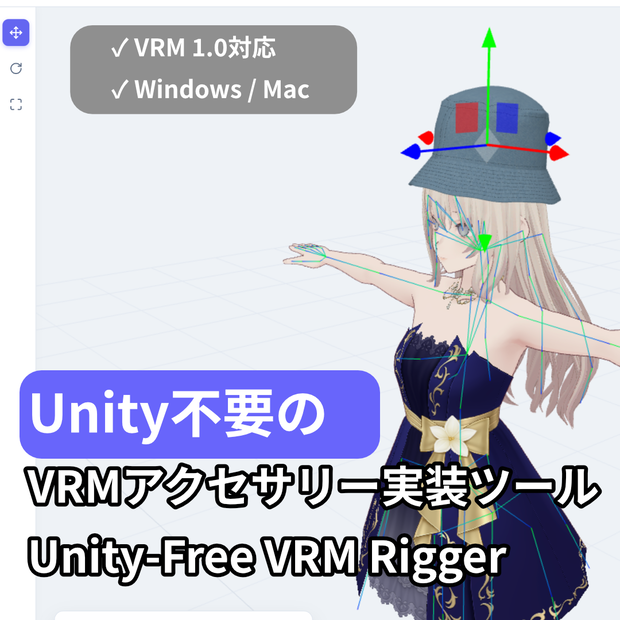
 Unity不要のVRMアクセサリー実装ツール | Unity-Free VRM Rigger
상품 설명
【Moon: Unity不要のVRMアクセサリー実装ツール | Unity-Free VRM Rigger】
「ただ帽子やメガネをアバターに被せたいだけなのに、重いUnityを起動して、複雑な設定をするのは面倒…」
VTuberやVRChatユーザーのそんな悩みを解決するのが『Moon』です。
Moonは、完全「Unity不要」のスタンドアロン型VRMアクセサリー実装ツールで
す。
直感的なUIを採用し、お気に入りのアバター(VRM)とアクセサリー(GLB/VRM)をドラッグ&ドロップしてボーンにアタッチするだけで、誰でも簡単にセットアップが完了します。3Dの専門知識はもう必要ありません。
主な仕様と特徴 / Specifications & Features:
✅ 完全独立型: Unityや外部ツールのインストールは一切不要。
✅フォーマット: VRM 0.0 / 1.0 の読み込みに対応。完成品は VRM 1.0 として出力。
✅ 簡単操作: ドラッグ&ドロップと直感的なボーン階層検索。
✅ 軽量動作: サクサク動くUIで、配信前の数分でアクセサリーの着せ替えが可能。
内容物 / Package Contents:
- Moon_v1.0.1_Windows.exe
- Moon_v1.0.1_Mac.dmg
- README.txt
Moon is a 100% "Unity-Free", standalone VRM accessory rigger. With an intuitive user interface, you simply drag and drop your avatar (VRM) and accessories (GLB/VRM), attach them to the desired bone, and you're done. No 3D technical skills or heavy software required.
Specifications & Features:
✅ Standalone: No need to install Unity or any other external tools.
✅ Format Support: Import VRM 0.0 / 1.0 and GLB files. Exports fully rigged VRM 1.0 avatars.
✅ Easy Workflow: Simple drag-and-drop mechanics with an easy-to-use bone search hierarchy.
✅ Lightweight & Fast: Equip a new accessory and export your model in minutes right before you go live.
Package Contents:
- Moon_v1.0.1_Windows.exe
- Moon_v1.0.1_Mac.dmg
- README.txt
【インストールに関する重要なお知らせ / Important Installation Notes】
macOSをご利用の方へ 「Moonは壊れているため開けません。ゴミ箱に入れる必要があります」という警告が表示される場合があります。これは、インディー開発者のアプリに対するmacOSの標準的なセキュリティ機能によるものです。 以下の手順で起動できます:
1. Moon.app を「アプリケーション」フォルダに移動します。
2. Macの「ターミナル」アプリを開きます。
3. 以下のコマンドをコピー&ペーストしてEnterキーを押します: xattr -cr /Applications/Moon.app
4. これで通常通りアプリを開くことができます。
Windowsをご利用の方へ インストール時に青い画面(SmartScreen)が表示された場合は、「詳細情報」をクリックし、「実行」を選択してください。
For macOS Users If you receive a message saying "Moon is damaged and can't be opened", this is a standard macOS security feature for unsigned independent software. To run the app:
1. Move Moon.app to your Applications folder.
2. Open the "Terminal" app on your Mac.
3. Copy and paste the following command and press Enter: xattr -cr /Applications/Moon.app
4. You can now open the app normally.
For Windows Users If you see a blue SmartScreen warning during installation, click "More info" and then select "Run anyway".
【公式サイト・開発者 / Official Website & Developer】
開発者 (Developer): Amartsushiro
公式ウェブサイト (Website): https://amartsushiro.github.io/moon
X (Twitter): @amartsushiro
お問い合わせ (Contact): Boothのメッセージ機能をご利用ください。(Please use Booth messages for support).
【動作環境 / System Requirements】
OS: Windows 10 / 11 | macOS 11.0 以降 (or newer)
CPU: 2.4GHz Quad Core 以上 (or higher)
メモリ (Memory): 4GB RAM 以上 (8GB 推奨 / Recommended)
グラフィックス (Graphics): NVIDIA GeForce GTX 750 同等以上 (Equivalent or better)
ストレージ (Storage): 500MB の空き容量 (Available space)
【更新履歴 / Update History】
2026.03.26 - v1.0.1
最初のリリース (Initial Release)
WindowsおよびmacOS版の公開 (Published Windows and macOS versions)
VRM 1.0エクスポート対応 (Added support for VRM 1.0 export)
모든 리뷰
더보기리뷰 등록
리뷰를 작성하려면 로그인이 필요합니다.
로그인하고 리뷰 쓰기