'%3e%3cg%20clip-path='url(%23roundHexB)'%3e%3cpath%20fill='%236D5DFC'%20d='M256%2040%20443%20148%20443%20364%20256%20472%2069%20364%2069%20148Z'/%3e%3cpath%20fill='%239C93FB'%20d='M69%20148%20256%2040%20443%20148%20256%20256Z'/%3e%3cpath%20fill='%234A3FD1'%20d='M256%20256%20443%20148%20443%20364%20256%20472Z'/%3e%3c/g%3e%3c!--%20top%20face:%20filled%20round%20magnifier%20--%3e%3cg%20transform='matrix(0.8660254,-0.5,0.8660254,0.5,69,148)'%3e%3cg%20transform='matrix(0.935,0,0,0.935,7.02,7.02)'%3e%3ccircle%20cx='88'%20cy='88'%20r='52'%20fill='%23FFFFFF'/%3e%3ccircle%20cx='88'%20cy='88'%20r='28'%20fill='%239C93FB'/%3e%3cpath%20d='M124%20124%20164%20164'%20stroke='%23FFFFFF'%20stroke-width='26'%20stroke-linecap='round'/%3e%3c/g%3e%3c/g%3e%3cg%20transform='matrix(0.8660254,0.5,0,1,69,148)'%3e%3cpath%20d='M96.1,61.08%20L45.9,128.92%20Q34,145%2054,145%20L162,145%20Q182,145%20170.1,128.92%20L119.9,61.08%20Q108,45%2096.1,61.08%20Z'%20fill='%23FFFFFF'/%3e%3c/g%3e%3c!--%20right%20face:%20filled%20bubble%20--%3e%3cg%20transform='matrix(0.8660254,-0.5,0,1,256,256)'%3e%3cg%20transform='matrix(0.855,0,0,0.855,15.66,15.66)'%3e%3cpath%20d='M60%2042H156a28%2028%200%200%201%2028%2028V158Q184%20168%20174.47%20164.96L124.53%20149.04Q115%20146%20105%20146H60a28%2028%200%200%201-28-28V70a28%2028%200%200%201%2028-28Z'%20fill='%23FFFFFF'/%3e%3c/g%3e%3c/g%3e%3c/g%3e%3c/svg%3e)
 ベクターの倉庫
 無料配布:どこでもVRC専用時計(VRCアバター想定)VRC Avatar-Ready Clock for Anywhere
상품 설명
【VRChat対応】挨拶&時計用シェーダー 無料配布
Time_Shader / GreetingBoard Shader & UVClockOverlay Shader
VRChat向けに作られた2種類の便利なシェーダーを無料配布中!
GreetingBoard Shader:朝・昼・夜の挨拶テクスチャを自動切替
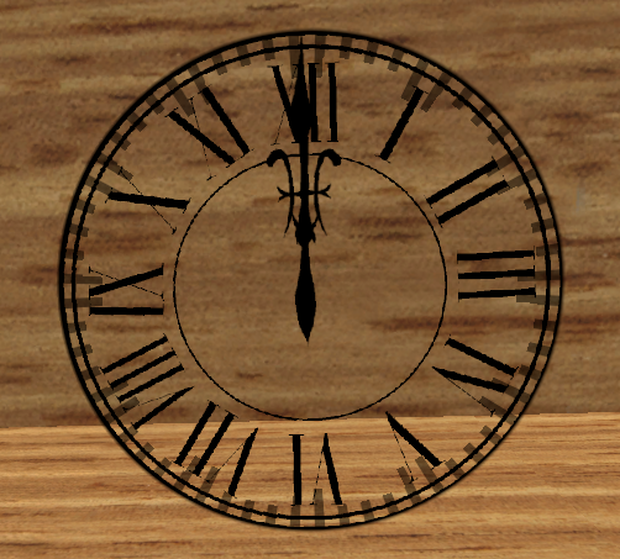
UVClockOverlay Shader:既存メッシュ上にアナログ時計をオーバーレイ
看板やウェルカムボード、アバター小物、顔や腕メッシュまで、空間演出をぐっとリッチにできます。
🌅 GreetingBoard Shader の特徴
朝・昼・夜の自動切替(30分かけてブレンドで自然に変化)
開始時刻をInspectorで自由に調整可能
近接フェードイン(近づいた人だけに表示)
浮遊・スクロール・回転アニメーション(個別ON/OFF可能)
両面描画対応、Emission・Tintカラー調整可能
⏱ UVClockOverlay Shader の特徴
任意UV位置にアナログ時計を重ね描き(時計エリア以外は透過)
最大2個まで同時表示可能
楕円形対応(縦横比独立調整可能)
針描画:SDF生成 or テクスチャ画像
文字盤・目盛・縁取り・グローはSDF生成(テクスチャ不要)
秒針動作:ステップ(カチカチ)/滑らか切替可能
Emissionカラー・強度個別調整
VRChat Stereo Instancing対応
📦 配布ZIP内容
カテゴリ ファイル名 説明
Prefab Quad時計.prefab 指定UV座標に時計表示のサンプル
Prefab まめひ時計瞳.prefab 顔Mesh(まめひ)に時計表示のポン置きサンプル
Prefab 時間で挨拶プレート.prefab QuadにGreetingBoard Shaderを設定したサンプル
Shader Shader\#指定座標時計.shader UVClockOverlay Shader
Shader Shader\#挨拶用時間Shader.shader GreetingBoard Shader
マテリアル まめひ用時計瞳.mat 設定済みマテリアル
マテリアル 挨拶用.mat GreetingBoard Shader用
マテリアル 時計マテリアル.mat UVClockOverlay用
テクスチャ おはよう.png / こんにちは.png / こんばんわ.png GreetingBoard Shader用
テクスチャ 文字盤.png / 時針.png / 分針.png / 秒針.png UVClockOverlay Shader用サンプル画像
説明書 説明書.txt 本説明書ファイル
🛠 必要環境
VRChat SDK(Udon / Creator Companion どちらでも可)
Unity 2022.3.x 推奨
VRChat上でのみ現地時刻が反映(_VRChatTimeEncoded1 使用)
⚡ 使い方
GreetingBoard Shader
.shader をUnityプロジェクトにインポート
マテリアル作成 → Time_Shader/3time_Change を設定
朝・昼・夜テクスチャを設定
時間帯の境界を調整
Contact Proximityで近接演出可能
UVClockOverlay Shader
.shader をUnityプロジェクトにインポート
時計表示したいメッシュにマテリアル追加
シェーダーを Time_Shader/UVClockOverlay に設定
Center U / V で表示位置、Radius U / V でサイズ調整
必要に応じ文字盤・針テクスチャを設定
2個目の時計使用時は Clock 2 Enable をオン
🎨 使用例
GreetingBoard Shader:ウェルカムボード・アバター小物の挨拶演出
UVClockOverlay Shader:アバターの顔・腕・アクセサリーメッシュに時計を重ね描き
⚠ 注意事項
Unityエディタ上では時刻は反映されません(VRChat上のみ)
顔メッシュUVのミラーリングにより意図しない位置に表示される場合あり
改変・再配布自由(クレジット任意)
📜 規約
改変・アバターへの組み込みOK。禁止:そのままの形での配布(改変した場合はOK)・販売・転売はご遠慮ください。再配布時はクレジット表記を出来ればお願いします。
💡 GreetingBoard で空間に動きを、UVClockOverlay でアバターにアクセントを。 サンプルPrefab付きで、ダウンロードしてすぐ試せます。VRChatの世界をもっと生き生きと演出してみましょう!
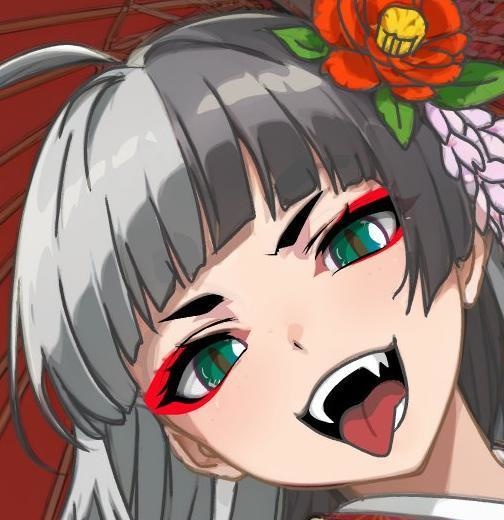
★まめひなたは付属しておりません!
画像:https://booth.pm/ja/items/4340548:まめひなた Mamehinata
もち山金魚さん
Readme
[VRChat-Compatible] Free Shader Distribution for Greetings & Clock
Time_Shader / GreetingBoard Shader & UVClockOverlay Shader
We are offering two useful shaders for VRChat, available for free!
GreetingBoard Shader: Automatically switches greeting textures for morning, afternoon, and night
UVClockOverlay Shader: Overlays an analog clock on existing meshes
Enhance your signs, welcome boards, avatar accessories, and even face or arm meshes for a richer spatial experience.
🌅 Features of GreetingBoard Shader
Automatic switching between morning, afternoon, and night (smooth blending over 30 minutes)
Start time adjustable freely in the Inspector
Proximity fade-in (visible only to nearby users)
Floating, scrolling, and rotation animations (individually toggleable)
Double-sided rendering, adjustable emission and tint colors
⏱ Features of UVClockOverlay Shader
Overlay analog clock on any UV position (transparent outside clock area)
Up to 2 clocks displayed simultaneously
Supports elliptical shapes (independently adjustable width and height)
Clock hands: SDF-generated or texture-based
Dial, markers, outlines, and glow are SDF-generated (no textures needed)
Second-hand motion: step (tick) or smooth transition
Individual emission color and intensity adjustments
VRChat Stereo Instancing compatible
📦 Contents of Distribution ZIP
Category File Name Description
Prefab QuadClock.prefab Sample showing clock at specified UV coordinates
Prefab MamehiClockEyes.prefab Sample showing clock on avatar face mesh (Mamehi)
Prefab TimeBasedGreetingBoard.prefab Sample with GreetingBoard Shader applied to Quad
Shader Shader#UVClockOverlay.shader UVClockOverlay Shader
Shader Shader#GreetingTime.shader GreetingBoard Shader
Material MamehiClockEyes.mat Pre-configured material
Material GreetingBoard.mat For GreetingBoard Shader
Material ClockMaterial.mat For UVClockOverlay Shader
Texture GoodMorning.png / Hello.png / GoodEvening.png For GreetingBoard Shader
Texture Dial.png / HourHand.png / MinuteHand.png / SecondHand.png Sample images for UVClockOverlay Shader
Manual Manual.txt This instruction file
🛠 Required Environment
VRChat SDK (Udon or Creator Companion)
Unity 2022.3.x recommended
Local time reflected only in VRChat (_VRChatTimeEncoded1 used)
⚡ How to Use
GreetingBoard Shader
Import the .shader into your Unity project
Create a material → assign Time_Shader/3time_Change
Set morning, afternoon, and night textures
Adjust time boundaries
Enable proximity effects with Contact Proximity
UVClockOverlay Shader
Import the .shader into your Unity project
Add a material to the mesh you want the clock displayed on
Set the shader to Time_Shader/UVClockOverlay
Adjust display position with Center U / V and size with Radius U / V
Optionally set dial and hands textures
If using a second clock, enable Clock 2
🎨 Usage Examples
GreetingBoard Shader: Welcome boards, avatar accessories for greeting effects
UVClockOverlay Shader: Overlay clocks on avatar faces, arms, or accessory meshes
⚠ Notes
Time does not update in the Unity Editor (VRChat only)
Clock may display incorrectly on mirrored face UVs
Modification and redistribution are allowed (credit optional)
📜 Terms
Modification and integration into avatars are allowed. Prohibited: direct redistribution without changes, commercial sale, or resale. Please credit if possible when redistributing.
💡 Add dynamic greetings to spaces with GreetingBoard and accent avatars with UVClockOverlay. Sample prefabs included—download and try immediately to make your VRChat worlds more lively!
모든 리뷰
더보기리뷰 등록
리뷰를 작성하려면 로그인이 필요합니다.
로그인하고 리뷰 쓰기