'%3e%3cg%20clip-path='url(%23roundHexB)'%3e%3cpath%20fill='%236D5DFC'%20d='M256%2040%20443%20148%20443%20364%20256%20472%2069%20364%2069%20148Z'/%3e%3cpath%20fill='%239C93FB'%20d='M69%20148%20256%2040%20443%20148%20256%20256Z'/%3e%3cpath%20fill='%234A3FD1'%20d='M256%20256%20443%20148%20443%20364%20256%20472Z'/%3e%3c/g%3e%3c!--%20top%20face:%20filled%20round%20magnifier%20--%3e%3cg%20transform='matrix(0.8660254,-0.5,0.8660254,0.5,69,148)'%3e%3cg%20transform='matrix(0.935,0,0,0.935,7.02,7.02)'%3e%3ccircle%20cx='88'%20cy='88'%20r='52'%20fill='%23FFFFFF'/%3e%3ccircle%20cx='88'%20cy='88'%20r='28'%20fill='%239C93FB'/%3e%3cpath%20d='M124%20124%20164%20164'%20stroke='%23FFFFFF'%20stroke-width='26'%20stroke-linecap='round'/%3e%3c/g%3e%3c/g%3e%3cg%20transform='matrix(0.8660254,0.5,0,1,69,148)'%3e%3cpath%20d='M96.1,61.08%20L45.9,128.92%20Q34,145%2054,145%20L162,145%20Q182,145%20170.1,128.92%20L119.9,61.08%20Q108,45%2096.1,61.08%20Z'%20fill='%23FFFFFF'/%3e%3c/g%3e%3c!--%20right%20face:%20filled%20bubble%20--%3e%3cg%20transform='matrix(0.8660254,-0.5,0,1,256,256)'%3e%3cg%20transform='matrix(0.855,0,0,0.855,15.66,15.66)'%3e%3cpath%20d='M60%2042H156a28%2028%200%200%201%2028%2028V158Q184%20168%20174.47%20164.96L124.53%20149.04Q115%20146%20105%20146H60a28%2028%200%200%201-28-28V70a28%2028%200%200%201%2028-28Z'%20fill='%23FFFFFF'/%3e%3c/g%3e%3c/g%3e%3c/g%3e%3c/svg%3e)
 Chitose Magic
상품 설명
【 OBS Blend Control Panel 】
OBS Studio で選択中のソースにブレンドモードやループ設定を
ワンクリックで適用できるコントロールパネルです。
インストール不要・完全無料でご利用いただけます。
Japanese / English
(Switchable from the script settings panel)
A control panel for OBS Studio that applies blend mode,
loop, and linear alpha settings to selected sources with one click.
No installation required. Completely free.
OBS Blend Control Panel
━━━━━━━━━━━━━━━━━━━━━━━━
できること
━━━━━━━━━━━━━━━━━━━━━━━━
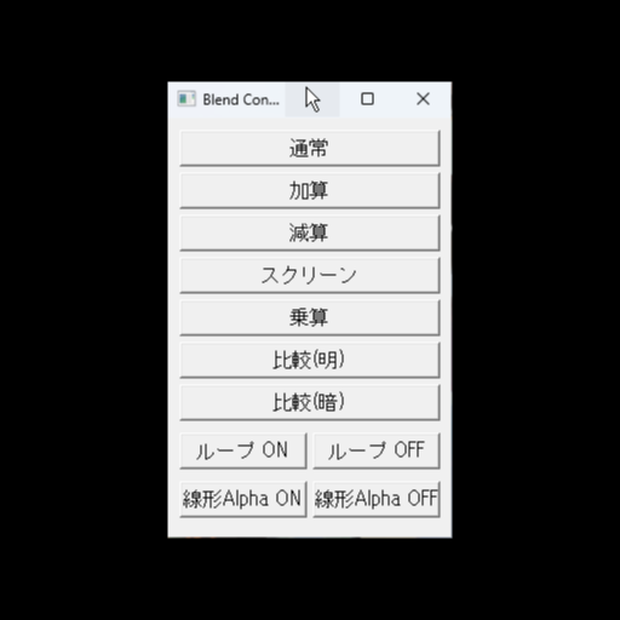
✦ 選択中のソースにブレンドモードをワンクリックで設定
✦ ループ ON / OFF の切り替え
✦ 線形アルファ ON / OFF の切り替え
✦ 常に最前面に表示される小型パネル
✦ ウィンドウ位置を自動保存
━━━━━━━━━━━━━━━━━━━━━━━━
対応ブレンドモード(7種類)
━━━━━━━━━━━━━━━━━━━━━━━━
通常 / 加算 / 減算 / スクリーン / 乗算 / 比較(明) / 比較(暗)
━━━━━━━━━━━━━━━━━━━━━━━━
その他の設定ボタン
━━━━━━━━━━━━━━━━━━━━━━━━
ループ ON / OFF
線形Alpha ON / OFF
※ ブレンドモードはすべてのソースに適用できます。
ループ・線形Alpha はメディアソースにのみ有効です。
━━━━━━━━━━━━━━━━━━━━━━━━
対応言語
━━━━━━━━━━━━━━━━━━━━━━━━
日本語 / English
(スクリプト設定パネルから切り替え可能)
━━━━━━━━━━━━━━━━━━━━━━━━
動作環境
━━━━━━━━━━━━━━━━━━━━━━━━
Windows 10 / 11(64-bit)
OBS Studio 32.0 以降
Python 3.12(OBS の設定でパスを指定済みであること)
※ 外部ライブラリのインストールは不要です。
━━━━━━━━━━━━━━━━━━━━━━━━
使い方
━━━━━━━━━━━━━━━━━━━━━━━━
1. obs_blend_panel.py を任意のフォルダに配置
2. OBS メニュー → ツール → スクリプト を開く
3. 左下の + ボタンから obs_blend_panel.py を追加
4. 「ウィンドウを開く」ボタンでパネルを起動
5. シーン上でソースを選択し、パネルのボタンを押す
━━━━━━━━━━━━━━━━━━━━━━━━
利用規約
━━━━━━━━━━━━━━━━━━━━━━━━
◎ 個人・商用問わず、OBS での配信・制作ツールとして
自由にご利用いただけます。
✕ 禁止事項
・本スクリプト自体の販売・再配布・改変・転売
・本スクリプトを自分が作ったと偽る行為
※ 本スクリプトの使用によって生じたいかなる損害についても、
作者は責任を負いません。
OBS Blend Control Panel
A control panel for OBS Studio that applies blend mode,
loop, and linear alpha settings to selected sources with one click.
No installation required. Completely free.
━━━━━━━━━━━━━━━━━━━━━━━━
Features
━━━━━━━━━━━━━━━━━━━━━━━━
✦ Set blend mode on selected sources with one click
✦ Toggle loop ON / OFF
✦ Toggle linear alpha ON / OFF
✦ Always-on-top compact panel
✦ Window position auto-saved
━━━━━━━━━━━━━━━━━━━━━━━━
Supported Blend Modes (7 types)
━━━━━━━━━━━━━━━━━━━━━━━━
Normal / Add / Subtract / Screen / Multiply / Lighten / Darken
━━━━━━━━━━━━━━━━━━━━━━━━
Additional Setting Buttons
━━━━━━━━━━━━━━━━━━━━━━━━
Loop ON / OFF
Linear Alpha ON / OFF
Note: Blend mode buttons apply to any source type.
Loop and Linear Alpha are only effective on media sources.
━━━━━━━━━━━━━━━━━━━━━━━━
Languages
━━━━━━━━━━━━━━━━━━━━━━━━
Japanese / English
(Switchable from the script settings panel)
━━━━━━━━━━━━━━━━━━━━━━━━
System Requirements
━━━━━━━━━━━━━━━━━━━━━━━━
Windows 10 / 11 (64-bit)
OBS Studio 32.0 or later
Python 3.12 (Python path must be configured in OBS)
No external libraries required.
━━━━━━━━━━━━━━━━━━━━━━━━
How to Use
━━━━━━━━━━━━━━━━━━━━━━━━
1. Place obs_blend_panel.py in any folder
2. In OBS, go to Tools -> Scripts
3. Click the + button and add obs_blend_panel.py
4. Click "Open Window" to launch the control panel
5. Select a source in your scene, then click a button in the panel
━━━━━━━━━━━━━━━━━━━━━━━━
Terms of Use
━━━━━━━━━━━━━━━━━━━━━━━━
◎ Free to use as a tool for OBS streaming and content creation,
for both personal and commercial purposes.
✕ Not permitted:
· Selling, redistributing, modifying, or reselling this script
· Claiming this script as your own creation
The author is not responsible for any damage or loss caused
by the use of this script.
모든 리뷰
더보기리뷰 등록
리뷰를 작성하려면 로그인이 필요합니다.
로그인하고 리뷰 쓰기