'%3e%3cg%20clip-path='url(%23roundHexB)'%3e%3cpath%20fill='%236D5DFC'%20d='M256%2040%20443%20148%20443%20364%20256%20472%2069%20364%2069%20148Z'/%3e%3cpath%20fill='%239C93FB'%20d='M69%20148%20256%2040%20443%20148%20256%20256Z'/%3e%3cpath%20fill='%234A3FD1'%20d='M256%20256%20443%20148%20443%20364%20256%20472Z'/%3e%3c/g%3e%3c!--%20top%20face:%20filled%20round%20magnifier%20--%3e%3cg%20transform='matrix(0.8660254,-0.5,0.8660254,0.5,69,148)'%3e%3cg%20transform='matrix(0.935,0,0,0.935,7.02,7.02)'%3e%3ccircle%20cx='88'%20cy='88'%20r='52'%20fill='%23FFFFFF'/%3e%3ccircle%20cx='88'%20cy='88'%20r='28'%20fill='%239C93FB'/%3e%3cpath%20d='M124%20124%20164%20164'%20stroke='%23FFFFFF'%20stroke-width='26'%20stroke-linecap='round'/%3e%3c/g%3e%3c/g%3e%3cg%20transform='matrix(0.8660254,0.5,0,1,69,148)'%3e%3cpath%20d='M96.1,61.08%20L45.9,128.92%20Q34,145%2054,145%20L162,145%20Q182,145%20170.1,128.92%20L119.9,61.08%20Q108,45%2096.1,61.08%20Z'%20fill='%23FFFFFF'/%3e%3c/g%3e%3c!--%20right%20face:%20filled%20bubble%20--%3e%3cg%20transform='matrix(0.8660254,-0.5,0,1,256,256)'%3e%3cg%20transform='matrix(0.855,0,0,0.855,15.66,15.66)'%3e%3cpath%20d='M60%2042H156a28%2028%200%200%201%2028%2028V158Q184%20168%20174.47%20164.96L124.53%20149.04Q115%20146%20105%20146H60a28%2028%200%200%201-28-28V70a28%2028%200%200%201%2028-28Z'%20fill='%23FFFFFF'/%3e%3c/g%3e%3c/g%3e%3c/g%3e%3c/svg%3e)
 kotohibi-cg
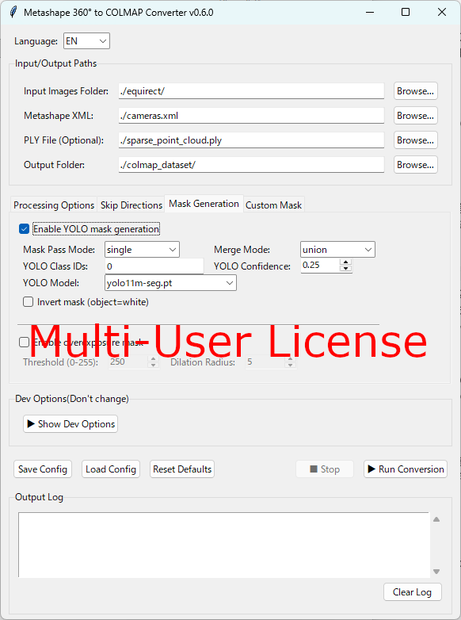
 360 MCConverter ( Metashape 360° to COLMAP Converter ( GUI, Windows binary edition ) ) Multi-user license
상품 설명
Metashapeの360°のSfM結果をCOLMAPのCubemapに変換するプログラムです。
Windows実行ファイル形式でGUI実装されています。
コマンドライン実行は不要なバージョンです。
zipファイル解凍後、metashape_360_gui.exeを実行してください。
操作方法は下記"Instructions and Workflow"を参照してください。
ライセンス利用範囲:永続ライセンス、複数ユーザー(1組織内に限り無制限)利用可能、商用利用可能、再配布不可
---English---
This program converts Metashape 360° SfM results into a COLMAP Cubemap.
It is implemented as a Windows executable file with a GUI.
This version does not require command line execution.
After extracting the zip file, please run metashape_360_gui.exe.
For operating instructions, please refer to the "Instructions and Workflow" section below.
License scope: Perpetual license, Can be used by multiple users (Unlimited within one organization), can be used for commercial purposes, cannot be redistributed
Instructions and Workflow
English :
Overall workflow
Easy&Fast 3D Gaussian Splatting workflow with 360 Camera
https://zenn.dev/kotohibi/articles/409bc16876b9e0
Mixed 3DGS Workflow with 360 Video and Planar Images
https://zenn.dev/kotohibi/articles/a14d2ff4fc205c
日本語 :
全体フロー
Easy&Fast 3D Gaussian Splatting workflow with 360 Camera
https://zenn.dev/kotohibi/articles/28b137f1873921
全天球動画と平面画像の混合3DGSワークフロー
https://zenn.dev/kotohibi/articles/34e3ad7fdd24db
Github page
https://github.com/Kotohibi/Metashape_360_to_COLMAP_plane
動作環境 / Operating environment
Windows 11
CPU: Intel Core i7, AMD Ryzen 5700X 以上
Memory: 32GB以上
GPU: Geforce RTX 4070 VRAM 8G more (推奨 5070Ti VRAM 16GB and more for large scene)
SSD: 512GB以上
Update history
[2026-03-07: V.0.3.5] GUI support
[2026-03-09: V.0.4.0] Dual mask mode
[2026-03-15: V.0.4.1] Compact binary size
[2026-03-27: V.0.4.2] PNG support
[2026-04-04: V.0.5.0] Added Coordinate Conversion(*developer option, Not supported*)
https://x.com/kotohibi_3d/status/2040418910470910178
How to utilize with LiDAR SLAM : https://x.com/kotohibi_3d/status/2040637580149145909
[2026-04-09: V.0.6.0] Supported custom mask
https://x.com/kotohibi_3d/status/2041909510047199539
[2026-04-16: V.0.7.0] Export XMP file for RealityScan
https://x.com/kotohibi_3d/status/2044779767002771827
[2026-04-25: V.0.8.0] 360 and planar mixed image workflow
https://x.com/kotohibi_3d/status/2048018154304188725
[2026-04-30: V.0.9.0] specify the resolution rate and skip frames for each direction of extraction, bug fix
https://x.com/kotohibi_3d/status/2049747035344224515
[2026-05-07: V.1.0.0] Real scale 3DGS with AprilTag(Add-on license needed)
https://x.com/kotohibi_3d/status/2052254524036047299
[2026-06-06: V.1.1.0] Auto set origin and orientation with AprilTag(Add-on license needed), App name was changed to "360mcconverter"
https://x.com/kotohibi_3d/status/2063237342354370630
[2026-07-17: V.1.2.0] Cubemap filter(remove overlap face between cubemap and planar images)
https://x.com/kotohibi_3d/status/2078088377371681237
[2026-08-09: V.1.3.0] Parallax-based cubemap reduction
https://x.com/kotohibi_3d/status/2086408535768973659
[2026-08-12: V.1.4.0] Able to convert georeferenced data of Metashape Pro. ("This is a developer option")
https://x.com/kotohibi_3d/status/2087452130697453809
[2026-08-27: V.1.5.0] Train Splitter which is able to split 3DGS dataset for large scale 3DGS or small VRAM GPU
https://x.com/kotohibi_3d/status/2090993549475197128
[2026-09-06: V.1.5.1] Bug fix : Fixed an issue when using YOLO masks and custom masks simultaneously.
모든 리뷰
더보기리뷰 등록
리뷰를 작성하려면 로그인이 필요합니다.
로그인하고 리뷰 쓰기