'%3e%3cg%20clip-path='url(%23roundHexB)'%3e%3cpath%20fill='%236D5DFC'%20d='M256%2040%20443%20148%20443%20364%20256%20472%2069%20364%2069%20148Z'/%3e%3cpath%20fill='%239C93FB'%20d='M69%20148%20256%2040%20443%20148%20256%20256Z'/%3e%3cpath%20fill='%234A3FD1'%20d='M256%20256%20443%20148%20443%20364%20256%20472Z'/%3e%3c/g%3e%3c!--%20top%20face:%20filled%20round%20magnifier%20--%3e%3cg%20transform='matrix(0.8660254,-0.5,0.8660254,0.5,69,148)'%3e%3cg%20transform='matrix(0.935,0,0,0.935,7.02,7.02)'%3e%3ccircle%20cx='88'%20cy='88'%20r='52'%20fill='%23FFFFFF'/%3e%3ccircle%20cx='88'%20cy='88'%20r='28'%20fill='%239C93FB'/%3e%3cpath%20d='M124%20124%20164%20164'%20stroke='%23FFFFFF'%20stroke-width='26'%20stroke-linecap='round'/%3e%3c/g%3e%3c/g%3e%3cg%20transform='matrix(0.8660254,0.5,0,1,69,148)'%3e%3cpath%20d='M96.1,61.08%20L45.9,128.92%20Q34,145%2054,145%20L162,145%20Q182,145%20170.1,128.92%20L119.9,61.08%20Q108,45%2096.1,61.08%20Z'%20fill='%23FFFFFF'/%3e%3c/g%3e%3c!--%20right%20face:%20filled%20bubble%20--%3e%3cg%20transform='matrix(0.8660254,-0.5,0,1,256,256)'%3e%3cg%20transform='matrix(0.855,0,0,0.855,15.66,15.66)'%3e%3cpath%20d='M60%2042H156a28%2028%200%200%201%2028%2028V158Q184%20168%20174.47%20164.96L124.53%20149.04Q115%20146%20105%20146H60a28%2028%200%200%201-28-28V70a28%2028%200%200%201%2028-28Z'%20fill='%23FFFFFF'/%3e%3c/g%3e%3c/g%3e%3c/g%3e%3c/svg%3e)
 sakutaro shop
 【無料あり】InspectorLocker / ワンクリックでInspectorを固定!
상품 설명
UnityのInspectorをワンクリックでLockするツールです。
・Inspectorを編集しているときに別のオブジェクトを選択すると、表示が切り替わってしまう!煩わしい!
・複数のInspectorを見ながら編集するとき、片方をLockしてからInspectorを追加してもう片方を選択してLockして、、、手間!
と困ったことはないでしょうか。
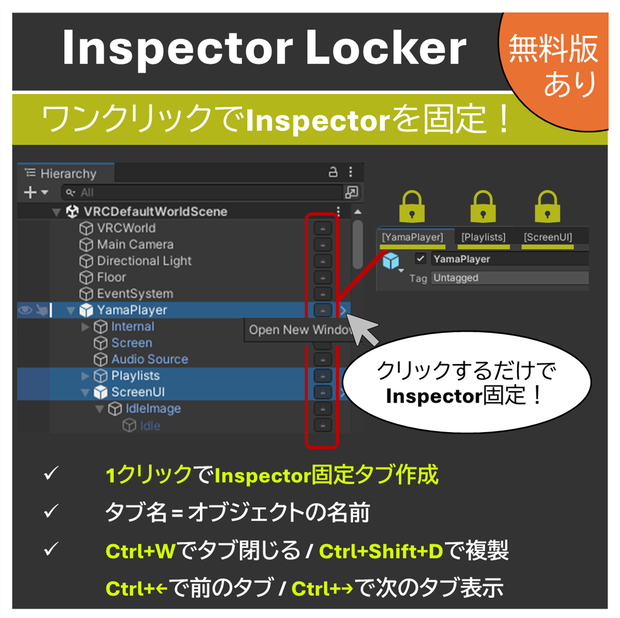
このツールを導入することで、ワンクリックでオブジェクトのLock済みInspectorを新しいWindowで表示 or 選択しているDockにタブを追加することができます。
※無料お試し版は全て新規Windowで開きます(タブ追加なし)。
---
This is a tool that lets you lock Unity’s Inspector with a single click.
※ The Full version is discounted from 500 JPY to 250 JPY until 3/7.
Have you ever experienced this?
- While editing something in the Inspector, you select another object and the view switches unexpectedly — frustrating!
- When editing while viewing multiple Inspectors, you lock one, open another Inspector, select the next object, lock it again… too much hassle!
With this tool, you can display a locked Inspector for any object with just one click — either in a new window or as an additional tab in your current docked Inspector.
※ The free trial version always opens in a new window (no tab addition).
◆提供機能◆
◆お試し版 (Free) 機能
一部の機能のみ利用できます。
Hierarcy上のボタンをクリックすると、新規WindowでLock済みのInspectorを開きます。
◆Full版 機能
Lock済みのInspectorを柔軟に管理することができます。
・ Hierarchy 上の🔒ボタンを
クリック → 選択されているDockにLock済みのInspector タブを追加
Ctrl+クリック → 新しいWindowでLock済みのInspector タブを表示
・ Hierarchy 上でオブジェクトをShiftキーで複数選択し、🔒ボタンを押すとまとめて表示/非表示 可能
・ ショートカットキー(本ツールで作成したタブのみ有効)
`Ctrl+W` で選択中のタブを閉じる
`Ctrl+Shift+D` で選択中の管理タブを複製
`Ctrl+右矢印キー`: 右のタブへ移動
`Ctrl+左矢印キー`: 左のタブへ移動
・ 表示されるタブ名は、Hierarcy上で選択した"[オブジェクト名]"になります。
(オプションフォームで表示名をカスタマイズ可能)
・ オプションフォーム
Tools→Sakutaro→InspectorLockerを選択するとオプションフォームが開きます。
タブ名、ボタンの位置、新規Windowで開くショートカットキーをカスタマイズすることができます。
※ 動画内のオブジェクト等は含まれていません。
◆起動方法◆
1. unitypackageをimportするだけで利用可能です。
Unity 2022.3.22f1で動作確認済み。
将来のアップデートでの動作を保証しません。
◆利用規約◆
・改変・商業利用可能
Modification and commercial use permitted.
・再配布禁止
Prohibition of redistribution.
・本ソフトウェアは、現状の機能のまま提供されます。
This software is provided as-is, with its current functionality.
・本ツールを使用することによって発生した不具合や損害には作者は一切の責任を負いません。ご利用は自己責任でお願いいたします。
The author accepts no liability for any defects or damages arising from its use. Please use it at your own risk.
◆お問い合わせ◆
ご不明点や不具合等ございましたら さくたろ までご連絡下さい。
◆更新履歴◆
2026/2/22 v1.0.0 公開
모든 리뷰
더보기리뷰 등록
리뷰를 작성하려면 로그인이 필요합니다.
로그인하고 리뷰 쓰기