'%3e%3cg%20clip-path='url(%23roundHexB)'%3e%3cpath%20fill='%236D5DFC'%20d='M256%2040%20443%20148%20443%20364%20256%20472%2069%20364%2069%20148Z'/%3e%3cpath%20fill='%239C93FB'%20d='M69%20148%20256%2040%20443%20148%20256%20256Z'/%3e%3cpath%20fill='%234A3FD1'%20d='M256%20256%20443%20148%20443%20364%20256%20472Z'/%3e%3c/g%3e%3c!--%20top%20face:%20filled%20round%20magnifier%20--%3e%3cg%20transform='matrix(0.8660254,-0.5,0.8660254,0.5,69,148)'%3e%3cg%20transform='matrix(0.935,0,0,0.935,7.02,7.02)'%3e%3ccircle%20cx='88'%20cy='88'%20r='52'%20fill='%23FFFFFF'/%3e%3ccircle%20cx='88'%20cy='88'%20r='28'%20fill='%239C93FB'/%3e%3cpath%20d='M124%20124%20164%20164'%20stroke='%23FFFFFF'%20stroke-width='26'%20stroke-linecap='round'/%3e%3c/g%3e%3c/g%3e%3cg%20transform='matrix(0.8660254,0.5,0,1,69,148)'%3e%3cpath%20d='M96.1,61.08%20L45.9,128.92%20Q34,145%2054,145%20L162,145%20Q182,145%20170.1,128.92%20L119.9,61.08%20Q108,45%2096.1,61.08%20Z'%20fill='%23FFFFFF'/%3e%3c/g%3e%3c!--%20right%20face:%20filled%20bubble%20--%3e%3cg%20transform='matrix(0.8660254,-0.5,0,1,256,256)'%3e%3cg%20transform='matrix(0.855,0,0,0.855,15.66,15.66)'%3e%3cpath%20d='M60%2042H156a28%2028%200%200%201%2028%2028V158Q184%20168%20174.47%20164.96L124.53%20149.04Q115%20146%20105%20146H60a28%2028%200%200%201-28-28V70a28%2028%200%200%201%2028-28Z'%20fill='%23FFFFFF'/%3e%3c/g%3e%3c/g%3e%3c/g%3e%3c/svg%3e)
 munyang
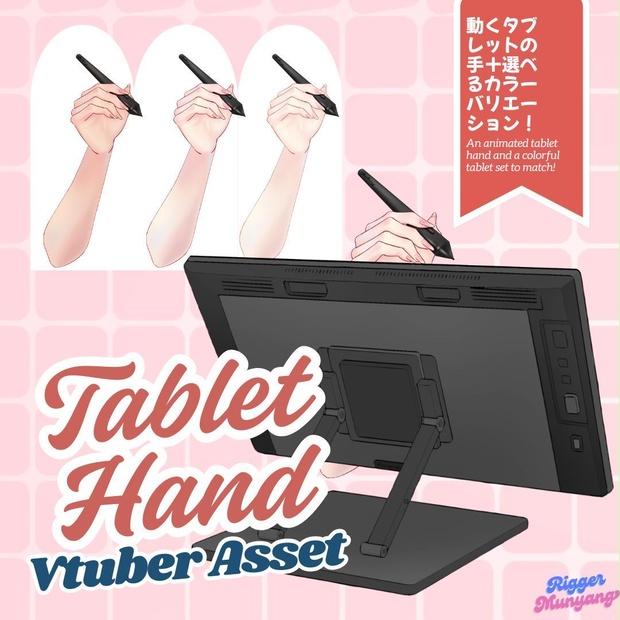
 物理対応・動くLive2Dタブレット手 Asset /Physics Applied Live2D Tablet Hand Asset
상품 설명
✨ 物理対応・動くLive2Dタブレットハンド Asset / Physics Applied Live2D Tablet Hand Asset✨
■ こんな方におすすめ ■
✔ お絵描き配信をよくされる方
✔ 作業配信の雰囲気をよりリアルにしたい方
✔ タブレット作業の演出を強化したい方
✔ Live2Dアイテムで配信クオリティを上げたい方
✔ ペン連動の細かい表現を追加したい方
■ Recommended For ■
✔ VTubers who frequently do drawing streams
✔ Creators who want a more immersive workspace setup
✔ Streamers emphasizing tablet work concepts
✔ Anyone looking to enhance stream quality with Live2D props
✔ Users who want pen-linked motion details
■ お問い合わせ / Contact ■
◾ mail / [email protected]
◾ twitter(X) / https://x.com/Mu_nyang12
■ 内容 ■
物理が適用された動く Live2Dタブレット用の手(フォルダデータ)
◾ 腕の色変更可能
◾ ペンの色変更可能
◾ タブレットの色変更可能
◾ ペンボタン連動
◾ お絵描き配信用Live2Dアイテム
◾ 男女モデルどちらも使用可能
お絵描き配信・作業配信に最適なLive2D専用アイテムです。
■ 基本情報 ■
◾ 動くLive2DタブレットハンドAsset
◾ Live2D 5.2 制作
◾ VTube Studio専用
(NIZIMAで使用予定の場合は事前にお問い合わせください)
■ カスタマイズ範囲 ■
◾ 腕カラー:基本3種 / 詳細合計5種
◾ ペン&タブレットカラー:合計7種
◾ タブレット ON / OFF 可能
◾ タブレット画像PNG別途同梱
カラー変更はExpression設定から変更可能です。
(Tablet / Pen / Hand color)
■ キー設定 ■
◾ ボタン1(P)
◾ ボタン2(E)
◾ タブレットOFF(Shift + ALT + 1)
◾ タブレット使用 ON / OFF(Shift + ALT + 2)
キー設定は変更可能です。
カラー変更はExpression設定から変更可能
(Tablet / Pen / Hand color)
■ インストール方法 ■
◾ フォルダデータをVTube Studioにインストール
◾ 上部一番左の「Change VTS Model」を選択
◾ 本モデルデータを選択
◾ 上部4番目の「Settings」を選択
◾ 「Key Binding Settings」を選択
◾ 「Expression File Editor」を選択
◾ 「Create New Expression File」を選択
◾ 任意のキーをカスタマイズ
◾ 「Save」を選択
◾ 「Create new key bindings for all unused expression files」を選択
◾ 追加されたKey Bindingsタブでキーの組み合わせを設定
◾ ホームに戻り「Item Settings」を選択
◾ 「Load current model as live2d item」を選択
◾ 保存後、「Item Settings」からいつでも使用可能
■ 収益について ■
◾ 配信での収益化可能
◾ 二次加工禁止
◾ リギング改変不可
■ Contents ■
Movable Live2D tablet hand asset with physics (folder data)
◾ Arm color customizable
◾ Pen color customizable
◾ Tablet color customizable
◾ Pen button linked
◾ Designed for drawing/art streams
◾ Usable for both male and female models
Perfect for art streams and working stream concepts.
■ Basic Information ■
◾ Movable Live2D Tablet Hand Asset
◾ Made with Live2D 5.2
◾ VTube Studio exclusive
(Please contact before using with NIZIMA)
■ Customization Range ■
◾ Arm colors: 3 main types / total 5 variations
◾ Pen & tablet colors: 7 variations
◾ Tablet ON / OFF toggle
◾ Separate tablet PNG image included
Color changes are adjustable via Expression settings.
(Tablet / Pen / Hand color)
■ Key Settings ■
◾ Button 1 (P)
◾ Button 2 (E)
◾ Tablet OFF (Shift + ALT + 1)
◾ Tablet ON / OFF Toggle (Shift + ALT + 2)
Key bindings are customizable.
Color changes are adjustable via Expression settings
(Tablet / Pen / Hand color)
■ Installation Guide ■
◾ Install the folder data into VTube Studio.
◾ Select the top-left button “Change VTS Model.”
◾ Choose the model data.
◾ Select the fourth button from the top, “Settings.”
◾ Select “Key Binding Settings.”
◾ Select “Expression File Editor.”
◾ Select “Create New Expression File.”
◾ Customize your desired keys.
◾ Click “Save.”
◾ Select “Create new key bindings for all unused expression files.”
◾ Assign key combinations in the added Key Bindings tab.
◾ Return to the home screen and select “Item Settings.”
◾ Select “Load current model as live2d item.”
◾ After saving, the item can be used anytime from the Item Settings tab.
■ Revenue & Terms ■
◾ Monetization allowed for streaming
◾ Redistribution prohibited
◾ Rigging modification not allowed
모든 리뷰
더보기리뷰 등록
리뷰를 작성하려면 로그인이 필요합니다.
로그인하고 리뷰 쓰기