'%3e%3cg%20clip-path='url(%23roundHexB)'%3e%3cpath%20fill='%236D5DFC'%20d='M256%2040%20443%20148%20443%20364%20256%20472%2069%20364%2069%20148Z'/%3e%3cpath%20fill='%239C93FB'%20d='M69%20148%20256%2040%20443%20148%20256%20256Z'/%3e%3cpath%20fill='%234A3FD1'%20d='M256%20256%20443%20148%20443%20364%20256%20472Z'/%3e%3c/g%3e%3c!--%20top%20face:%20filled%20round%20magnifier%20--%3e%3cg%20transform='matrix(0.8660254,-0.5,0.8660254,0.5,69,148)'%3e%3cg%20transform='matrix(0.935,0,0,0.935,7.02,7.02)'%3e%3ccircle%20cx='88'%20cy='88'%20r='52'%20fill='%23FFFFFF'/%3e%3ccircle%20cx='88'%20cy='88'%20r='28'%20fill='%239C93FB'/%3e%3cpath%20d='M124%20124%20164%20164'%20stroke='%23FFFFFF'%20stroke-width='26'%20stroke-linecap='round'/%3e%3c/g%3e%3c/g%3e%3cg%20transform='matrix(0.8660254,0.5,0,1,69,148)'%3e%3cpath%20d='M96.1,61.08%20L45.9,128.92%20Q34,145%2054,145%20L162,145%20Q182,145%20170.1,128.92%20L119.9,61.08%20Q108,45%2096.1,61.08%20Z'%20fill='%23FFFFFF'/%3e%3c/g%3e%3c!--%20right%20face:%20filled%20bubble%20--%3e%3cg%20transform='matrix(0.8660254,-0.5,0,1,256,256)'%3e%3cg%20transform='matrix(0.855,0,0,0.855,15.66,15.66)'%3e%3cpath%20d='M60%2042H156a28%2028%200%200%201%2028%2028V158Q184%20168%20174.47%20164.96L124.53%20149.04Q115%20146%20105%20146H60a28%2028%200%200%201-28-28V70a28%2028%200%200%201%2028-28Z'%20fill='%23FFFFFF'/%3e%3c/g%3e%3c/g%3e%3c/g%3e%3c/svg%3e)
 BthJon
상품 설명
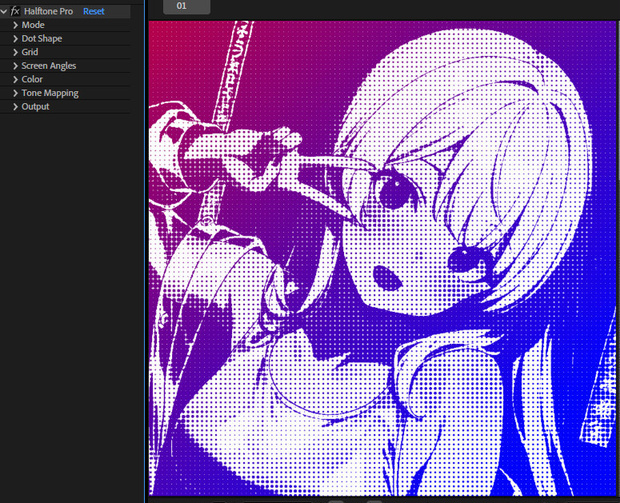
Halftone Pro は映像をハーフトーンドットパターンに変換し、従来の
印刷スクリーニング技術をシミュレートします。単純な閾値エフェクトとは
異なり、数学的に正確なドット形状関数、スムーズなアンチエイリアシング、
チャンネルごとのスクリーン角度分離、完全なカラー制御を使用します。
主な機能:
- 4つのレンダリングモード:輝度、CMYK、RGB、カスタムデュアルトーン
- 10種類のドット形状:円形、正方形、ひし形、楕円、ライン、クロス、
星形、ハート、リング、ユークリッド
- 3種類のグリッドタイプ:正方形、六角形、スタガー
- 3種類のドットカラーリング:ソリッドカラー、グラデーション、
ソースカラー
- コンポジティング用透明背景出力
- 38種類の内蔵ブレンドモード
- アニメーション用フェーズオフセット
- 入力コントラスト/明るさコントロール
- 8ビットおよび16ビットカラー深度対応
Halftone Pro converts your footage into a halftone dot pattern, simulating
traditional print screening techniques. Unlike simple threshold effects,
Halftone Pro uses mathematically precise dot shape functions with smooth
anti-aliasing, per-channel screen angle separation, and full color control.
Key features:
- 4 rendering modes: Luminance, CMYK, RGB, Custom Dual-Tone
- 10 dot shapes: Circle, Square, Diamond, Ellipse, Line, Cross, Star,
Heart, Ring, Euclidean
- 3 grid types: Square, Hexagonal, Stagger
- 3 dot coloring methods: Solid Color, Gradient, Source Color
- Transparent background output for compositing
- 38 built-in blend modes
- Phase Offset for animation
- Input Contrast / Brightness for tone control
- 8-bit and 16-bit color depth support
使用此檔案產生的任何問題均由使用者自行承擔風險與責任,下載即視為同意。
Any problems caused by the use of this file are at your own risk and responsibility.
【免責事項】
お客様は、自らの責任において、素材をダウンロードし、これを使用することに同意します。
素材の利用によってお客様に何らかの損害が発生したとしても、損害賠償義務及びその他一切の責任を負いません
不具合等により生じたいかなる損害に関しましては一切責任を負いませんのでご了承ください。了承ください。
모든 리뷰
더보기리뷰 등록
리뷰를 작성하려면 로그인이 필요합니다.
로그인하고 리뷰 쓰기