'%3e%3cg%20clip-path='url(%23roundHexB)'%3e%3cpath%20fill='%236D5DFC'%20d='M256%2040%20443%20148%20443%20364%20256%20472%2069%20364%2069%20148Z'/%3e%3cpath%20fill='%239C93FB'%20d='M69%20148%20256%2040%20443%20148%20256%20256Z'/%3e%3cpath%20fill='%234A3FD1'%20d='M256%20256%20443%20148%20443%20364%20256%20472Z'/%3e%3c/g%3e%3c!--%20top%20face:%20filled%20round%20magnifier%20--%3e%3cg%20transform='matrix(0.8660254,-0.5,0.8660254,0.5,69,148)'%3e%3cg%20transform='matrix(0.935,0,0,0.935,7.02,7.02)'%3e%3ccircle%20cx='88'%20cy='88'%20r='52'%20fill='%23FFFFFF'/%3e%3ccircle%20cx='88'%20cy='88'%20r='28'%20fill='%239C93FB'/%3e%3cpath%20d='M124%20124%20164%20164'%20stroke='%23FFFFFF'%20stroke-width='26'%20stroke-linecap='round'/%3e%3c/g%3e%3c/g%3e%3cg%20transform='matrix(0.8660254,0.5,0,1,69,148)'%3e%3cpath%20d='M96.1,61.08%20L45.9,128.92%20Q34,145%2054,145%20L162,145%20Q182,145%20170.1,128.92%20L119.9,61.08%20Q108,45%2096.1,61.08%20Z'%20fill='%23FFFFFF'/%3e%3c/g%3e%3c!--%20right%20face:%20filled%20bubble%20--%3e%3cg%20transform='matrix(0.8660254,-0.5,0,1,256,256)'%3e%3cg%20transform='matrix(0.855,0,0,0.855,15.66,15.66)'%3e%3cpath%20d='M60%2042H156a28%2028%200%200%201%2028%2028V158Q184%20168%20174.47%20164.96L124.53%20149.04Q115%20146%20105%20146H60a28%2028%200%200%201-28-28V70a28%2028%200%200%201%2028-28Z'%20fill='%23FFFFFF'/%3e%3c/g%3e%3c/g%3e%3c/g%3e%3c/svg%3e)
 KSG
KSG상품 설명
Both Japanese and English versions are included. / 日本語と英語の二種類を同梱してあります。
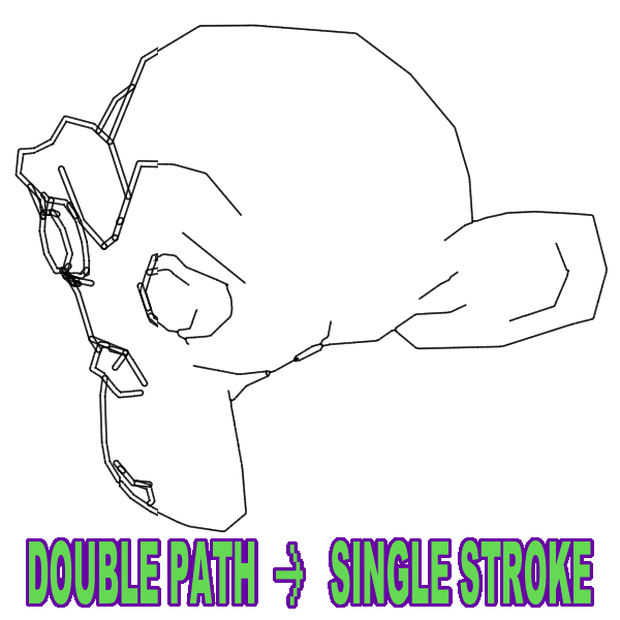
Blender の Line Art を Freestyle SVG Export でSVG出力すると、見た目は1本線でも内部は「塗りつぶしの輪郭」になり、2本のパスが並走しがちです。
SVG L1 Dropper は、その2本線の中央を拾って、1本の中心線SVGに変換します。
使い方: 左にSVGをドロップ → 右に結果が出る → クリックでプレビュー → 出力フォルダに保存。
ファイル名には自動で「_L1」を追加(すでにあれば追加しません)。
・できること
SVGを中心線(1本線)に変換して出力
ドラッグ&ドロップ対応(複数OK)
生成ファイル一覧&クリックで簡易プレビュー
出力名に _L1 を付与(元名にL1があれば追加しない)
!注意 !
一本線は長い繋がりではなく、短い線が並びます。
交差部分では、元の二本線と違う向きに進む場合があります。
必要なもの
Windows 11(動作確認)
Inkscape(SVG→PNGのラスタライズに使用。先にインストールが必要)
※Inkscape本体は同梱しない
!注意!
非公式ツール(Blender / Inkscape とは無関係)
元SVGの性質によって結果は変わる
ライセンス
本ソフトは PySide6/Qt、NumPy、Pillow、scikit-image 等のライブラリを利用しています。各ライブラリのライセンスは同梱の LICENSES.txt を参照してください。
返金について
本商品はデジタル商品です。原則として返金は行いません。
ただし、購入後に「起動しない」「必須要件(Windows / Inkscape)を満たしているのに動作しない」など明確な不具合が確認できる場合は、状況を確認のうえ個別に対応します。
English
SVG L1 Dropper — Centreline tool for Blender Line Art / Freestyle SVG Export
Blender Line Art SVG exports often look like a single stroke, but internally they’re two parallel paths (a filled outline).
SVG L1 Dropper converts that “double line” into a clean single centreline SVG.
How it works: Drop SVGs on the left → results appear on the right → click to preview → saved to your output folder.
Filenames automatically get “_L1” added (won’t duplicate if already present).
Requirements
Windows 11 (tested)
Inkscape (must be installed separately; used for SVG→PNG rasterisation)
Notes / Limitations
Output is many short segments, not one continuous long stroke.
At intersections, the direction may differ from the original double paths.
Refunds
Digital product: no refunds in general.
If it won’t run despite meeting the requirements, contact me with details and I’ll help.
모든 리뷰
더보기리뷰 등록
리뷰를 작성하려면 로그인이 필요합니다.
로그인하고 리뷰 쓰기