'%3e%3cg%20clip-path='url(%23roundHexB)'%3e%3cpath%20fill='%236D5DFC'%20d='M256%2040%20443%20148%20443%20364%20256%20472%2069%20364%2069%20148Z'/%3e%3cpath%20fill='%239C93FB'%20d='M69%20148%20256%2040%20443%20148%20256%20256Z'/%3e%3cpath%20fill='%234A3FD1'%20d='M256%20256%20443%20148%20443%20364%20256%20472Z'/%3e%3c/g%3e%3c!--%20top%20face:%20filled%20round%20magnifier%20--%3e%3cg%20transform='matrix(0.8660254,-0.5,0.8660254,0.5,69,148)'%3e%3cg%20transform='matrix(0.935,0,0,0.935,7.02,7.02)'%3e%3ccircle%20cx='88'%20cy='88'%20r='52'%20fill='%23FFFFFF'/%3e%3ccircle%20cx='88'%20cy='88'%20r='28'%20fill='%239C93FB'/%3e%3cpath%20d='M124%20124%20164%20164'%20stroke='%23FFFFFF'%20stroke-width='26'%20stroke-linecap='round'/%3e%3c/g%3e%3c/g%3e%3cg%20transform='matrix(0.8660254,0.5,0,1,69,148)'%3e%3cpath%20d='M96.1,61.08%20L45.9,128.92%20Q34,145%2054,145%20L162,145%20Q182,145%20170.1,128.92%20L119.9,61.08%20Q108,45%2096.1,61.08%20Z'%20fill='%23FFFFFF'/%3e%3c/g%3e%3c!--%20right%20face:%20filled%20bubble%20--%3e%3cg%20transform='matrix(0.8660254,-0.5,0,1,256,256)'%3e%3cg%20transform='matrix(0.855,0,0,0.855,15.66,15.66)'%3e%3cpath%20d='M60%2042H156a28%2028%200%200%201%2028%2028V158Q184%20168%20174.47%20164.96L124.53%20149.04Q115%20146%20105%20146H60a28%2028%200%200%201-28-28V70a28%2028%200%200%201%2028-28Z'%20fill='%23FFFFFF'/%3e%3c/g%3e%3c/g%3e%3c/g%3e%3c/svg%3e)
 Rieszの素材置き場
 AE RenderDrop — レンダリング通知 & 自動アップロード for After Effects
상품 설명
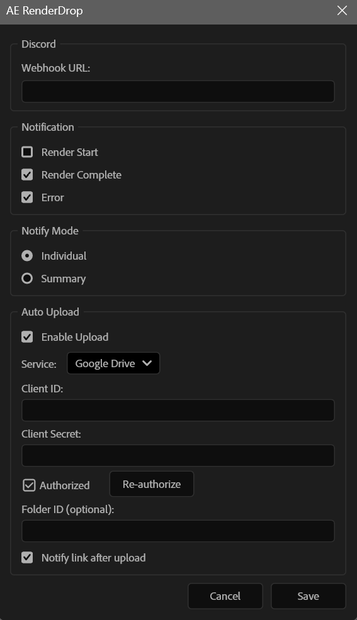
AE RenderDropは、After Effects のレンダリング状況を Discord にリアルタイム通知** する CEP エクステンションです。
レンダリングの開始・完了・エラーをスマホで確認できるから、**別の作業をしながら、外出しながら、寝ながら** レンダリングの進捗を把握できます。
---
✨ 主な機能
🔔 Discord リアルタイム通知
レンダリングの開始・完了・エラーを Discord Webhook で即座に通知。スマホでも PC でもどこからでも確認できます。
📊 詳細なレンダリング情報
通知には以下のメタデータが自動で付与されます:
- 解像度(例: 1920×1080)
- フレームレート(例: 29.97fps)
- 再生時間 & フレーム数
- 出力ファイルサイズ
- レンダリング所要時間
- 出力モジュール名
📤 Dropbox / Google Drive 自動アップロード(オプション)
レンダリング完了後、出力ファイルを自動でクラウドにアップロード。共有リンクも Discord に自動送信されるので、チームへの共有が一瞬で完了します。
🎯2つの通知モード
- 個別通知 — 各コンポの完了ごとに詳細通知
- サマリー通知 — 全コンポ完了後にまとめて1通
---
📋 通知イメージ
個別通知:
✅ main_comp のレンダリングが完了しました
📐 1920 × 1080 @ 29.97fps
⏱️ 00:01:30:00 (2697 frames)
🏞️ H.264 - Match Render Settings
📦 245.3 MB
⏳ 3m 42s
📂 C:\output\main_comp.mp4
サマリー通知:
✅ レンダリング完了:
main_comp — ⏱️ 1:30 | 📦 120.5 MB | ⏳ 1m 12s
intro_comp — ⏱️ 1:00 | 📦 340.2 MB | ⏳ 2m 30s
---
📦 同梱内容
- AE-RenderDrop.zxp — エクステンション本体
- マニュアル.html — セットアップ & 使い方ガイド
---
🔧 インストール方法
1. `AE-RenderDrop.zxp` をダウンロード
2. [Anastasiy's Extension Manager](https://install.anastasiy.com/) または [aescripts ZXP Installer](https://aescripts.com/learn/zxp-installer/)(いずれも無料)で ZXP をインストール
3. After Effects を再起動
4. **ウィンドウ ▸ エクステンション ▸ AE RenderDrop** でパネルを開く
5. ⚙️ アイコンから設定を開き、Discord Webhook URL を貼り付けて保存
6. レンダリングすると自動で通知が届きます 🎉
💡 Discord Webhook の作り方は同梱のマニュアルに記載しています。
---
💻 対応環境
- Adobe After Effects 2022 以降(Windows / Mac)
- Node.js 不要(CEP に内蔵されています)
- Discord アカウント(通知用の Webhook URL を取得するために必要)
---
⚠️ ご注意
- 本製品はサイドロード形式のインストールです。Adobe Exchange は経由しません。
- Dropbox / Google Drive 連携はオプション機能です。Discord 通知のみでもお使いいただけます。
- 連携方法の詳細はマニュアルに記載しています。
-------
Here's the English version:
AE RenderDrop is a CEP extension that sends real-time Discord notifications about your After Effects render status.
Get notified of render start, completion, and errors right on your phone — so you can work on other tasks, go out, or even sleep while keeping track of your renders.
✨ Key Features
🔔 Real-Time Discord Notifications Instantly notified of render start, completion, and errors via Discord Webhook. Check from your phone, PC, or anywhere.
📊 Detailed Render Info Each notification automatically includes:
Resolution (e.g., 1920×1080)
Frame rate (e.g., 29.97fps)
Duration & frame count
Output file size
Render time
Output module name
📤 Dropbox / Google Drive Auto-Upload (Optional) Automatically uploads your rendered files to the cloud after completion. A share link is also posted to Discord, making team handoffs instant.
🎯 Two Notification Modes
Individual — Detailed notification for each comp as it finishes
Summary — One consolidated message after all comps are done
📋 Notification Examples
Individual:
✅ Render complete: main_comp
📐 1920 × 1080 @ 29.97fps
⏱️ 00:01:30:00 (2697 frames)
🏞️ H.264 - Match Render Settings
📦 245.3 MB ⏳ 3m 42s 📂 C:\output\main_comp.mp4
Summary:
✅ Render complete: main_comp
⏱️ 1:30 | 📦 120.5 MB | ⏳ 1m 12s intro_comp — ⏱️ 1:00 |
📦 What's Included
AE-RenderDrop.zxp — Extension package
Manual.html — Setup & usage guide
🔧 Installation
Download AE-RenderDrop.zxp
Install the ZXP using Anastasiy's Extension Manager or aescripts ZXP Installer (both free)
Restart After Effects
Open the panel: Window ▸ Extensions ▸ AE RenderDrop
Click the ⚙️ icon, paste your Discord Webhook URL, and save
Start rendering — notifications will arrive automatically 🎉
💡 Instructions for creating a Discord Webhook are included in the manual.
💻 System Requirements
Adobe After Effects 2022 or later (Windows / Mac)
No Node.js required (bundled with CEP)
Discord account (needed to create a Webhook URL for notifications)
⚠️ Notes
This product is installed via sideloading. It is not distributed through Adobe Exchange.
Dropbox / Google Drive integration is optional. The extension works with Discord notifications only.
Detailed setup instructions for cloud integration are included in the manual.
모든 리뷰
더보기리뷰 등록
리뷰를 작성하려면 로그인이 필요합니다.
로그인하고 리뷰 쓰기