'%3e%3cg%20clip-path='url(%23roundHexB)'%3e%3cpath%20fill='%236D5DFC'%20d='M256%2040%20443%20148%20443%20364%20256%20472%2069%20364%2069%20148Z'/%3e%3cpath%20fill='%239C93FB'%20d='M69%20148%20256%2040%20443%20148%20256%20256Z'/%3e%3cpath%20fill='%234A3FD1'%20d='M256%20256%20443%20148%20443%20364%20256%20472Z'/%3e%3c/g%3e%3c!--%20top%20face:%20filled%20round%20magnifier%20--%3e%3cg%20transform='matrix(0.8660254,-0.5,0.8660254,0.5,69,148)'%3e%3cg%20transform='matrix(0.935,0,0,0.935,7.02,7.02)'%3e%3ccircle%20cx='88'%20cy='88'%20r='52'%20fill='%23FFFFFF'/%3e%3ccircle%20cx='88'%20cy='88'%20r='28'%20fill='%239C93FB'/%3e%3cpath%20d='M124%20124%20164%20164'%20stroke='%23FFFFFF'%20stroke-width='26'%20stroke-linecap='round'/%3e%3c/g%3e%3c/g%3e%3cg%20transform='matrix(0.8660254,0.5,0,1,69,148)'%3e%3cpath%20d='M96.1,61.08%20L45.9,128.92%20Q34,145%2054,145%20L162,145%20Q182,145%20170.1,128.92%20L119.9,61.08%20Q108,45%2096.1,61.08%20Z'%20fill='%23FFFFFF'/%3e%3c/g%3e%3c!--%20right%20face:%20filled%20bubble%20--%3e%3cg%20transform='matrix(0.8660254,-0.5,0,1,256,256)'%3e%3cg%20transform='matrix(0.855,0,0,0.855,15.66,15.66)'%3e%3cpath%20d='M60%2042H156a28%2028%200%200%201%2028%2028V158Q184%20168%20174.47%20164.96L124.53%20149.04Q115%20146%20105%20146H60a28%2028%200%200%201-28-28V70a28%2028%200%200%201%2028-28Z'%20fill='%23FFFFFF'/%3e%3c/g%3e%3c/g%3e%3c/g%3e%3c/svg%3e)
 穏和電工
穏和電工상품 설명
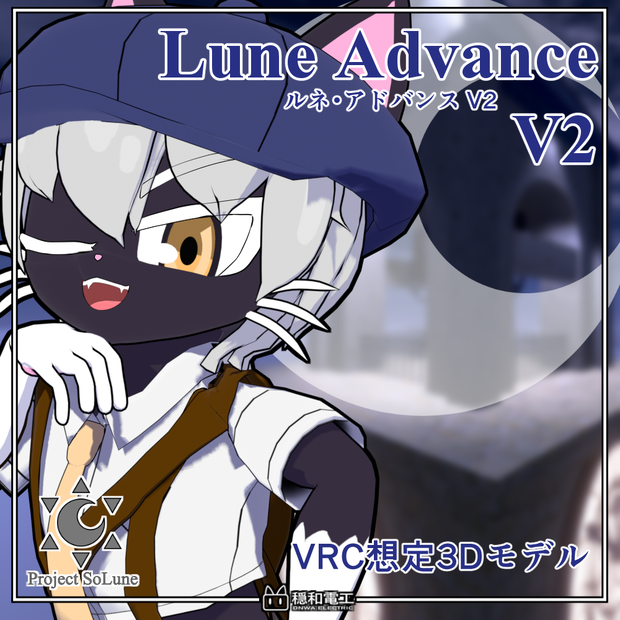
より可愛くなって新登場!
本モデルはUnityのHumanoid形式に対応した3Dモデルです。
VRChatでの利用を想定しており、アバター3.0に対応しています。
このキャラクターはProject SoLune TYPE-Aシリーズのキャラクターです。
同シリーズのキャラクターとの衣装互換性があります。
※一部アイテムには互換性がございません。
Now even cuter and newly released!
This model is a 3D model compatible with Unity's Humanoid format.
It is designed for use in VRChat and is compatible with Avatar 3.0.
This character is part of the Project SoLune TYPE-A series.
It shares costume compatibility with other characters in the same series.
※Some items are not compatible.
・アバター仕様/spec
ポリゴン数(通常版):△76332
ポリゴン数(Lite版):△63776
ポリゴン数(モバイル版):△10524
設定済み表情:14種
表情用シェイプキー:57種(a/e/i/o/u含む) +フェイストラッキング用シェイプキー
使用シェーダー(モバイル版除く):liltoon (https://lilxyzw.github.io/lilToon/ )
polygons (normal edition): △76332
polygons (lite edition):△63776
polygons(mobile edition):△10524
Preconfigured expressions: 14
Shape keys for expressions: 57 (including a/e/i/o/u) + for Face Tracking
Shader (without mobile): liltoon (https://lilxyzw.github.io/lilToon/ )
同梱衣装:タイムズボーイコーデ
ポリゴン数:△16620
Included Outfit: Times Boy Code
Polygons: △16,620
・試着/try-on
https://vrchat.com/home/avatar/avtr_f23c8691-c66f-4307-bbd7-96e8973b0842
・導入方法/introduction
・本モデル導入にあたってVRChat Creator Companion (VCC)を予めインポートして下さい
https://www.vrchat.net/home/download
lilToonシェーダーはこちらよりダウンロードできます。
事前にインポートをしておいてください。
https://lilxyzw.booth.pm/items/3087170
※VRCSDK2.0については動作しません。
【VRChat導入方法】
1.Unityのプロジェクトを作成し、VRCSDK3.0とLiltoonをあらかじめインポートする。
(VRCSDKのバージョンは必ず3.7.2以上のバージョンをご利用ください。)
2.プロジェクトを開いた状態で同梱のunitypackageをインポート。
3.インポート後Assetsの中にキャラ名のフォルダーができるので Onwa_Denko/キャラ名/prefab のフォルダからお好みのカラーのprefabをHierarchyにドラッグ&ドロップ。
4.その後、VRChat SDKからVRChatにログイン、アップロード作業をしたら完了です。
【Lite版・モバイル版について】
prefabフォルダ直下のLite及びquestフォルダのprefabは特殊な設定を施した軽量版です。
LiteフォルダのprefabはPC用、questフォルダのprefabはモバイル用のものとなっております。
上記の手順と同様に、任意のprefabをアップロードしてください。
Lite版及びモバイル版には以下の制約があります。
・expression menuから衣装の着脱ができません
・(モバイル版のみ)簡略化により一部見た目が変わります
・(モバイル版のみ)一部physbonesが省略されています
Installation Guide
Before importing this model, please ensure you have the VRChat Creator Companion (VCC) installed. https://www.vrchat.net/home/download
The lilToon Shader is required. Please download and import it into your project beforehand. https://lilxyzw.booth.pm/items/3087170
Note: This model is not compatible with VRCSDK 2.0.
[How to Upload to VRChat]
1.Prepare your Project: Create a new Unity project and import VRCSDK 3.0 and lilToon. (Please ensure you are using VRCSDK version 3.7.2 or higher.)
2.Import the Model: With your project open, import the included .unitypackage file.
3.Setup the Avatar: After importing, a folder named after the character will appear in your Assets. Navigate to the Onwa_Denko/[Character Name]/prefab folder and drag your preferred color variant prefab into the Hierarchy.
4.Upload: Log in to VRChat via the VRChat SDK panel and proceed with the upload process.
[Lite and Mobile Versions]
The prefabs located in the Lite and Quest subfolders (within the prefab folder) are optimized lightweight versions with special settings.
Lite Folder: Optimized for PC.
Quest Folder: Optimized for Mobile/Quest.
To use these, follow the same upload steps as above using the specific prefab of your choice.
Please note the following limitations for Lite and Mobile versions:
Outfit toggles via the Expression Menu are unavailable.
(Mobile only): Some visual elements may differ due to simplification.
(Mobile only): Certain PhysBones have been omitted for optimization.
・衣装導入方法/How to import the clothes
・導入にあたり、アバター側で必須のものに加え、Modular Avatarを事前にインポートしておいてください。
ダウンロードはこちらからできます。
https://modular-avatar.nadena.dev
・衣装はモバイル版非対応です
【衣装の導入方法】
1.通常の方法と同じくアバターのunitypackageをインポート。
2.衣装に同梱されているunitypackageをインポート。 ※アバターに同梱されている衣装は対応したアバターのunitypackageをインポートしてください。
3. Onwa_Denko/キャラ名/prefab/base フォルダーからお好みの色のprefabをHierarchyにドラッグ&ドロップ。
4.Onwa_Denko/clothes/衣装名/prefab フォルダーからお好みの色のprefabをHierarchyのアバター直下にドラッグ&ドロップ。 ※まれに衣装が正しく配置されないことがございます。衣装がアバターの子になっているかご確認ください。
4.その後、VRChat SDKからVRChatにログイン、アップロード作業をしたら完了です。
【Lite版について】
prefabフォルダ直下のLiteフォルダのprefabは特殊な設定を施した軽量版です。
上記の手順と同様に、任意のprefabを配置した後、
衣装直下のbody2のマテリアル「body_replace」を各キャラに対応したbodyマテリアルに変更してください。
bodyマテリアルはOnwa_Denko/キャラ名/mat/カラー名 フォルダーにございます。
なお、必ずアバター側も Onwa_Denko/キャラ名/prefab/lite/base フォルダー内のprefabを使用してください。
Lite版には以下の制約があります。
・expression menuから衣装の着脱ができません
Please ensure you have Modular Avatar imported in addition to the avatar's requirements. You can download it here: https://modular-avatar.nadena.dev
This outfit is not compatible with the Mobile (Quest) version.
[How to Setup the Outfit]
1.Import your avatar's unitypackage as usual.
2.Import the unitypackage included with the outfit. Note: If the outfit is bundled with the avatar, please ensure you have already imported the compatible avatar's unitypackage.
3.Navigate to the Onwa_Denko/[Character Name]/prefab/base folder and drag the prefab of your preferred color into the Hierarchy.
4.Navigate to the Onwa_Denko/clothes/[Outfit Name]/prefab folder and drag your preferred color prefab directly onto your avatar in the Hierarchy. Note: In rare cases, the outfit may not be positioned correctly. Please double-check that the outfit prefab is parented under the avatar.
5.Log in to VRChat via the VRChat SDK and proceed with the upload.
[About the Lite Version]
The prefabs in the Lite folder (inside the prefab folder) are optimized lightweight versions with special settings.
After placing any prefab as described above,
change the “body_replace” material on the body2 component directly under the costume to the corresponding body material for each character.
Body materials are located in the Onwa_Denko/Character Name/mat/Color Name folder.
Important: Please make sure to use the avatar prefab located in the Onwa_Denko/[Character Name]/prefab/lite/base folder as well.
The Lite version has the following limitations:
Outfit toggles via the Expression Menu are unavailable.
・内容物/Contents
・Unitypackage
・利用規約・免責事項PDFデータ
・VRMデータ(0.x)
・FBXデータ
・psdデータ
・omake
├2D立ち絵
├壁紙
└ バナー
・Unitypackage
・Terms of use and disclaimer PDF data
・VRM data (0.x)
・FBX data
・psd data
・omake
├ 2D portrait
├ wall paper
└ Banner
・利用規約・免責事項/Terms of Use & Disclaimer
https://drive.google.com/drive/folders/1tW7r5ynVvlJID38tmNv8nXonPuYW4dqt?usp=drive_link
本規約はVN3ライセンスによって作成されています
This agreement is made by VN3 License
・連絡先/Contact
・X(旧twitter) @Onwa_INU
・Misskey.io @[email protected]
・更新履歴
ver1.0.0 公開(2026/2/14)
ver1.0.1 破損したファイルを修正
設定画をomakeフォルダに追加(2026/6/14)
ver1.0.0 published(2026/2/14)
ver1.0.1 Repair damaged files
Add concept art to the omake folder(2026/6/14)
모든 리뷰
더보기리뷰 등록
리뷰를 작성하려면 로그인이 필요합니다.
로그인하고 리뷰 쓰기