'%3e%3cg%20clip-path='url(%23roundHexB)'%3e%3cpath%20fill='%236D5DFC'%20d='M256%2040%20443%20148%20443%20364%20256%20472%2069%20364%2069%20148Z'/%3e%3cpath%20fill='%239C93FB'%20d='M69%20148%20256%2040%20443%20148%20256%20256Z'/%3e%3cpath%20fill='%234A3FD1'%20d='M256%20256%20443%20148%20443%20364%20256%20472Z'/%3e%3c/g%3e%3c!--%20top%20face:%20filled%20round%20magnifier%20--%3e%3cg%20transform='matrix(0.8660254,-0.5,0.8660254,0.5,69,148)'%3e%3cg%20transform='matrix(0.935,0,0,0.935,7.02,7.02)'%3e%3ccircle%20cx='88'%20cy='88'%20r='52'%20fill='%23FFFFFF'/%3e%3ccircle%20cx='88'%20cy='88'%20r='28'%20fill='%239C93FB'/%3e%3cpath%20d='M124%20124%20164%20164'%20stroke='%23FFFFFF'%20stroke-width='26'%20stroke-linecap='round'/%3e%3c/g%3e%3c/g%3e%3cg%20transform='matrix(0.8660254,0.5,0,1,69,148)'%3e%3cpath%20d='M96.1,61.08%20L45.9,128.92%20Q34,145%2054,145%20L162,145%20Q182,145%20170.1,128.92%20L119.9,61.08%20Q108,45%2096.1,61.08%20Z'%20fill='%23FFFFFF'/%3e%3c/g%3e%3c!--%20right%20face:%20filled%20bubble%20--%3e%3cg%20transform='matrix(0.8660254,-0.5,0,1,256,256)'%3e%3cg%20transform='matrix(0.855,0,0,0.855,15.66,15.66)'%3e%3cpath%20d='M60%2042H156a28%2028%200%200%201%2028%2028V158Q184%20168%20174.47%20164.96L124.53%20149.04Q115%20146%20105%20146H60a28%2028%200%200%201-28-28V70a28%2028%200%200%201%2028-28Z'%20fill='%23FFFFFF'/%3e%3c/g%3e%3c/g%3e%3c/g%3e%3c/svg%3e)
 badluckluka
상품 설명
CLOTHING FOR AURORA BODY BASE
AURORA ボディベース用衣装
https://badluckluka.booth.pm/items/7910434
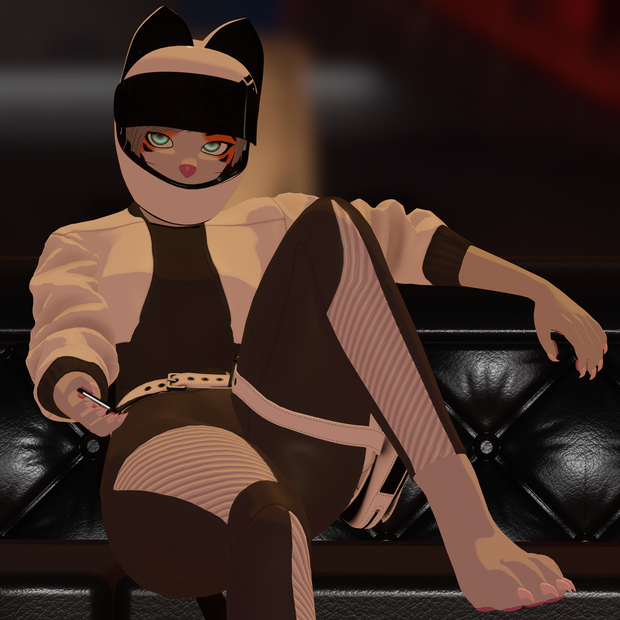
The Sportbike Outfit Set is a fully modular VRChat ready clothing collection created for extreme customization and a unified high performance look. Every piece in the set is designed to mix, match, recolor, and layer smoothly with the rest of the Aurora ecosystem.
Features
- Material Variety
The Sportbike Outfit Set includes eighty six unique material variations across all clothing pieces
- Clothing Combinations
The Sportbike Outfit Set includes over eight hundred billion possible clothing combinations
- In Game Color Control
All items support in game adjustment of hue shift, brightness, contrast, emission strength, emission hue shift, and emission contrast
- Advanced Helmet Options
Helmet materials include additional control for glitter hue shift and glitter strength for enhanced visual effects
- Modular Compatibility
All pieces are fully modular and designed to mix and match with the entire Aurora ecosystem
- VRCFury Setup
Every item is prepared with VRCFury for simple and reliable setup
____________________________
特徴
- 素材バリエーション
Sportbike Outfit Set には、全ての衣装パーツに合計 86 種類のユニークな素材バリエーションが含まれています
- 衣装コンビネーション
Sportbike Outfit Set は、衣装の組み合わせが 8,000 億通り以上になります
- インゲームカラーコントロール
全てのアイテムは、色相シフト、明るさ、コントラスト、発光強度、発光色相シフト、発光コントラストの調整に対応しています
- 高度なヘルメットオプション
ヘルメット素材には、グリッターの色相シフトと強度を調整できる追加コントロールが含まれ、より豊かな視覚表現が可能です
- モジュラー互換性
全てのパーツは完全にモジュラー化されており、Aurora エコシステム全体と自由に組み合わせられるよう設計されています
- 全てのアイテムは、簡単で安定したセットアップが行えるよう VRCFury に対応しています
____________________________
Included
- .blend file
- FBX models
- Pre configured .unitypackage
Includes all assets and systems ready to use in Unity.
- 86 unique and customizable materials
- Texture sets
Multiple styles prepared for recoloring and customization.
- Prefabs
Ready to use prefabs for the modular parts.
- AudioLink setup
Fully configured and ready to use.
- LTCGI setup
Preconfigured for dynamic lighting and reactive effects.
- VRCFury setup
Prebuilt toggles and systems included.
____________________________
同梱内容
- .blend ファイル
- FBX モデル
- 事前設定済み .unitypackage
Unity でそのまま使用できる全てのアセットとシステムを含みます。
- 86 種類のユニークでカスタマイズ可能なマテリアル
- テクスチャセット
再配色やカスタマイズに対応した複数のスタイルを用意しています。
- プレハブ
モジュラーパーツ用のすぐに使えるプレハブが含まれています。
- AudioLink セットアップ
完全に設定済みで、そのまま使用できます。
- LTCGI セットアップ
動的ライティングとリアクティブ効果に対応したプリセット構成です。
- VRCFury セットアップ
プリビルトのトグルとシステムが含まれています。
____________________________
Dependencies - 依存パッケージ
You will need the following before installing:
を使用するために、以下が必要です
- VRChat Creator Companion
https://vrchat.com/home/download
- VRCFury
- Poiyomi Shader
https://poiyomi.booth.pm/items/4841309
____________________________
Installation Instructions
1. Install VRChat Creator Companion
Download and install VCC, which manages Unity versions and VRChat project setup.
2. Create a new Avatar Project
In VCC, create a Unity Avatar Project using the newest Unity version recommended by VCC.
3. Add required packages to the project
In the project’s VCC package list, add:
- VRCFury
- (Optional) Gesture Manager for testing animations and expressions.
4. Open the Unity project
Launch the project through VCC so all packages load correctly.
5. Install Poiyomi
Import the Poiyomi shader package into the Unity project.
6. Import the Aurora Sportbike Outfit.unitypackage
Double‑click the Aurora Sportbike Outfit.unitypackage and import all included assets.
7. Select which clothing you'd like
Choose the prefabs you want to use and drag it onto the root of the avatar.
8. Apply your materials
Go to:
Assets > Aurora > Clothing
Assign your preferred materials to the chosen clothing.
9. Log in to the VRChat SDK
Open the VRChat SDK menu at the top of Unity and sign in with your VRChat account.
10. Build and upload
Use the VRChat Control Panel to upload your avatar.
____________________________
インストール手順
1 VRChat Creator Companion をインストール
Unity のバージョン管理と VRChat プロジェクト設定を行う VCC をダウンロードしてインストールします。
2 新しいアバタープロジェクトを作成
VCC で、推奨されている最新の Unity バージョンを使用して Unity アバタープロジェクトを作成します。
3 必要なパッケージをプロジェクトに追加
プロジェクトの VCC パッケージ一覧に以下を追加します:
- VRCFury
- (任意)Gesture Manager(アニメーションや表情のテスト用)
4 Unity プロジェクトを開く
VCC からプロジェクトを起動し、すべてのパッケージを正しく読み込みます。
5 Poiyomi をインストール
Poiyomi シェーダーパッケージを Unity プロジェクトにインポートします。
6 Aurora Sportbike Outfit.unitypackage をインポート
Aurora Sportbike Outfit.unitypackage をダブルクリックし、含まれるすべてのアセットをインポートします。
7 使用したい衣装を選択
使用したいプレハブを選び、アバターのルートにドラッグします。
8 マテリアルを適用
Assets > Aurora > Clothing に移動し、選択した衣装に好みのマテリアルを割り当てます。
9 VRChat SDK にログイン
Unity 上部の VRChat SDK メニューを開き、VRChat アカウントでサインインします。
10 ビルドしてアップロード
VRChat コントロールパネルを使用してアバターをアップロードします。
____________________________
FAQ - よくある質問
FAQ
https://docs.google.com/document/d/1m6IyGTMetI9HjrnZSj2_FJ47fcyZfe_V0dzxvh91lik/edit?usp=sharing
よくある質問
https://docs.google.com/document/d/1PaCM7_wqVIUtKWLDOXrLUdfrWrMEI1GyqjDI2RrsMEI/edit?usp=sharing
모든 리뷰
더보기리뷰 등록
리뷰를 작성하려면 로그인이 필요합니다.
로그인하고 리뷰 쓰기