'%3e%3cg%20clip-path='url(%23roundHexB)'%3e%3cpath%20fill='%236D5DFC'%20d='M256%2040%20443%20148%20443%20364%20256%20472%2069%20364%2069%20148Z'/%3e%3cpath%20fill='%239C93FB'%20d='M69%20148%20256%2040%20443%20148%20256%20256Z'/%3e%3cpath%20fill='%234A3FD1'%20d='M256%20256%20443%20148%20443%20364%20256%20472Z'/%3e%3c/g%3e%3c!--%20top%20face:%20filled%20round%20magnifier%20--%3e%3cg%20transform='matrix(0.8660254,-0.5,0.8660254,0.5,69,148)'%3e%3cg%20transform='matrix(0.935,0,0,0.935,7.02,7.02)'%3e%3ccircle%20cx='88'%20cy='88'%20r='52'%20fill='%23FFFFFF'/%3e%3ccircle%20cx='88'%20cy='88'%20r='28'%20fill='%239C93FB'/%3e%3cpath%20d='M124%20124%20164%20164'%20stroke='%23FFFFFF'%20stroke-width='26'%20stroke-linecap='round'/%3e%3c/g%3e%3c/g%3e%3cg%20transform='matrix(0.8660254,0.5,0,1,69,148)'%3e%3cpath%20d='M96.1,61.08%20L45.9,128.92%20Q34,145%2054,145%20L162,145%20Q182,145%20170.1,128.92%20L119.9,61.08%20Q108,45%2096.1,61.08%20Z'%20fill='%23FFFFFF'/%3e%3c/g%3e%3c!--%20right%20face:%20filled%20bubble%20--%3e%3cg%20transform='matrix(0.8660254,-0.5,0,1,256,256)'%3e%3cg%20transform='matrix(0.855,0,0,0.855,15.66,15.66)'%3e%3cpath%20d='M60%2042H156a28%2028%200%200%201%2028%2028V158Q184%20168%20174.47%20164.96L124.53%20149.04Q115%20146%20105%20146H60a28%2028%200%200%201-28-28V70a28%2028%200%200%201%2028-28Z'%20fill='%23FFFFFF'/%3e%3c/g%3e%3c/g%3e%3c/g%3e%3c/svg%3e)
 ひあひあパーク
 【複数アバター対応】うごく!海のアイテクスチャ【無料版あり】
상품 설명
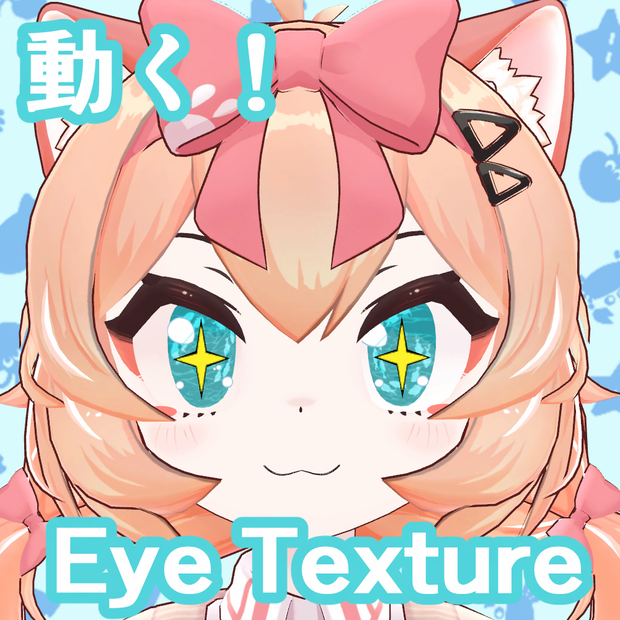
お魚が動くアイテクスチャです。基本無料です。
通常版を購入して頂けると連番画像が付属します。
2枚目の画像をクリックすると動きが確認できます。
GIFアイテクスチャを作ってみたかったので、試しに作ってみました。
(対応アバター)
サクラマルチバース様 山月マウ YAMATSUKI MAU
https://booth.pm/ja/items/8661057
FLASTORE様 Maon まおん
https://booth.pm/ja/items/7800632
段ボールでできた店様 イーシャン Yixiang
https://booth.pm/ja/items/7648079
EXTENSION CLOTHING様 ルミナ - LUMINA
https://booth.pm/ja/items/7502898
利用規約(Team of use)
以下のページに記載されております。
ご確認よろしくお願いします。
https://hiahiapark.booth.pm/items/7519807
Please check the terms of use at the following URL.
https://hiahiapark.booth.pm/items/7519807
请在以下网址查看使用条款。
https://hiahiapark.booth.pm/items/7519807
内容物(Product)
(無料版/Free version)
Free_SeaEye_hiahiapark
・readme.txt
・Eye texture.gif(2000×2000pixel)
(支援版/Paid Version)
SeaEye_hiahiapark
・readme.txt
・Eye texture.gif(2000×2000pixel)
・連番画像(Sequential images)png
導入方法(How to install textures)
・liltoonのメインカラー2ndに適用→GIFを変換
・(推奨)FPSを下げる!そのままだと高速です。
・(推奨)テクスチャのMax Sizeを4096に設定
GIFアイテクスチャの導入方法について、こちらの解説記事が分かりやすいです。ぜひ参考にしてみてください!
https://note.com/leraxarel/n/n7b0c241f8767
・Apply liltoon's main color 2nd → Convert to GIF
・(Recommended) Lower the FPS! It's fast as is.
・(Recommended) Set the texture's Max Size to 4096
This article explains how to use GIF eye textures in a simple way. Please take a look!
https://note.com/leraxarel/n/n7b0c241f8767
lilToon
https://lilxyzw.github.io/lilToon/
更新履歴
2026/01/14 公開
2026/01/29 Maonちゃん対応追加
2026/08/09 山月マウちゃん対応追加
모든 리뷰
더보기리뷰 등록
리뷰를 작성하려면 로그인이 필요합니다.
로그인하고 리뷰 쓰기