'%3e%3cg%20clip-path='url(%23roundHexB)'%3e%3cpath%20fill='%236D5DFC'%20d='M256%2040%20443%20148%20443%20364%20256%20472%2069%20364%2069%20148Z'/%3e%3cpath%20fill='%239C93FB'%20d='M69%20148%20256%2040%20443%20148%20256%20256Z'/%3e%3cpath%20fill='%234A3FD1'%20d='M256%20256%20443%20148%20443%20364%20256%20472Z'/%3e%3c/g%3e%3c!--%20top%20face:%20filled%20round%20magnifier%20--%3e%3cg%20transform='matrix(0.8660254,-0.5,0.8660254,0.5,69,148)'%3e%3cg%20transform='matrix(0.935,0,0,0.935,7.02,7.02)'%3e%3ccircle%20cx='88'%20cy='88'%20r='52'%20fill='%23FFFFFF'/%3e%3ccircle%20cx='88'%20cy='88'%20r='28'%20fill='%239C93FB'/%3e%3cpath%20d='M124%20124%20164%20164'%20stroke='%23FFFFFF'%20stroke-width='26'%20stroke-linecap='round'/%3e%3c/g%3e%3c/g%3e%3cg%20transform='matrix(0.8660254,0.5,0,1,69,148)'%3e%3cpath%20d='M96.1,61.08%20L45.9,128.92%20Q34,145%2054,145%20L162,145%20Q182,145%20170.1,128.92%20L119.9,61.08%20Q108,45%2096.1,61.08%20Z'%20fill='%23FFFFFF'/%3e%3c/g%3e%3c!--%20right%20face:%20filled%20bubble%20--%3e%3cg%20transform='matrix(0.8660254,-0.5,0,1,256,256)'%3e%3cg%20transform='matrix(0.855,0,0,0.855,15.66,15.66)'%3e%3cpath%20d='M60%2042H156a28%2028%200%200%201%2028%2028V158Q184%20168%20174.47%20164.96L124.53%20149.04Q115%20146%20105%20146H60a28%2028%200%200%201-28-28V70a28%2028%200%200%201%2028-28Z'%20fill='%23FFFFFF'/%3e%3c/g%3e%3c/g%3e%3c/g%3e%3c/svg%3e)
 Eric VFX Studio
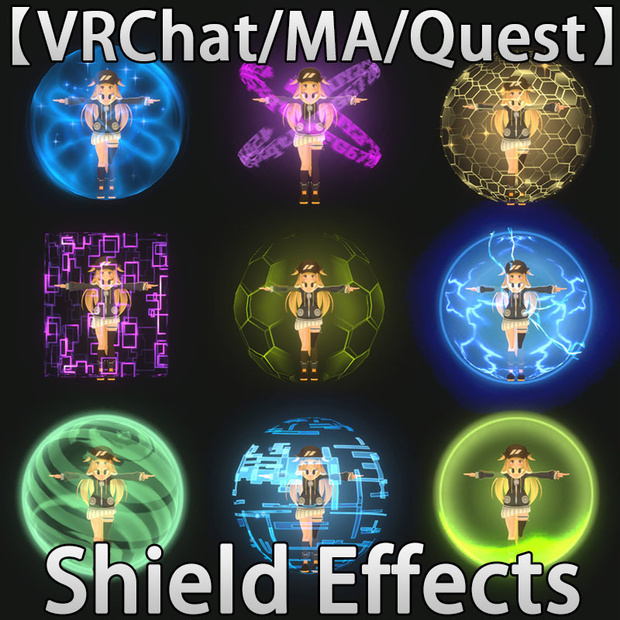
 【VRChat/MA support/Quest】Shield Effects / シールドエフェクト
상품 설명
■ コンテンツ
- シールドエフェクト
10種類の保護サラウンドエフェクトを収録。
モジュラーアバターに対応。キャラクターのアバターの直下に配置するだけでOK!
インストールはとても簡単です。
1. このUnityツールキットをインポートします。
2. 「Eric_VFXStudio/VRChatVFX_Shield Effects/Prefab」ディレクトリにある「VFX_Shield Effects」ファイルを、キャラクターのアバターの直下に配置します。
3. アップロード前に「Auto-Fix」オプションが表示された場合は、選択してください。表示されない場合は、直接アップロードできます。
✅ 「コントロール」メニューの「VFX_Shield Effects」を選択することで、このエフェクトのオン/オフを切り替えることができます。
PCおよびQuestに対応しています
■システム要件
Unity バージョン: 2022.3.22f1
VRChat Creator Companion バージョン: 2.4.4
ModularAvatar
https://modular-avatar.nadena.dev/en/
■利用規約
複製および再販は禁止されています。
---------------------------------------------------------
■ Content
- Shield Effects
Includes 10 different protective surround effects.
Compatible with modular avatars. Simply place it directly below your character's avatar!
Installation is very simple.
1. Import this Unity toolkit.
2. Place the "VFX_Shield Effects" file from the "Eric_VFXStudio/VRChatVFX_Shield Effects/Prefab" directory directly below your character's avatar.
3. If an "Auto-Fix" option appears before uploading, please select it. If not, you can upload directly.
✅ You can turn this effect on/off by selecting "VFX_Shield Effects" in the "Controls" menu.
Compatible with PC and Quest
■System Requirements
Unity Version: 2022.3.22f1
VRChat Creator Companion Version: 2.4.4
ModularAvatar
https://modular-avatar.nadena.dev/en/
■Terms of Use
Reproduction and resale are prohibited.
After downloading, please unzip the file first, and then import the Package file into Your VRChat Unity project.
모든 리뷰
더보기리뷰 등록
리뷰를 작성하려면 로그인이 필요합니다.
로그인하고 리뷰 쓰기