'%3e%3cg%20clip-path='url(%23roundHexB)'%3e%3cpath%20fill='%236D5DFC'%20d='M256%2040%20443%20148%20443%20364%20256%20472%2069%20364%2069%20148Z'/%3e%3cpath%20fill='%239C93FB'%20d='M69%20148%20256%2040%20443%20148%20256%20256Z'/%3e%3cpath%20fill='%234A3FD1'%20d='M256%20256%20443%20148%20443%20364%20256%20472Z'/%3e%3c/g%3e%3c!--%20top%20face:%20filled%20round%20magnifier%20--%3e%3cg%20transform='matrix(0.8660254,-0.5,0.8660254,0.5,69,148)'%3e%3cg%20transform='matrix(0.935,0,0,0.935,7.02,7.02)'%3e%3ccircle%20cx='88'%20cy='88'%20r='52'%20fill='%23FFFFFF'/%3e%3ccircle%20cx='88'%20cy='88'%20r='28'%20fill='%239C93FB'/%3e%3cpath%20d='M124%20124%20164%20164'%20stroke='%23FFFFFF'%20stroke-width='26'%20stroke-linecap='round'/%3e%3c/g%3e%3c/g%3e%3cg%20transform='matrix(0.8660254,0.5,0,1,69,148)'%3e%3cpath%20d='M96.1,61.08%20L45.9,128.92%20Q34,145%2054,145%20L162,145%20Q182,145%20170.1,128.92%20L119.9,61.08%20Q108,45%2096.1,61.08%20Z'%20fill='%23FFFFFF'/%3e%3c/g%3e%3c!--%20right%20face:%20filled%20bubble%20--%3e%3cg%20transform='matrix(0.8660254,-0.5,0,1,256,256)'%3e%3cg%20transform='matrix(0.855,0,0,0.855,15.66,15.66)'%3e%3cpath%20d='M60%2042H156a28%2028%200%200%201%2028%2028V158Q184%20168%20174.47%20164.96L124.53%20149.04Q115%20146%20105%20146H60a28%2028%200%200%201-28-28V70a28%2028%200%200%201%2028-28Z'%20fill='%23FFFFFF'/%3e%3c/g%3e%3c/g%3e%3c/g%3e%3c/svg%3e)
 lykosavatars
상품 설명
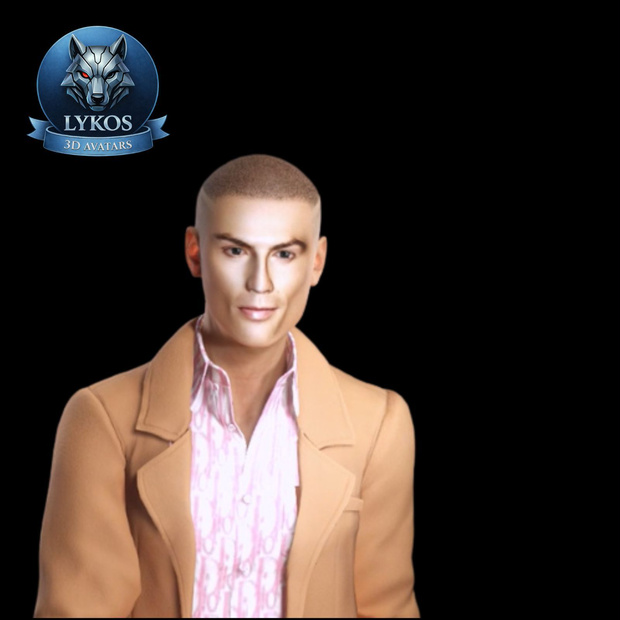
🧍♂️ Daniel Carter – Realistic 3D Human Avatar
This package includes a high-quality realistic 3D human avatar, built with a professional production pipeline and optimized for Unity and other real-time engines.
⸻
📦 Package Contents
• 🦴 Fully rigged humanoid FBX (clean and organized skeleton)
• 🎨 High-resolution PBR textures (up to 4096×4096)
• 🧩 Clean topology optimized for animation and real-time performance
• 📐 Accurate human proportions for natural movement and visual realism
⸻
🎯 Recommended Use Cases
• 🎮 Games (indie and AAA)
• 🥽 VR / 🌐 Metaverse experiences
• 🎬 Cinematics & real-time cinematography
• 🏗️ Visualization and interactive projects
⸻
💻 Software Compatibility
• 🧠 Unity (Humanoid rig compatible)
• 🚀 Unreal Engine & other engines supporting FBX
⸻
ℹ️ Notes
• ❌ Animations are not included
• 📦 Unity package is not included
• ⚙️ Materials may require minor setup depending on the target engine or render pipeline
⚠️ Important
This product is delivered exclusively in FBX format, ensuring broad compatibility and freedom of use across different engines and workflows.
To keep the package lightweight, organized, and highly flexible:
• The Unity package is not included, allowing you to use your own project structure
• Textures are included, giving you full freedom for visual adjustments
• Materials can be set up directly in Unity according to your desired style
• You can use the shader of your choice (lilToon, Poiyomi, or Unity Standard), installed separately
This format was designed to provide greater creative control, customization, and compatibility, making it easy to adapt the avatar to different types of projects.
🎨 How to Apply Textures in Unity (5-Minute Setup)
1. Import the files
• Drag the FBX file and the textures folder into Assets in Unity.
2. Create a Material
• Right-click in Assets → Create > Material.
3. Select the Shader
• Click the material.
• In the Inspector, choose:
• lilToon (if installed)
• Poiyomi (if installed)
• or Standard (Unity default)
4. Add the Texture
• Drag the main texture into Main Texture / Base Map / Albedo.
5. Apply to the Avatar
• Drag the material onto the avatar model in the scene
(or into the Material slot of the Skinned Mesh Renderer).
✅ Done.
The avatar will appear fully textured and ready to use — setup takes about 5 minutes.
💡 Note: lilToon and Poiyomi follow the same workflow — select the shader, drop in the texture, and apply the material.
모든 리뷰
더보기리뷰 등록
리뷰를 작성하려면 로그인이 필요합니다.
로그인하고 리뷰 쓰기