'%3e%3cg%20clip-path='url(%23roundHexB)'%3e%3cpath%20fill='%236D5DFC'%20d='M256%2040%20443%20148%20443%20364%20256%20472%2069%20364%2069%20148Z'/%3e%3cpath%20fill='%239C93FB'%20d='M69%20148%20256%2040%20443%20148%20256%20256Z'/%3e%3cpath%20fill='%234A3FD1'%20d='M256%20256%20443%20148%20443%20364%20256%20472Z'/%3e%3c/g%3e%3c!--%20top%20face:%20filled%20round%20magnifier%20--%3e%3cg%20transform='matrix(0.8660254,-0.5,0.8660254,0.5,69,148)'%3e%3cg%20transform='matrix(0.935,0,0,0.935,7.02,7.02)'%3e%3ccircle%20cx='88'%20cy='88'%20r='52'%20fill='%23FFFFFF'/%3e%3ccircle%20cx='88'%20cy='88'%20r='28'%20fill='%239C93FB'/%3e%3cpath%20d='M124%20124%20164%20164'%20stroke='%23FFFFFF'%20stroke-width='26'%20stroke-linecap='round'/%3e%3c/g%3e%3c/g%3e%3cg%20transform='matrix(0.8660254,0.5,0,1,69,148)'%3e%3cpath%20d='M96.1,61.08%20L45.9,128.92%20Q34,145%2054,145%20L162,145%20Q182,145%20170.1,128.92%20L119.9,61.08%20Q108,45%2096.1,61.08%20Z'%20fill='%23FFFFFF'/%3e%3c/g%3e%3c!--%20right%20face:%20filled%20bubble%20--%3e%3cg%20transform='matrix(0.8660254,-0.5,0,1,256,256)'%3e%3cg%20transform='matrix(0.855,0,0,0.855,15.66,15.66)'%3e%3cpath%20d='M60%2042H156a28%2028%200%200%201%2028%2028V158Q184%20168%20174.47%20164.96L124.53%20149.04Q115%20146%20105%20146H60a28%2028%200%200%201-28-28V70a28%2028%200%200%201%2028-28Z'%20fill='%23FFFFFF'/%3e%3c/g%3e%3c/g%3e%3c/g%3e%3c/svg%3e)
 strongestpower's 100 Yen Shop
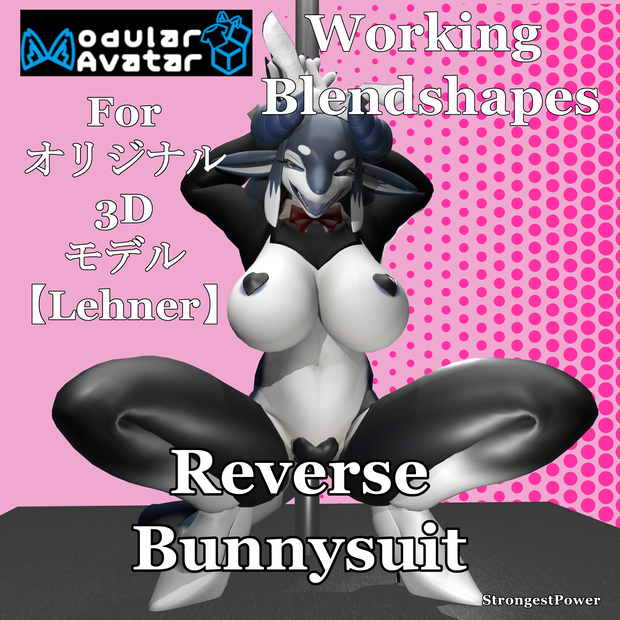
 Lehner Reverse Bunny Outfit - ModularAvatar
상품 설명
This is an outfit for Original 3D model [Lehner]
THIS IS NOT THE BASE MODEL
THIS IS JUST THE DRESS
---------------------------------------------------------------
Producer:https://x.com/eipontarOwO
https://booth.pm/en/items/6639794
---------------------------------------------------------------
Total Outfit Model Stats
Vertices 13,889
Edges 27,667
Faces 13,790
Triangles 27,206
10 Bones Addes
Ears
Vertices 352
Edges 706
Faces 356
Triangles 700
Tail Band
Vertices 154
Edges 344
Faces 192
Triangles 304
High Heels
Vertices 1,206
Edges 2,380
Faces 1,176
Triangles 2,352
Leggings
Vertices 4,398
Edges 8,842
Faces 4,446
Triangles 8,710
Top
Vertices 3,249
Edges 6,415
Faces 3,168
Triangles 6,334
Body Piece
Vertices 3,394
Edges 6,720
Faces 3,324
Triangles 6,618
Covers
Vertices 1,138
Edges 2,260
Faces 1,128
Triangles 2,188
---------------------------------------------------------------
Requirements
lilitoon(not required but is the default)
https://booth.pm/ja/items/3087170
Modular Avatar
A free tool to modify avatars. You can set this up with VRChat Creator Companion
https://modular-avatar.nadena.dev/ja
【無料】BlendShare - シェイプキー配布, blendshapes extraction & distribution
A free tool to copy blendshapes
https://booth.pm/ja/items/5901276
FloorAdjuster
A free tool to change the floor point for avatars
https://booth.pm/ja/items/5756378
It also a link for VCC
----------------------------- How to ------------------------
1. Create new project with VCC with Modity Avatars add-on
2. Open the project and add the unitypackages lilToon, Base Model package, BlendShare, FloorAdjuster and Reverse Bunny_ver1_0.unitypackage
3. Go to the prefab folder and pick one.
3a. Setting up the heels needs FloorAdjester and BlendShare to work
3b. Create the FloorAdjester by Right clicking the Prefab's Hierarchy
3c. Move the Lehner's Prefab so the heels to touch the floor. I move the Y-axies to 0.2.
3d. Move the FloorAdjuster Y-axies to the bottom of the heels. I use -0.195
4a. Click the Body in the Hierarchy.
4b. Click the reverse bunnysuit32.asset's right arrow and drag the body mesh into the box next
Mesh under the Inspector
5. Drag the prefab into the Lehner Hierarchy root.
You are free to edit and change the textures and shaders.
6. Upload the VRChat Avatar.
----------------------------Contents -------------------------
Reverse Bunny_ver1_0.unitypackage
reverse bunnysuit Final.fbx
All the outfit Textures
Blender files ver 4.4 - reverse bunnysuit Final.blend
PSD file - Leggings.psd, Shoes and Acc.psd, Top.psd
SPP File - R Bunny.spp
Terms of Use
Please follow the same terms of the creator of the base model.
Prohibitions
Do not make the model containing this product available for download or use by a third party
Do not upload in a state where others can copy it, installation of avatar pedestal
Redistribute or sell any modification or unmodified
Self-made remarks.
Do not use for the purpose of slander against others
Do not use for political and religious activities
Or other acts that are offensive to public order and morals.
You can change the dress model or textures.
You can rig the dress model to another model.
Please message me if you have any problems.
-----------------------------------------------------------------------------------
これはオリジナル3Dモデル[Lehner]用の衣装です
これはベースモデルではありません
これはドレスのみです
---------------------------------------------------------------
プロデューサー:https://x.com/eipontarOwO
https://booth.pm/en/items/6639794
-----------------------------------------------------------------------------------
衣装全体のモデル統計
頂点数 13,889
辺数 27,667
面数 13,790
三角形数 27,206
追加ボーン数 10
耳
頂点数 352
辺数 706
面数 356
三角形数 700
テールバンド
頂点数 154
辺数 344
面数 192
三角形数 304
ハイヒール
頂点数 1,206
辺数 2,380
面数 1,176
三角形数 2,352
レギンス
頂点数 4,398
辺数 8,842
面数 4,446
三角形数 8,710
トップ
頂点数 3,249
辺数 6,415
面数 3,168
三角形数 6,334
ボディパーツ
頂点数 3,394
辺数 6,720
面数 3,324
三角形数 6,618
カバー
頂点数 1,138
辺数 2,260
面数 1,128
三角形数 2,188
-----------------------------------------------------------------------------
必要条件
lilitoon(必須ではありませんがデフォルトです)
https://booth.pm/ja/items/3087170
モジュラーアバター
アバターを編集する無料ツール。VRChat Creator Companionで設定可能
https://modular-avatar.nadena.dev/ja
【無料】BlendShare - シェイプキー配布, blendshapes extraction & distribution
ブレンドシェイプをコピーする無料ツール
https://booth.pm/ja/items/5901276
FloorAdjuster
アバターのフロアポイントを変更する無料ツール
https://booth.pm/ja/items/5756378
VCC用リンクもこちら
----------------------------- 手順 ------------------------
1. Modity Avatars アドオン付きの VCC で新規プロジェクトを作成
2. プロジェクトを開き、Unityパッケージ lilToon、Base Model package、BlendShare、FloorAdjuster、Reverse Bunny_ver1_0.unitypackage を追加
3. プレファブフォルダに移動し、いずれかを選択
3a. かかとの設定には FloorAdjester と BlendShare の動作が必要
3b. 3c. プレハブの階層を右クリックし、FloorAdjesterを作成
3c. Lehnerプレハブを移動し、かかとが床に触れるように調整。Y軸を0.2に移動
3d. FloorAdjusterのY軸を、かかとの底部に移動。-0.195を使用
4a. 階層内のBodyをクリック
4b. reverse bunnysuit32.assetの右矢印をクリックし、ボディメッシュをインスペクター下の
「メッシュ」ボックスにドラッグ
5. プレハブをLehner階層のルートにドラッグ
テクスチャやシェーダーは自由に編集・変更可能です
6. VRChatアバターをアップロード
----------------------------内容 -------------------------
Reverse Bunny_ver1_0.unitypackage
reverse bunnysuit Final.fbx
全衣装テクスチャ
Blenderファイル ver 4.4 - reverse bunnysuit Final.blend
PSDファイル - Leggings.psd, Shoes and Acc.psd, Top.psd
SPPファイル - R Bunny.spp
利用規約
ベースモデルの制作者と同じ利用規約に従ってください。
禁止事項
本製品を含むモデルを第三者がダウンロードまたは使用可能な状態にしないこと
他者が複製可能な状態でのアップロード、アバター台座への設置を行わないこと
改変版・未改変版を再配布または販売しないこと
自作の注釈を追加しないこと
他者への中傷目的で使用しないこと
政治的・宗教的活動に使用しないこと
その他公序良俗に反する行為を行わないこと
ドレスモデルやテクスチャの変更は可能です。
ドレスモデルを別のモデルにリグすることは可能です。
問題が生じた場合はご連絡ください。
모든 리뷰
더보기리뷰 등록
리뷰를 작성하려면 로그인이 필요합니다.
로그인하고 리뷰 쓰기