'%3e%3cg%20clip-path='url(%23roundHexB)'%3e%3cpath%20fill='%236D5DFC'%20d='M256%2040%20443%20148%20443%20364%20256%20472%2069%20364%2069%20148Z'/%3e%3cpath%20fill='%239C93FB'%20d='M69%20148%20256%2040%20443%20148%20256%20256Z'/%3e%3cpath%20fill='%234A3FD1'%20d='M256%20256%20443%20148%20443%20364%20256%20472Z'/%3e%3c/g%3e%3c!--%20top%20face:%20filled%20round%20magnifier%20--%3e%3cg%20transform='matrix(0.8660254,-0.5,0.8660254,0.5,69,148)'%3e%3cg%20transform='matrix(0.935,0,0,0.935,7.02,7.02)'%3e%3ccircle%20cx='88'%20cy='88'%20r='52'%20fill='%23FFFFFF'/%3e%3ccircle%20cx='88'%20cy='88'%20r='28'%20fill='%239C93FB'/%3e%3cpath%20d='M124%20124%20164%20164'%20stroke='%23FFFFFF'%20stroke-width='26'%20stroke-linecap='round'/%3e%3c/g%3e%3c/g%3e%3cg%20transform='matrix(0.8660254,0.5,0,1,69,148)'%3e%3cpath%20d='M96.1,61.08%20L45.9,128.92%20Q34,145%2054,145%20L162,145%20Q182,145%20170.1,128.92%20L119.9,61.08%20Q108,45%2096.1,61.08%20Z'%20fill='%23FFFFFF'/%3e%3c/g%3e%3c!--%20right%20face:%20filled%20bubble%20--%3e%3cg%20transform='matrix(0.8660254,-0.5,0,1,256,256)'%3e%3cg%20transform='matrix(0.855,0,0,0.855,15.66,15.66)'%3e%3cpath%20d='M60%2042H156a28%2028%200%200%201%2028%2028V158Q184%20168%20174.47%20164.96L124.53%20149.04Q115%20146%20105%20146H60a28%2028%200%200%201-28-28V70a28%2028%200%200%201%2028-28Z'%20fill='%23FFFFFF'/%3e%3c/g%3e%3c/g%3e%3c/g%3e%3c/svg%3e)
 𝐒𝐞𝐥𝐞𝐜𝐭 ❥∔ShapeshifterClinic∔
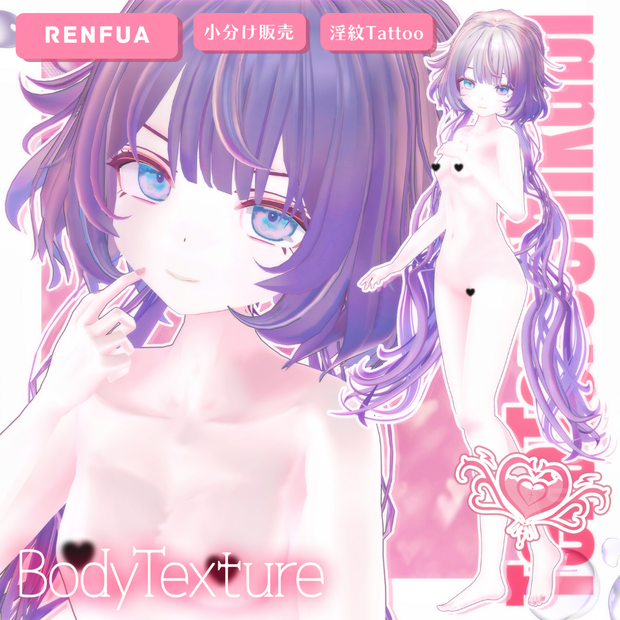
 💗【レンフア-Renfua】AFK付き❥てろてろ乳首*淫紋タトゥーテクスチャ
상품 설명
✦【 𝐌𝐞𝐧𝐮 】✦
┊ Info(JP|KR|EN)
┊ 導入・内容・規約
✦【 𝐍𝐨𝐭𝐢𝐜𝐞 】✦
┊ こちらは メインショップ「BodyTextureフルパッケージ( R18 )」から、
┊ 単体販売専用ページ となります。
┊ フルパッケージをご希望の方、完全表示版は以下のページをご覧下さい。
┊ https://shapeshiftercl.booth.pm/items/4693458
🖤 FREE無料配布 🖤
✦【 100 Items ↑ 】✦
𝙼𝚊𝚒𝚗
https://shapeshiftercl.booth.pm/item_lists/8aYTb1y8
𝚂𝚎𝚕𝚎𝚌𝚝
https://select-ssc.booth.pm/item_lists/rooT4AyD
🖤 𝐎𝐰𝐧𝐞𝐫'𝐬 𝐂𝐡𝐨𝐢𝐜𝐞 🖤
FaceAnimationと組み合わせるとよりオリジナリティーが高まります✧
https://select-ssc.booth.pm/items/7635136
【FREE】悪&光堕ち∔3TouchMysticTattoo↝《MAギミック対応》
https://shapeshiftercl.booth.pm/items/6660949
【FREE/商用OK】撮影向けPoseAnimation ❮ ⁺Max1000 ❯
第1弾 https://shapeshiftercl.booth.pm/items/6485829
第2弾 https://shapeshiftercl.booth.pm/items/8064843
第3弾 男性向けポーズ500種 現在制作中→今年販売予定
【FREE/商用CC0】手描き⁺500-Liltoon MatCap
第1弾 https://shapeshiftercl.booth.pm/items/7100790
第2弾 https://shapeshiftercl.booth.pm/items/7614401
オリジナル3Dモデル「レンファ」
https://booth.pm/ja/items/7544937
こちらのデータはレンフア-Renfuaで使えるボディーテクスチャです。
🖤 JP 🖤
▌AFK_Sexy
~説明~
アバターAFK(放置)時に動作するアニメーションとして使えるアセットです。
セクシーの一種類を用意しています。パーティクルは任意で使用可能です。
AFK_SexyParticle_HeadHeartの子要素として、湯気のようなパーティクル「Smoke」が含まれています。
初期状態では非アクティブになっており、Inspector でチェックを入れることで有効化できます。
演出を強めたい場合や雰囲気を調整したいときにご活用ください。
~導入方法~
1. 導入後、[∔Shapeshifter Clinic∔] フォルダが Project 内に作成されます。
2. お持ちのアバターのInspector > VRC Avatar Descriptor > Playable Layers > ActionにあるAction Layerスロットをクリックし、Project Window内に表示されたAction Layerを複製して任意の場所へ移動してください。
※ Action Layer がデフォルトで存在しない場合は、VRChat SDKのフォルダ内にある、VRChat SDK - Avatars > Samples > AV3 Demo Assets > Animation > Controllers >VRC_AvatarV3ActionLayer で代用してください。
3. 複製したAction Layerを、アバターのAction Layerスロットにドラッグ&ドロップして設定してください。
4. 複製したAction LayerをAnimator Windowに開き、AFK用ステートのInspector > Motionに、本商品同梱のアニメーションクリップをドラッグ&ドロップしてください。
アバターによって Action Layer の構成は異なるため、AFK用ステートの位置は各自で探す必要があります。
一般的には左下に配置されていることが多いです。
5. パーティクルを使用する場合は、パーティクルのprefabをアバター直下にドラッグ&ドロップしてください。
~内容物~
・AFK_Sexy.anim
・AFK_SexyParticle_HeadHeart.prefab
・Material / Texture
▌ 導入方法-Texture
1. PSD編集ソフトで、適用したいアバターのFaceまたはBodyの最上層、もしくはSkin(肌)の上に購入したPSD内の【Original】フォルダをコピー&ペーストしてください。
※ 色を変更したくない部分がある場合は、【Original】フォルダの上に移動させてください。
2. "乳首(Chikubi)"を非表示にしたい場合は、PSD編集ソフトでそのレイヤーを非表示にしてください。
3. 【2Way大理石Nail】Nailテクスチャが新たに追加されました。
※ Nail TOPを非表示にするとワンカラーになります。
~ Unity上の設定~
任意の場所にテクスチャーを配置し、Inspectorで以下の設定を行ってください
1.Max Size: 2048 → 8192
2.Compression: Normal Quality → High Quality
3.Apply
マテリアル設定で輪郭をオフにすると、より自然な仕上がりになります。
乳首&乳シェイプキーを使用して、テクスチャーが自然に見えるよう調整してください。
※より良い質感を得るには、本ページ内の画像をご参照ください。
~ “Question”~
身体と首の繋ぎ目の色が合わないと感じたら...
1.メインカラー以外のチェックを全て外す
2.影設定をFACE&BODY同じ色になるようコピー&ペースとして揃えると解消される場合がございます。
~内容物~
💝𝐅𝐮𝐥𝐥𝐀𝐯𝐚𝐭𝐚𝐫💝
3種類のテクスチャーが同梱されております。
▌利用規約
改変可・二次配布・転売禁止
本データの使用により生じたいかなるトラブル、損失、損害に対しても製作者は一切の責任を負いません。
ご質問やバグ報告は、“∔Shapeshifter Clinic∔”トップページのメッセージ機能からお問い合わせください。
🖤 KR 🖤
▌AFK_Sexy
~説明~
アバターAFK(放置)時に動作するアニメーションとして使えるアセットです。
セクシーの一種類を用意しています。パーティクルは任意で使用可能です。
AFK_SexyParticle_HeadHeartの子要素として、湯気のようなパーティクル「Smoke」が含まれています。
初期状態では非アクティブになっており、Inspector でチェックを入れることで有効化できます。
演出を強めたい場合や雰囲気を調整したいときにご活用ください。
~導入方法~
1. 導入後、[∔Shapeshifter Clinic∔] フォルダが Project 内に作成されます。
2. お持ちのアバターのInspector > VRC Avatar Descriptor > Playable Layers > ActionにあるAction Layerスロットをクリックし、Project Window内に表示されたAction Layerを複製して任意の場所へ移動してください。
※ Action Layer がデフォルトで存在しない場合は、VRChat SDKのフォルダ内にある、VRChat SDK - Avatars > Samples > AV3 Demo Assets > Animation > Controllers >VRC_AvatarV3ActionLayer で代用してください。
3. 複製したAction Layerを、アバターのAction Layerスロットにドラッグ&ドロップして設定してください。
4. 複製したAction LayerをAnimator Windowに開き、AFK用ステートのInspector > Motionに、本商品同梱のアニメーションクリップをドラッグ&ドロップしてください。
アバターによって Action Layer の構成は異なるため、AFK用ステートの位置は各自で探す必要があります。
一般的には左下に配置されていることが多いです。
5. パーティクルを使用する場合は、パーティクルのprefabをアバター直下にドラッグ&ドロップしてください。
~内容物~
・AFK_Sexy.anim
・AFK_SexyParticle_HeadHeart.prefab
・Material / Texture
▌ 導入方法-Texture
1. PSD編集ソフトで、適用したいアバターのFaceまたはBodyの最上層、もしくはSkin(肌)の上に購入したPSD内の【Original】フォルダをコピー&ペーストしてください。
※ 色を変更したくない部分がある場合は、【Original】フォルダの上に移動させてください。
2. "乳首(Chikubi)"を非表示にしたい場合は、PSD編集ソフトでそのレイヤーを非表示にしてください。
3. 【2Way大理石Nail】Nailテクスチャが新たに追加されました。
※ Nail TOPを非表示にするとワンカラーになります。
~ Unity上の設定~
任意の場所にテクスチャーを配置し、Inspectorで以下の設定を行ってください
1.Max Size: 2048 → 8192
2.Compression: Normal Quality → High Quality
3.Apply
マテリアル設定で輪郭をオフにすると、より自然な仕上がりになります。
乳首&乳シェイプキーを使用して、テクスチャーが自然に見えるよう調整してください。
※より良い質感を得るには、本ページ内の画像をご参照ください。
~ “Question”~
身体と首の繋ぎ目の色が合わないと感じたら...
1.メインカラー以外のチェックを全て外す
2.影設定をFACE&BODY同じ色になるようコピー&ペースとして揃えると解消される場合がございます。
~内容物~
💝𝐅𝐮𝐥𝐥𝐀𝐯𝐚𝐭𝐚𝐫💝
3種類のテクスチャーが同梱されております。
▌利用規約
改変可・二次配布・転売禁止
本データの使用により生じたいかなるトラブル、損失、損害に対しても製作者は一切の責任を負いません。
ご質問やバグ報告は、“∔Shapeshifter Clinic∔”トップページのメッセージ機能からお問い合わせください。
🖤 EN 🖤
▌AFK_Sexy
~Description~
This is an animation asset that can be used when your avatar is AFK (away from keyboard/idle).
It includes one “sexy” motion. Particles are optional.
As a child object of AFK_SexyParticle_HeadHeart, a steam-like particle called “Smoke” is included.
By default, it is inactive. You can enable it in the Inspector by checking the box.
Use this when you want to enhance the effect or adjust the overall atmosphere.
~Installation~
1. After importing, a folder named [∔Shapeshifter Clinic∔] will be created in your Project.
2. Go to your avatar’s Inspector > VRC Avatar Descriptor > Playable Layers > Action, click the Action Layer slot, duplicate the Action Layer shown in the Project Window, and move it to a desired location.
※ If the Action Layer is not available by default, you can use the one found in:
VRChat SDK - Avatars > Samples > AV3 Demo Assets > Animation > Controllers > VRC_AvatarV3ActionLayer.
3. Drag & drop the duplicated Action Layer into your avatar’s Action Layer slot.
4. Open the duplicated Action Layer in the Animator Window. In the AFK state, drag & drop the animation clip included with this product into Inspector > Motion.
Note: The structure of the Action Layer may vary depending on the avatar, so you will need to locate the AFK state yourself. Typically, it is found in the bottom-left corner.
5. If you wish to use the particles, drag & drop the particle prefab under the avatar root.
~Contents~
・AFK_Sexy.anim
・AFK_SexyParticle_HeadHeart.prefab
・Material / Texture
▌Texture Installation
1. In your PSD editing software, copy & paste the 【Original】 folder from the purchased PSD onto the top layer of your avatar’s Face or Body, or above the Skin layer.
※ If there are parts you do not want to recolor, move the 【Original】 folder above those areas.
2. If you want to hide the “Nipple (Chikubi)” layer, simply turn off its visibility in your PSD software.
3. A new texture 【2Way Marble Nail】 has been added.
※ If you hide the Nail TOP layer, it will appear as a single-color design.
~Unity Settings~
Place the texture anywhere you like and configure the following in the Inspector:
1. Max Size: 2048 → 8192
2. Compression: Normal Quality → High Quality
3. Apply
For a more natural look, disable the outline in the material settings.
Use the nipple & breast shape keys to adjust the texture so it looks natural.
※ For best quality results, please refer to the sample images on this page.
~“Question”~
If you notice that the color between the body and neck doesn’t match…
1. Uncheck all options except the Main Color.
2. Copy & paste the shadow settings so that FACE & BODY share the same color. This often resolves the issue.
~Contents~
💝𝐅𝐮𝐥𝐥𝐀𝐯𝐚𝐭𝐚𝐫💝
Includes 3 types of textures.
▌Terms of Use
・ Modification allowed
・ Redistribution & reselling prohibited
・ The creator takes no responsibility for any issues, losses, or damages arising from the use of this data.
For inquiries or bug reports, please use the message function on the “∔Shapeshifter Clinic∔” main page.
모든 리뷰
더보기리뷰 등록
리뷰를 작성하려면 로그인이 필요합니다.
로그인하고 리뷰 쓰기