'%3e%3cg%20clip-path='url(%23roundHexB)'%3e%3cpath%20fill='%236D5DFC'%20d='M256%2040%20443%20148%20443%20364%20256%20472%2069%20364%2069%20148Z'/%3e%3cpath%20fill='%239C93FB'%20d='M69%20148%20256%2040%20443%20148%20256%20256Z'/%3e%3cpath%20fill='%234A3FD1'%20d='M256%20256%20443%20148%20443%20364%20256%20472Z'/%3e%3c/g%3e%3c!--%20top%20face:%20filled%20round%20magnifier%20--%3e%3cg%20transform='matrix(0.8660254,-0.5,0.8660254,0.5,69,148)'%3e%3cg%20transform='matrix(0.935,0,0,0.935,7.02,7.02)'%3e%3ccircle%20cx='88'%20cy='88'%20r='52'%20fill='%23FFFFFF'/%3e%3ccircle%20cx='88'%20cy='88'%20r='28'%20fill='%239C93FB'/%3e%3cpath%20d='M124%20124%20164%20164'%20stroke='%23FFFFFF'%20stroke-width='26'%20stroke-linecap='round'/%3e%3c/g%3e%3c/g%3e%3cg%20transform='matrix(0.8660254,0.5,0,1,69,148)'%3e%3cpath%20d='M96.1,61.08%20L45.9,128.92%20Q34,145%2054,145%20L162,145%20Q182,145%20170.1,128.92%20L119.9,61.08%20Q108,45%2096.1,61.08%20Z'%20fill='%23FFFFFF'/%3e%3c/g%3e%3c!--%20right%20face:%20filled%20bubble%20--%3e%3cg%20transform='matrix(0.8660254,-0.5,0,1,256,256)'%3e%3cg%20transform='matrix(0.855,0,0,0.855,15.66,15.66)'%3e%3cpath%20d='M60%2042H156a28%2028%200%200%201%2028%2028V158Q184%20168%20174.47%20164.96L124.53%20149.04Q115%20146%20105%20146H60a28%2028%200%200%201-28-28V70a28%2028%200%200%201%2028-28Z'%20fill='%23FFFFFF'/%3e%3c/g%3e%3c/g%3e%3c/g%3e%3c/svg%3e)
 stones
 カメラ方向連動 BlendShape コントローラー(LateUpdate制御版)「Camera Look Based BlendShape Controller【Unity C# Script】」
상품 설명
🎯 カメラ方向連動 BlendShape コントローラー(LateUpdate制御版)
このスクリプトは、キャラクターの頭部がカメラの方向に自然に追従するように BlendShape を制御する Unity 用ツールです。
特にアニメーションやVTuberモデル、カットシーン制作などで便利です。
✅ 主な特徴
カメラの位置に応じて自動で左右・上下の BlendShape を調整
複数カメラ環境に対応(depthの高いカメラを自動選択)
BlendShape のスムーズな補間
Editor/Runtime どちらでも動作
LateUpdateで安全に適用(Animatorの後に反映)
🧩 設定方法
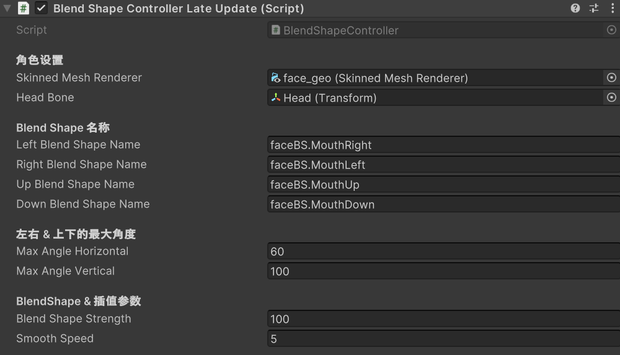
SkinnedMeshRenderer を持つオブジェクトにスクリプトをアタッチ
「HeadBone」に頭のボーンを設定
「BlendShape名(Left/Right/Up/Down)」を入力
再生すると、カメラ方向に応じて自動でBlendShapeが変化
💻 対応環境
Unity 2021.3 以降
Standard / URP / HDRP 対応
📦 同梱内容
BlendShapeControllerLateUpdate.cs
Readme_説明書.txt
License.txt
(オプション)SampleScene.unity
💰 商用利用について
個人・商用利用ともに可能
改変・プロジェクト組み込みOK
再配布は禁止(改変版含む)
クレジット表記任意(例:「BlendShapeController by CannaTech」)
🧠 開発者メモ
本スクリプトはカメラ位置が (0,0,0) の初期フレームバグにも対応しています。
安定した挙動を保証するため、LateUpdateでBlendShapeを反映します。
🇬🇧 English Version
🎯 Camera-Based BlendShape Controller (LateUpdate version)
This Unity C# script automatically adjusts your character’s head BlendShapes
to match the direction of the active camera.
Ideal for VTuber models, cutscenes, and cinematic animation.
✅ Features
Automatically adjusts left/right/up/down BlendShapes based on camera direction
Multi-camera support (selects the camera with highest depth)
Smooth interpolation for natural motion
Works in both Editor and Runtime
Updates in LateUpdate for stable results after Animator
🧩 How to Use
Attach this script to an object with a SkinnedMeshRenderer
Assign the HeadBone (usually the head joint)
Set BlendShape names for Left / Right / Up / Down
Play the scene — the head BlendShapes will follow the camera direction automatically
💻 Compatibility
Unity 2021.3 or later
Compatible with Standard / URP / HDRP
📦 Included Files
BlendShapeControllerLateUpdate.cs
Readme_説明書.txt
License.txt
(Optional) SampleScene.unity
💰 License
Free for personal and commercial use
Modification allowed
Redistribution prohibited
Credit optional: “BlendShapeController by CannaTech”
모든 리뷰
더보기리뷰 등록
리뷰를 작성하려면 로그인이 필요합니다.
로그인하고 리뷰 쓰기