'%3e%3cg%20clip-path='url(%23roundHexB)'%3e%3cpath%20fill='%236D5DFC'%20d='M256%2040%20443%20148%20443%20364%20256%20472%2069%20364%2069%20148Z'/%3e%3cpath%20fill='%239C93FB'%20d='M69%20148%20256%2040%20443%20148%20256%20256Z'/%3e%3cpath%20fill='%234A3FD1'%20d='M256%20256%20443%20148%20443%20364%20256%20472Z'/%3e%3c/g%3e%3c!--%20top%20face:%20filled%20round%20magnifier%20--%3e%3cg%20transform='matrix(0.8660254,-0.5,0.8660254,0.5,69,148)'%3e%3cg%20transform='matrix(0.935,0,0,0.935,7.02,7.02)'%3e%3ccircle%20cx='88'%20cy='88'%20r='52'%20fill='%23FFFFFF'/%3e%3ccircle%20cx='88'%20cy='88'%20r='28'%20fill='%239C93FB'/%3e%3cpath%20d='M124%20124%20164%20164'%20stroke='%23FFFFFF'%20stroke-width='26'%20stroke-linecap='round'/%3e%3c/g%3e%3c/g%3e%3cg%20transform='matrix(0.8660254,0.5,0,1,69,148)'%3e%3cpath%20d='M96.1,61.08%20L45.9,128.92%20Q34,145%2054,145%20L162,145%20Q182,145%20170.1,128.92%20L119.9,61.08%20Q108,45%2096.1,61.08%20Z'%20fill='%23FFFFFF'/%3e%3c/g%3e%3c!--%20right%20face:%20filled%20bubble%20--%3e%3cg%20transform='matrix(0.8660254,-0.5,0,1,256,256)'%3e%3cg%20transform='matrix(0.855,0,0,0.855,15.66,15.66)'%3e%3cpath%20d='M60%2042H156a28%2028%200%200%201%2028%2028V158Q184%20168%20174.47%20164.96L124.53%20149.04Q115%20146%20105%20146H60a28%2028%200%200%201-28-28V70a28%2028%200%200%201%2028-28Z'%20fill='%23FFFFFF'/%3e%3c/g%3e%3c/g%3e%3c/g%3e%3c/svg%3e)
 MetaCreatorsTYO EN
상품 설명
Translation: ◆ amane_harfup ◆
Creator: Gozatouya (Amane Fuyu)
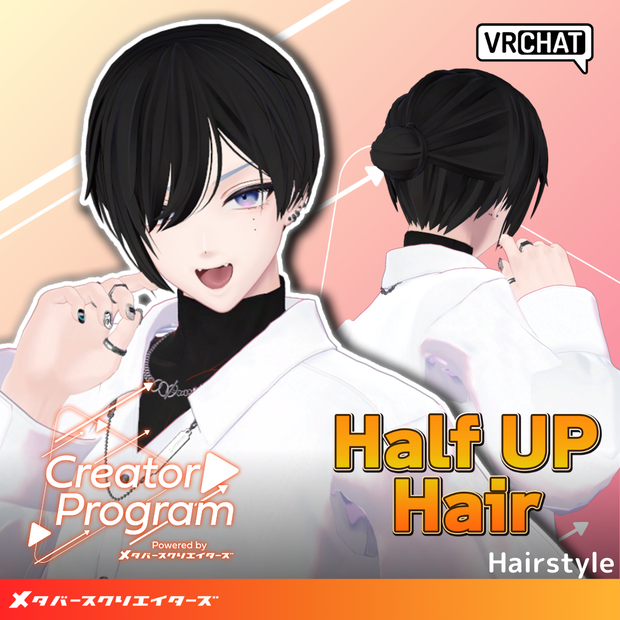
This is a bun half-up hairstyle. It can also be used as a regular short hairstyle.
※This product is a hairstyle model for avatars. Avatar body data is not included. ※Due to the nature of downloadable products, returns and refunds are not available. Please review and agree to the product description and terms of use before purchasing.
◆Item Overview
●Contents
amane_harfup.Unitypackage
FBX
Textures
ReadMe.txt (this document)
Shader Used:
liltoon https://lilxyzw.booth.pm/items/3087170
Required Assets:
Modular Avatar https://modular-avatar.nadena.dev/ja/docs/intro
●Model Data
△Polygon count: Total 9,642 polygons
Hair_base: 5,320 polygons
Hair_halfup: 2,114 polygons
Hair_short: 1,872 polygons
Hair_hyde: 336 polygons
Mesh count: 4 Material count: 11 PB component count: 0
Import folder: Assets > MetaverseCreators_CP > amane > Item_harfup
◆Compatible Avatars
Fully Compatible:
【Original 3D Model】Komano https://booth.pm/ja/items/5260363
For other avatars, this is a "semi-compatible" product that requires adjustments in Unity from the base model. The semi-compatible avatars that have been pre-adjusted in this product are listed below:
Minase VRChat Avatar #Minase3D https://booth.pm/ja/items/4013951
『Hyakko』 - by Niyami https://booth.pm/ja/items/6328134
【Original 3D Model】-HAOLAN- https://booth.pm/ja/items/3818504
Multiple shape keys are included for adjusting overall size and position. Please try wearing it on avatars not listed as compatible.
※When shape keys with the same name are installed across different objects, setting them to the same values will result in clean adjustments.
●Model Structure Overview
Hair_base: Base hairstyle Hair_hyde: Hair around the ears. If using on avatars with ears, this can remain hidden. Hair_halfup: Back hair for bun half-up style Hair_short: Back hair for short hairstyle
●Shape Key Overview
Hair_base
front_long → Lengthen bangs
front_short → Shorten bangs
X_big → Enlarge in X direction
Y_big → Enlarge in Y direction
Z_big → Enlarge in Z direction
Z_small → Shrink in Z direction
Hair_hyde
X_big → Enlarge in X direction
X_move → Move in X direction (enlarge)
X_move2 → Move in X direction (shrink)
Y_move → Move in Y direction
Hair_short
X_big → Enlarge in X direction
Y_big → Enlarge in Y direction
Z_big → Enlarge in Z direction
Hair_halfup
X_big → Enlarge in X direction
Y_big → Enlarge in Y direction
Z_big → Enlarge in Z direction
◆Installation Instructions
Set up the latest version of VRC SDK in VCC
Install required assets (liltoon, Modular Avatar) via VCC
Import the latest package for each avatar body
Import this data package
Drag and drop the avatar (or costume change/modification prefab if available) into the Scene Hierarchy
Hide or set unnecessary avatar parts (hairstyles, attached ears, etc.) to Editor Only as needed
Drag and drop "halfup_[avatar name].Prefab" directly under the avatar
Adjust scale, position, and shape key values to fit the avatar (this step is unnecessary if pre-adjusted prefabs are included)
Upload the avatar via VRC SDK
◆Color Variations
Please use the color variation materials in the Common > Material folder by swapping them out. Additionally, ForGradationMap is created in grayscale. When changing colors using gradient maps, please utilize this texture.
◆Terms of Use
https://drive.google.com/drive/folders/1qRMXoIxM1ZgacBPfwOigQRtXP1vCbNMn?usp=sharing
※Please comply with the terms of use for the original avatar when using this product.
◆Production Environment
Modeling: Blender Ver2.93.18 Textures: firealpaca Setup: Unity Ver2022.3.22f1
VRChat SDK - Avatars Ver3.8.0 (VCC)
liltoon 1.9.0
ModularAvatar 1.12.5
◆Credits
Creator: #Gozatouya (Amane Fuyu) BOOTH (Personal): https://satu.booth.pm/
Support Inquiries: https://discord.gg/bmw3PWE37M
모든 리뷰
더보기리뷰 등록
리뷰를 작성하려면 로그인이 필요합니다.
로그인하고 리뷰 쓰기