'%3e%3cg%20clip-path='url(%23roundHexB)'%3e%3cpath%20fill='%236D5DFC'%20d='M256%2040%20443%20148%20443%20364%20256%20472%2069%20364%2069%20148Z'/%3e%3cpath%20fill='%239C93FB'%20d='M69%20148%20256%2040%20443%20148%20256%20256Z'/%3e%3cpath%20fill='%234A3FD1'%20d='M256%20256%20443%20148%20443%20364%20256%20472Z'/%3e%3c/g%3e%3c!--%20top%20face:%20filled%20round%20magnifier%20--%3e%3cg%20transform='matrix(0.8660254,-0.5,0.8660254,0.5,69,148)'%3e%3cg%20transform='matrix(0.935,0,0,0.935,7.02,7.02)'%3e%3ccircle%20cx='88'%20cy='88'%20r='52'%20fill='%23FFFFFF'/%3e%3ccircle%20cx='88'%20cy='88'%20r='28'%20fill='%239C93FB'/%3e%3cpath%20d='M124%20124%20164%20164'%20stroke='%23FFFFFF'%20stroke-width='26'%20stroke-linecap='round'/%3e%3c/g%3e%3c/g%3e%3cg%20transform='matrix(0.8660254,0.5,0,1,69,148)'%3e%3cpath%20d='M96.1,61.08%20L45.9,128.92%20Q34,145%2054,145%20L162,145%20Q182,145%20170.1,128.92%20L119.9,61.08%20Q108,45%2096.1,61.08%20Z'%20fill='%23FFFFFF'/%3e%3c/g%3e%3c!--%20right%20face:%20filled%20bubble%20--%3e%3cg%20transform='matrix(0.8660254,-0.5,0,1,256,256)'%3e%3cg%20transform='matrix(0.855,0,0,0.855,15.66,15.66)'%3e%3cpath%20d='M60%2042H156a28%2028%200%200%201%2028%2028V158Q184%20168%20174.47%20164.96L124.53%20149.04Q115%20146%20105%20146H60a28%2028%200%200%201-28-28V70a28%2028%200%200%201%2028-28Z'%20fill='%23FFFFFF'/%3e%3c/g%3e%3c/g%3e%3c/g%3e%3c/svg%3e)
 MetaCreatorsTYO EN
 SummerHoloJacket (Foam Spewer Water Gun included!) - VRChat Women's Clothing / CP4
상품 설명
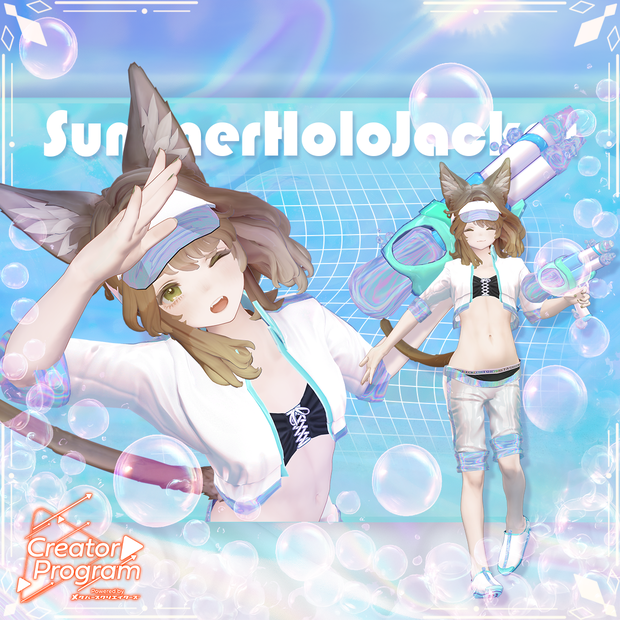
Summer Holographic Jacket Set
This is a summer-like coordinate set that radiates dazzling brilliance with holographic materials. The unisex design makes it suitable for male avatars when the bustier is removed. A sparkling summer like a hologram for you―
You can show or hide the bubble-shooting water gun, jacket, and sun visor. Easy color customization is possible by simply replacing materials.
※The bustier is not included in the package for male avatars.
※This product is a costume model for avatars. Avatar body data is not included. ※Due to the nature of downloadable products, returns and refunds are not possible. Please confirm and agree to the product description and terms of use before purchasing.
◆ Item Overview
Contents:
SummerHoloJacket_〇〇.Unitypackage (◯◯ indicates variation name)
PSD files for modifications
ReadMe.txt (main text)
Shader Used:
liltoon https://lilxyzw.booth.pm/items/3087170
Required Assets:
Modular Avatar https://modular-avatar.nadena.dev/ja/docs/intro
Model Data: △ Polygon count: Total 20,174 polygons ├ BeachShoes: 2,530 polygons ├ Bikini_Top: 4,636 polygons ├ Bikini_Under: 536 polygons ├ BubbleGun: 4,484 polygons ├ Jacket: 4,912 polygons ├ Pants: 2,810 polygons └ Sunvisor: 266 polygons Mesh count: 7 Material count: 8 PB component count: 2 PB collider count: 2
Import Folder: Assets > MetaverseCreators_CP > INOMOTOHANTEN > SummerHoloJacket
◆ Compatible Avatars
[Kuuta] Original 3D Model #Kuuta3D https://booth.pm/ja/items/4897493
[Original 3D Model] Bokuse (PlusHead Body) https://booth.pm/ja/items/5727810
Original 3D Model "Shinano" https://booth.pm/ja/items/6106863
Original 3D Model "Manuka" https://booth.pm/ja/items/5058077
[Original 3D Model] Sio https://booth.pm/ja/items/5650156
Original 3D Model "Miltina" https://booth.pm/ja/items/6538026
Marycia - Original 3D Model #Marycia3D https://booth.pm/ja/items/6305948
Original 3D Model "Minagi" #Minagi3D / AC2 https://metacreatorstyo.booth.pm/items/7430855
★ Breast Shape Key Compatibility Table
(Other body shape keys are not supported)
MA Blendshape Sync set on the costume basically automatically syncs by moving the shape keys on the body side in Unity. Also, for avatars that have a default menu to change breast size in VRChat, the costume side breast size will sync with that menu.
When changing breast size, please adjust the breast PB on the body side as needed. With default settings, the breasts may protrude from the costume.
Marycia:
Breast_Large
Breast_Small
Shinano:
Breasts_big
Breasts_flat
Manuka:
Breast_big
Breast_big_PLUS (only used with Breast_big shape key)
SIO:
Breasts_Big
Breasts_Small
Miltina:
Breasts_Flat
(No bra)Breasts_Small
(No bra)Breasts_Cow
※When putting on the costume, shape keys that hide the body (making it stick-like) are used.
◆ Installation Instructions
Set up the latest VRC SDK in VCC
Install required assets (liltoon, Modular Avatar) in VCC
Import the latest package of each avatar body
Import this data package
Place the avatar (or dress-up/modification prefab if available) by dragging and dropping it into the Scene's Hierarchy
Hide or set unnecessary clothing on the avatar (default clothing, underwear, etc.) to Editor Only as needed
Drag and drop "SummerHoloJacket_For_AvatarName.Prefab" and "BubbleGun_For_AvatarName.Prefab" directly under the avatar
Drag and drop "Sunvisor.Prefab" directly under "SummerHoloJacket_For_AvatarName.Prefab"
Upload the avatar from VRC SDK
※The costume has "MA Shape Changer," a Modular Avatar function, configured. When you drag and drop the costume directly under the avatar, the avatar body's shape keys are automatically turned ON, making the body slimmer, or meshes that change with shape keys disappear, allowing the costume to be worn without interfering with the body.
If you want to use only part of the costume, please delete the unnecessary parts of "MA Shape Changer" set on the costume parent or configure it according to your preference.
※Regarding MAShapeChanger for +Head, the component may not work correctly depending on the avatar due to different mesh names for the body parts (the mesh name in this data is set as PlusHead). In that case, please adjust it manually by changing the body mesh name or manually moving shape keys.
◆ About Color Changing
Please replace with each color variation material in the Common > Material folder. You can also modify to your preferred colors using the included psd files.
◆ Terms of Use
https://drive.google.com/drive/folders/1qRMXoIxM1ZgacBPfwOigQRtXP1vCbNMn?usp=sharing
※Please use this product while adhering to the terms of the original avatar.
◆ Credits
Creator: Inomoto Kazura URL: https://inomotokazura.myportfolio.com/ BOOTH (Personal): https://inomotokazura.booth.pm/
Support Inquiries: https://discord.gg/bmw3PWE37M
★ Acknowledgments
The following matcaps created by these creators were used in production. I would like to express my gratitude here.
Hologram Matcap:
Sakazuki Naigi (https://sakazuki.booth.pm/)
Rubber Matcap and others:
Inani-ya (https://inani.booth.pm/)
◆ Production Environment
Modeling: Blender Ver4.0.2 Texturing: Adobe Substance 3D Painter 9.1 Setup: Unity Ver2022.3.22f1 VRChat SDK - Avatars Ver3.8.1 (VCC) liltoon 1.10.3 ModularAvatar 1.12.5
모든 리뷰
더보기리뷰 등록
리뷰를 작성하려면 로그인이 필요합니다.
로그인하고 리뷰 쓰기