'%3e%3cg%20clip-path='url(%23roundHexB)'%3e%3cpath%20fill='%236D5DFC'%20d='M256%2040%20443%20148%20443%20364%20256%20472%2069%20364%2069%20148Z'/%3e%3cpath%20fill='%239C93FB'%20d='M69%20148%20256%2040%20443%20148%20256%20256Z'/%3e%3cpath%20fill='%234A3FD1'%20d='M256%20256%20443%20148%20443%20364%20256%20472Z'/%3e%3c/g%3e%3c!--%20top%20face:%20filled%20round%20magnifier%20--%3e%3cg%20transform='matrix(0.8660254,-0.5,0.8660254,0.5,69,148)'%3e%3cg%20transform='matrix(0.935,0,0,0.935,7.02,7.02)'%3e%3ccircle%20cx='88'%20cy='88'%20r='52'%20fill='%23FFFFFF'/%3e%3ccircle%20cx='88'%20cy='88'%20r='28'%20fill='%239C93FB'/%3e%3cpath%20d='M124%20124%20164%20164'%20stroke='%23FFFFFF'%20stroke-width='26'%20stroke-linecap='round'/%3e%3c/g%3e%3c/g%3e%3cg%20transform='matrix(0.8660254,0.5,0,1,69,148)'%3e%3cpath%20d='M96.1,61.08%20L45.9,128.92%20Q34,145%2054,145%20L162,145%20Q182,145%20170.1,128.92%20L119.9,61.08%20Q108,45%2096.1,61.08%20Z'%20fill='%23FFFFFF'/%3e%3c/g%3e%3c!--%20right%20face:%20filled%20bubble%20--%3e%3cg%20transform='matrix(0.8660254,-0.5,0,1,256,256)'%3e%3cg%20transform='matrix(0.855,0,0,0.855,15.66,15.66)'%3e%3cpath%20d='M60%2042H156a28%2028%200%200%201%2028%2028V158Q184%20168%20174.47%20164.96L124.53%20149.04Q115%20146%20105%20146H60a28%2028%200%200%201-28-28V70a28%2028%200%200%201%2028-28Z'%20fill='%23FFFFFF'/%3e%3c/g%3e%3c/g%3e%3c/g%3e%3c/svg%3e)
 MetaCreatorsTYO EN
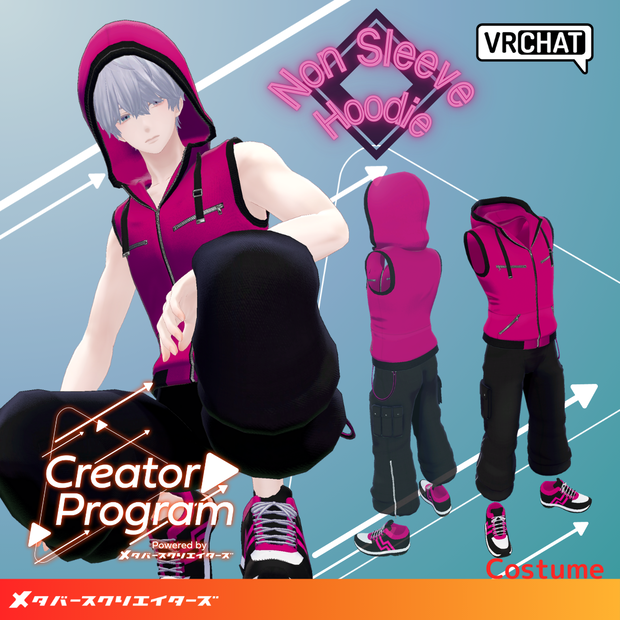
 Sleeveless Hoodie Set - VRChat Men's Clothing / CP5
상품 설명
◆ Sleeveless Hoodie Set ◆
Creator: Ritsushita Awa (Kara no Atelier / 空のあとりえ)
Flavor Text
This is a hooded sleeveless wear. With its shoulder-exposing style, it might pair well with arm tattoos and similar accessories. It comes with a bonus hood gimmick that allows you to grab and put on/take off the hood.
※ This product is a costume model for avatars. Avatar body data is not included. ※ While bones for head size adjustment are configured in the hood, we may not be able to support gimmick operation or clipping issues on non-compatible avatars (for PlusHead avatars, any other than Sumise). ※ Due to the nature of downloadable products, returns and refunds are not possible. Please review and agree to the product description and terms of use before purchasing.
◆ Item Overview
● Contents
Ns_hoodie_[Compatible Avatar Name].Unitypackage
FBX
Textures
PSD files for modification
ReadMe.txt (this document)
Shader Used
liltoon
https://lilxyzw.booth.pm/items/3087170
Required Assets
Modular Avatar
https://modular-avatar.nadena.dev/ja/docs/intro
● Model Data
△ Polygon Count: Total 33,140 polygons
belt_chain: 1,928 polygons
hoodie: 10,000 polygons
pants: 12,336 polygons
shoes: 7,876 polygons
Mesh Count: 4
Material Count: 4
PhysBone Component Count: 5
VRC Constraint Count: 2
Import Folder Path:
Assets > MetaverseCreators_CP > Empty-atelier > Ns_hoodie
◆ Compatible Avatars
Minase VRChat Avatar #Minase3D
https://booth.pm/ja/items/4013951
【Original 3D Model】Komano
https://booth.pm/ja/items/5260363
【Kuuta】Original 3D Model #Kuuta3D
https://booth.pm/ja/items/4897493
Original 3D Model "Corporate Slave Turanari-san" (Tinmeshitei Common Body)
https://booth.pm/ja/items/5498540
【Original 3D Model】Bokusei (PlusHead Body)
https://booth.pm/ja/items/5727810
"Hyakko" - by Niyami
https://booth.pm/ja/items/6328134
※ When dressing the costume, shape keys that hide the base body (making the body appear stick-like) will be used.
◆ Installation Instructions
Set up the latest version of VRC SDK in VCC
Install required assets (liltoon, Modular Avatar) via VCC
Import the latest package for each avatar body
Import this data package
Drag and drop the avatar (or dress-up/modification prefab if available) into the Scene Hierarchy
Hide or set unnecessary clothing (default outfits, underwear, etc.) to Editor Only as needed
Drag and drop "Ns_hoodie_[Compatible Avatar Name].Prefab" and, if needed, "[Compatible Avatar Name]_hair_shape.Prefab" directly under the avatar
Upload the avatar via VRC SDK
※ This costume utilizes Modular Avatar features "MA Shape Changer" and "MA Bone Proxy". When you drag and drop the costume directly under the avatar, shape keys on the avatar's base body will automatically turn ON, making the body slimmer or hiding mesh parts that change with shape keys, allowing the costume to be worn without interference with the base body. If the "MA Shape Changer" configured on the costume mesh is unnecessary, you may delete it or configure it according to your preferences.
※ Regarding MA Shape Changer for +Head: Depending on the avatar, the component may not work correctly due to different mesh names for the body part (this data's mesh name is set for PlusHead). In such cases, please adjust by changing the base body's mesh name or manually moving the shape keys.
※ If part of the base body is unintentionally thinned after dressing is complete, return the corresponding base body shape key to 0 and check the state where the base body is displayed.
◆ Color Changing
Please replace with the color variant materials in the Common > Material folder. You can also modify colors to your liking using the included PSD file or CLIP file. ※ The frontmost layer in the PSD file is a black dummy for data capacity reduction, so please hide it before use.
◆ Terms of Use
https://drive.google.com/drive/folders/1qRMXoIxM1ZgacBPfwOigQRtXP1vCbNMn?usp=sharing
※ Please use in compliance with the terms of the original avatar.
◆ Production Environment
Modeling: Blender Ver3.6.1
Textures: CLIP STUDIO PAINT
Setup: Unity Ver2022.3.22f1
VRChat SDK - Avatars Ver3.8.0 (VCC)
liltoon 1.10.3
ModularAvatar 1.12.4
◆ Credits
Creator: Ritsushita Awa
URL: X @Aw_ritsushitA
BOOTH (Kara no Atelier): https://kara-no-atelier.booth.pm/
Contact/Support:
모든 리뷰
더보기리뷰 등록
리뷰를 작성하려면 로그인이 필요합니다.
로그인하고 리뷰 쓰기