'%3e%3cg%20clip-path='url(%23roundHexB)'%3e%3cpath%20fill='%236D5DFC'%20d='M256%2040%20443%20148%20443%20364%20256%20472%2069%20364%2069%20148Z'/%3e%3cpath%20fill='%239C93FB'%20d='M69%20148%20256%2040%20443%20148%20256%20256Z'/%3e%3cpath%20fill='%234A3FD1'%20d='M256%20256%20443%20148%20443%20364%20256%20472Z'/%3e%3c/g%3e%3c!--%20top%20face:%20filled%20round%20magnifier%20--%3e%3cg%20transform='matrix(0.8660254,-0.5,0.8660254,0.5,69,148)'%3e%3cg%20transform='matrix(0.935,0,0,0.935,7.02,7.02)'%3e%3ccircle%20cx='88'%20cy='88'%20r='52'%20fill='%23FFFFFF'/%3e%3ccircle%20cx='88'%20cy='88'%20r='28'%20fill='%239C93FB'/%3e%3cpath%20d='M124%20124%20164%20164'%20stroke='%23FFFFFF'%20stroke-width='26'%20stroke-linecap='round'/%3e%3c/g%3e%3c/g%3e%3cg%20transform='matrix(0.8660254,0.5,0,1,69,148)'%3e%3cpath%20d='M96.1,61.08%20L45.9,128.92%20Q34,145%2054,145%20L162,145%20Q182,145%20170.1,128.92%20L119.9,61.08%20Q108,45%2096.1,61.08%20Z'%20fill='%23FFFFFF'/%3e%3c/g%3e%3c!--%20right%20face:%20filled%20bubble%20--%3e%3cg%20transform='matrix(0.8660254,-0.5,0,1,256,256)'%3e%3cg%20transform='matrix(0.855,0,0,0.855,15.66,15.66)'%3e%3cpath%20d='M60%2042H156a28%2028%200%200%201%2028%2028V158Q184%20168%20174.47%20164.96L124.53%20149.04Q115%20146%20105%20146H60a28%2028%200%200%201-28-28V70a28%2028%200%200%201%2028-28Z'%20fill='%23FFFFFF'/%3e%3c/g%3e%3c/g%3e%3c/g%3e%3c/svg%3e)
 raming
상품 설명
-Video Guide-
https://www.youtube.com/watch?v=SXpc2_WZBnQ
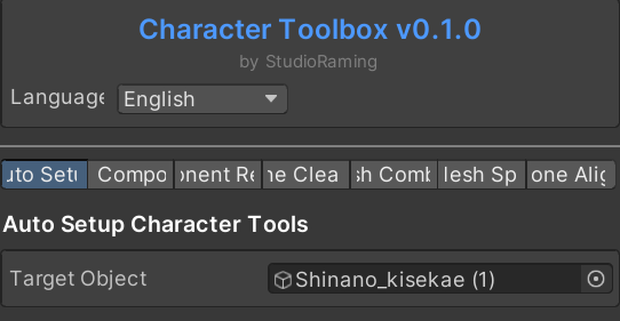
A comprehensive tool that collects features for simple virtual avatar tasks in Unity.
Function
- Automatic conversion of pistesbone (for VRC) springbone (VRM)
- Copy components (automatically copy to name or something)
(Materials/Transforms/Others)
- Component Removal (automatically remove components)
(Script for VRC/Missing Script/Springbone/Magica Closse/Other)
- This organizational function
Remove unused bons or even the bons and meshes associated with the selected mesh
- Mesh combining function (select multiple meshes and combine them)
- Mesh separation (Separate the mesh selected by link from one mesh into another mesh)
- Alignment and name change (easy to respond to non-visual clothes)
(Automatically aligns the name based on humanoid avatars, aligns + moves only one copy)
-Guided Video-
Please refer to the tool's internal guide and demonstration video for use examples!
Compatible Unity versions
21.3.14 ~ 21.3.44f
It does not guarantee compatibility with other versions.
It provides machine translation in three languages.
- How to Install -
After importing the attached Unity package
Once imported properly, the Studio Raming tab appears in the top bar
Click this tab to start the Character Toolbox.
- Terms and Conditions of Use -
Permit commercial activities using the utility.
Do not redistribute files containing the utility (Unity Project, Unity Package)
Prohibiting resale of such utility
Please share this utility removed when sharing projects such as commissions.
Alternatively, other parties to which the file is provided must also have permission to purchase and use this utility.
모든 리뷰
더보기리뷰 등록
리뷰를 작성하려면 로그인이 필요합니다.
로그인하고 리뷰 쓰기