'%3e%3cg%20clip-path='url(%23roundHexB)'%3e%3cpath%20fill='%236D5DFC'%20d='M256%2040%20443%20148%20443%20364%20256%20472%2069%20364%2069%20148Z'/%3e%3cpath%20fill='%239C93FB'%20d='M69%20148%20256%2040%20443%20148%20256%20256Z'/%3e%3cpath%20fill='%234A3FD1'%20d='M256%20256%20443%20148%20443%20364%20256%20472Z'/%3e%3c/g%3e%3c!--%20top%20face:%20filled%20round%20magnifier%20--%3e%3cg%20transform='matrix(0.8660254,-0.5,0.8660254,0.5,69,148)'%3e%3cg%20transform='matrix(0.935,0,0,0.935,7.02,7.02)'%3e%3ccircle%20cx='88'%20cy='88'%20r='52'%20fill='%23FFFFFF'/%3e%3ccircle%20cx='88'%20cy='88'%20r='28'%20fill='%239C93FB'/%3e%3cpath%20d='M124%20124%20164%20164'%20stroke='%23FFFFFF'%20stroke-width='26'%20stroke-linecap='round'/%3e%3c/g%3e%3c/g%3e%3cg%20transform='matrix(0.8660254,0.5,0,1,69,148)'%3e%3cpath%20d='M96.1,61.08%20L45.9,128.92%20Q34,145%2054,145%20L162,145%20Q182,145%20170.1,128.92%20L119.9,61.08%20Q108,45%2096.1,61.08%20Z'%20fill='%23FFFFFF'/%3e%3c/g%3e%3c!--%20right%20face:%20filled%20bubble%20--%3e%3cg%20transform='matrix(0.8660254,-0.5,0,1,256,256)'%3e%3cg%20transform='matrix(0.855,0,0,0.855,15.66,15.66)'%3e%3cpath%20d='M60%2042H156a28%2028%200%200%201%2028%2028V158Q184%20168%20174.47%20164.96L124.53%20149.04Q115%20146%20105%20146H60a28%2028%200%200%201-28-28V70a28%2028%200%200%201%2028-28Z'%20fill='%23FFFFFF'/%3e%3c/g%3e%3c/g%3e%3c/g%3e%3c/svg%3e)
 MetaCreatorsTYO EN
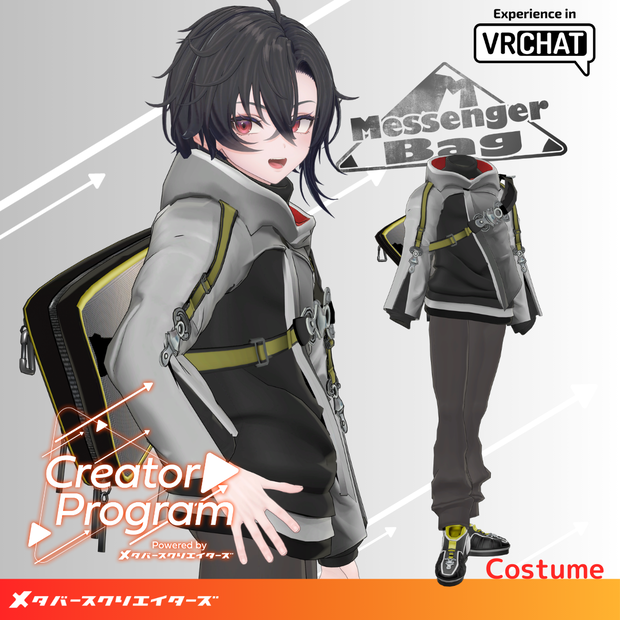
 Simple Messenger Outfit - VRChat Men's Clothing / CP2
상품 설명
◆ Simple Messenger Outfit /M_MessengerBag ◆
Creator: DEMITASS-KUN
Overview
This outfit was created as part of the “Creator Program” project.
A simple messenger bag outfit set designed for casual, everyday wear — perfect for daily use or laid-back styles.
Note:
This product is a clothing model for VRChat avatars.
The avatar body itself is not included.
As this is a digital download, refunds and returns cannot be accepted.
Please read and agree to the product description and Terms of Use before purchasing.
Item Details
Contents
M_MessengerBag_◯◯.Unitypackage (◯◯ indicates variation name)
ReadMe.txt (this document)
PSD data inside M_MessengerBag_PSD.zip (Note: color tones may differ depending on your editing software.)
Shader Used
liltoon
https://lilxyzw.booth.pm/items/3087170
Required Asset
Modular Avatar
https://modular-avatar.nadena.dev/ja/docs/intro
Model Data
Component Polygon Count
M_Parker 8,300
M_TurtleNeck 4,322
M_Pants 8,970
M_MessengerBag_Buckle 2,676
M_MessengerBag 3,760
M_Shoes 8,076
Total 36,104
Meshes: 6
Materials: 6
PB Components: 1
Import Folder:
Assets > MetaverseCreators_CP > demitassstore > M_MessengerBag
Compatible Avatars
Minase (VRChat Avatar) #Minase3D
https://booth.pm/ja/items/4013951
Komano (Original 3D Model)
https://booth.pm/ja/items/5260363
Kuuta (Original 3D Model) #Kuuta3D
https://booth.pm/ja/items/4897493
Tsuranari-san the Corporate Slave (Chin-Hantei Common Body)
https://booth.pm/ja/items/5498540
Bokusei (PlusHead Body)
https://booth.pm/ja/items/5727810
Hyakko by Niyami
https://booth.pm/ja/items/6328134
Original 3D Model “Shizune”
#Shizune3D / AC3
https://metacreators-en.booth.pm/items/7879835
When dressing the avatar, shape keys are used to hide the base body (the body becomes simplified or rod-like).
Installation Guide
Set up the latest VRC SDK in VCC.
In VCC, install the required assets (liltoon, Modular Avatar).
Import the latest version of your avatar package.
Import this outfit package.
Drag and drop your avatar (or its customization prefab) into the Scene Hierarchy.
Hide or set to “Editor Only” any unnecessary parts of the avatar (such as default clothing or underwear).
Drag and drop OutfitName_[AvatarName].Prefab directly under your avatar.
Upload your avatar using VRC SDK.
About MA Shape Changer
This outfit uses the Modular Avatar feature MA Shape Changer.
When the prefab is placed directly under your avatar, the body’s shape keys automatically activate,
slimming or hiding mesh areas as needed to prevent clipping between the outfit and the avatar body.
If you wish to use only part of the outfit, you can delete unneeded MA Shape Changer components from the parent object as desired.
Note for +Head (PlusHead) avatars:
Because body mesh names can differ between avatars (this outfit is set up for “PlusHead”),
the component may not function correctly in some cases.
If this occurs, rename the mesh or manually adjust the shape keys.
Terms of Use
https://drive.google.com/drive/folders/1qRMXoIxM1ZgacBPfwOigQRtXP1vCbNMn?usp=sharing
Please also comply with the terms of use for the base avatar when using this outfit.
Production Environment
Modeling: Blender Ver. 3.6.5
Texturing: CLIP STUDIO PAINT
Setup: Unity Ver. 2022.3.22f1
VRChat SDK - Avatars Ver. 3.7.3 (VCC)
liltoon 1.8.5
Modular Avatar 1.11.1
Credits
Creator: DEMITASS-KUN
Website: https://demitassdemitass.wixsite.com/demitass-kun-portal
BOOTH: https://demitass.booth.pm/
Support / Inquiries:
Discord: https://discord.gg/bmw3PWE37M
모든 리뷰
더보기리뷰 등록
리뷰를 작성하려면 로그인이 필요합니다.
로그인하고 리뷰 쓰기