'%3e%3cg%20clip-path='url(%23roundHexB)'%3e%3cpath%20fill='%236D5DFC'%20d='M256%2040%20443%20148%20443%20364%20256%20472%2069%20364%2069%20148Z'/%3e%3cpath%20fill='%239C93FB'%20d='M69%20148%20256%2040%20443%20148%20256%20256Z'/%3e%3cpath%20fill='%234A3FD1'%20d='M256%20256%20443%20148%20443%20364%20256%20472Z'/%3e%3c/g%3e%3c!--%20top%20face:%20filled%20round%20magnifier%20--%3e%3cg%20transform='matrix(0.8660254,-0.5,0.8660254,0.5,69,148)'%3e%3cg%20transform='matrix(0.935,0,0,0.935,7.02,7.02)'%3e%3ccircle%20cx='88'%20cy='88'%20r='52'%20fill='%23FFFFFF'/%3e%3ccircle%20cx='88'%20cy='88'%20r='28'%20fill='%239C93FB'/%3e%3cpath%20d='M124%20124%20164%20164'%20stroke='%23FFFFFF'%20stroke-width='26'%20stroke-linecap='round'/%3e%3c/g%3e%3c/g%3e%3cg%20transform='matrix(0.8660254,0.5,0,1,69,148)'%3e%3cpath%20d='M96.1,61.08%20L45.9,128.92%20Q34,145%2054,145%20L162,145%20Q182,145%20170.1,128.92%20L119.9,61.08%20Q108,45%2096.1,61.08%20Z'%20fill='%23FFFFFF'/%3e%3c/g%3e%3c!--%20right%20face:%20filled%20bubble%20--%3e%3cg%20transform='matrix(0.8660254,-0.5,0,1,256,256)'%3e%3cg%20transform='matrix(0.855,0,0,0.855,15.66,15.66)'%3e%3cpath%20d='M60%2042H156a28%2028%200%200%201%2028%2028V158Q184%20168%20174.47%20164.96L124.53%20149.04Q115%20146%20105%20146H60a28%2028%200%200%201-28-28V70a28%2028%200%200%201%2028-28Z'%20fill='%23FFFFFF'/%3e%3c/g%3e%3c/g%3e%3c/g%3e%3c/svg%3e)
 axinovium
상품 설명
🚀 VRChat Double Jump Script
Add double jump to your VRChat world instantly!
A single prefab adds smooth double jumps, optional VFX/SFX, and full settings.
Perfect for platformers, obstacle courses, or any world needing enhanced movement.
🛠️ Setup
1️⃣ Drag the “Double Jump System Object” prefab into your Unity scene.
2️⃣ The script activates automatically — all players can double jump!
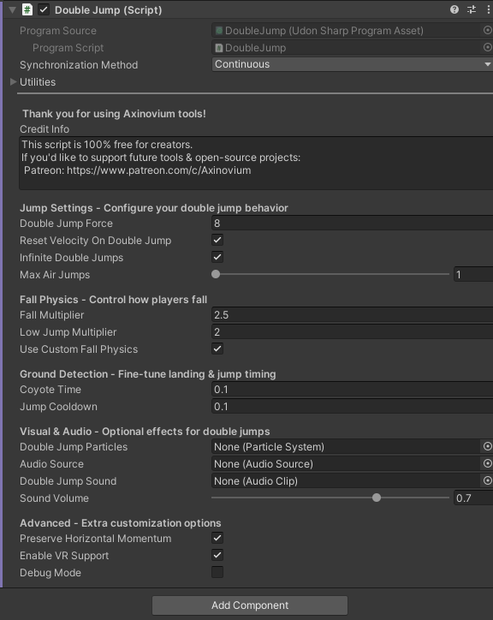
3️⃣ Adjust settings in the Inspector to your liking.
⚙️ Configuration
Jump Settings
Double Jump Force – jump height (try 3–7)
Reset Velocity – consistent height (OFF = momentum jumps)
Infinite Jumps – enable creative-mode style air jumps
Max Air Jumps – 1–5 jumps if Infinite OFF
Fall Physics
Fall Multiplier – faster, snappier falls
Low Jump Multiplier – control short jumps
Custom Physics – toggle custom gravity on/off
Ground Detection
Coyote Time – grace period after ledge (default 0.15s)
Jump Cooldown – prevents accidental double taps
🎨 Optional Effects
✨ Particle
Create a Particle System and customize it.
Place it under the map.
Drag it into Double Jump Particles slot.
🔊 Sound
Add an Audio Source to a child object.
Disable Play On Awake and set Spatial Blend.
Assign Audio Source and Clip in the inspector.
🎮 Features
Core:
Smooth double jumps
Multiple air jumps (1–5 or infinite)
VR support
Coyote time & jump buffering
Custom gravity
Advanced:
Preserves momentum
Consistent jump height
Variable jump height
Particle/Sound feedback
Debug mode
🐛 Troubleshooting
Not compiling: Check UdonSharp & file name DoubleJump.cs
Not working: Confirm attached object & check console
No jump after landing: Increase cooldown to 0.3s
No particles: Use ParticleSystem component, disable Play On Awake
No sound: Check Audio Source, Clip, and volume
💖 Credits
Created by Axinovium
Free for all creators — commercial or non-commercial.
Attribution required.
Support future tools:
👉 Patreon.com/c/Axinovium
🇯🇵 日本語バージョン
🚀 VRChat ダブルジャンプスクリプト
ワンクリックでVRChatにダブルジャンプを追加!
プレハブを置くだけで滑らかなジャンプが有効化。
VFX/SFX対応・設定変更も自由自在。
🛠️ セットアップ
1️⃣ 「Double Jump System Object」プレハブをシーンに配置
2️⃣ 自動的に有効化され、全プレイヤーがダブルジャンプ可能
3️⃣ インスペクターで設定を調整
⚙️ 設定ガイド
ジャンプ設定
ジャンプ力(推奨3〜7)
速度リセット(ONで安定、OFFで慣性)
無限ジャンプモード
空中ジャンプ回数(1〜5)
落下物理
落下速度調整(高いほど素早い)
低ジャンプ制御
カスタム重力ON/OFF
地面検知
コヨーテタイム(崖直後の猶予)
ジャンプクールダウン(誤動作防止)
🎨 オプション効果
パーティクル
Particle Systemを作成し設定
マップ外に配置
スロットにドラッグ
サウンド
子オブジェクトにAudio Source追加
Play On AwakeをOFF
Audio Clipとソースを割り当て
🎮 主な機能
基本:
スムーズなダブルジャンプ
複数空中ジャンプ
VR対応
コヨーテタイム
カスタム落下物理
拡張:
慣性維持
一貫した高さ
可変ジャンプ
パーティクル&サウンド
デバッグモード
🐛 トラブルシューティング
コンパイル不可: UdonSharp確認&ファイル名DoubleJump.cs
動作しない: シーンに追加済みか確認
着地後ジャンプ不可: クールダウン0.3秒推奨
パーティクル表示なし: Component設定確認
音が出ない: Audio設定と音量確認
💖 クレジット
製作者: Axinovium
VRChatワールドで無料使用可(商用・非商用)。
クレジット表記必須。
支援はこちら👇
👉 Patreon.com/c/Axinovium
Official Website
Details
Functions, how to use, etc...
Platform:
VRChat, UdonSharp, Unity, Udon, VRC
모든 리뷰
더보기리뷰 등록
리뷰를 작성하려면 로그인이 필요합니다.
로그인하고 리뷰 쓰기