'%3e%3cg%20clip-path='url(%23roundHexB)'%3e%3cpath%20fill='%236D5DFC'%20d='M256%2040%20443%20148%20443%20364%20256%20472%2069%20364%2069%20148Z'/%3e%3cpath%20fill='%239C93FB'%20d='M69%20148%20256%2040%20443%20148%20256%20256Z'/%3e%3cpath%20fill='%234A3FD1'%20d='M256%20256%20443%20148%20443%20364%20256%20472Z'/%3e%3c/g%3e%3c!--%20top%20face:%20filled%20round%20magnifier%20--%3e%3cg%20transform='matrix(0.8660254,-0.5,0.8660254,0.5,69,148)'%3e%3cg%20transform='matrix(0.935,0,0,0.935,7.02,7.02)'%3e%3ccircle%20cx='88'%20cy='88'%20r='52'%20fill='%23FFFFFF'/%3e%3ccircle%20cx='88'%20cy='88'%20r='28'%20fill='%239C93FB'/%3e%3cpath%20d='M124%20124%20164%20164'%20stroke='%23FFFFFF'%20stroke-width='26'%20stroke-linecap='round'/%3e%3c/g%3e%3c/g%3e%3cg%20transform='matrix(0.8660254,0.5,0,1,69,148)'%3e%3cpath%20d='M96.1,61.08%20L45.9,128.92%20Q34,145%2054,145%20L162,145%20Q182,145%20170.1,128.92%20L119.9,61.08%20Q108,45%2096.1,61.08%20Z'%20fill='%23FFFFFF'/%3e%3c/g%3e%3c!--%20right%20face:%20filled%20bubble%20--%3e%3cg%20transform='matrix(0.8660254,-0.5,0,1,256,256)'%3e%3cg%20transform='matrix(0.855,0,0,0.855,15.66,15.66)'%3e%3cpath%20d='M60%2042H156a28%2028%200%200%201%2028%2028V158Q184%20168%20174.47%20164.96L124.53%20149.04Q115%20146%20105%20146H60a28%2028%200%200%201-28-28V70a28%2028%200%200%201%2028-28Z'%20fill='%23FFFFFF'/%3e%3c/g%3e%3c/g%3e%3c/g%3e%3c/svg%3e)
 wolfy527
상품 설명
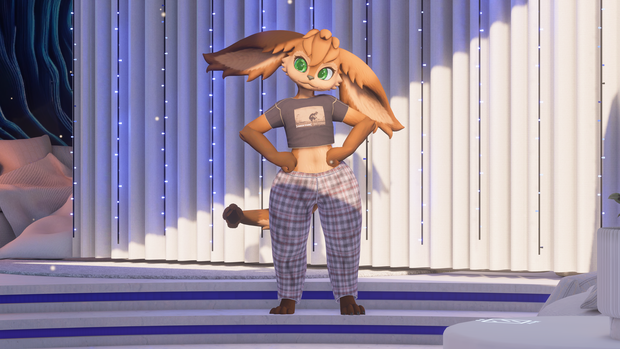
Comfortable pajamas for the OG Hobkin base
This clothing has been made for the OG Hobkin Base via an edited version of the model I put out that supports clothing. This clothing is only intended to be used with this version of the Hobkin, but the updated Hobkin is completely free and is quick and easy upload.
My main store page is over on Jinxxy if you want to stay up to date with everything I do!
This prefab REQUIRES VRCFury and is a simple drag and drop onto the avatar!
If you want to try out the clothing I have a public version of an avatar that has the clothing on it!
Prefab Stats
Triangles: 6,086
Skinned Meshes: 1
Materials: 1 - 2 (if you use material swap option)
Memory (Parameter) Allocation: 2 - 12 Bits (depending on customization settings)
VRAM Usage: 20.45 MiB (31.12 MiB with both 4k main textures + material swap)
If you would like to drop this down you can change the "Pajama Pants And Tshirt_Clothes_BaseColor" and "LP Base" textures from 4K to 2K.
What you get
Unity Package
Substance Painter Project texture files
Blender project with FBX
Base texture and Linkin Park texture
Material swap toggle
Hue slider
Constant hue shift toggle
Blendshape sliders
Lighting multiplier slider
Lighting add slider
This clothing was designed with modularity in mind. You can add and remove sliders and toggles via VRCFury prefabs I set up to have full customization options or a simple setup.
License:
Do not resell or claim ownership of this content, even if modified in any form.
Do not distribute to anyone in any form, except as described below.
This content may be shared between two parties only if both parties have gained access to this content legitimately.
If you wish to use this content in a manner not allowed by this license, please contact me.
Credits:
Modeling, texture and Unity setup all done by me!
Thanks Nekoyaki and Kino for helping with pictures and videos!
Instructions:
All textures were textured in 4K and exported in 8K from substance painter to ensure highest possible quality, hence the download sizes of the files. None of the textures are set to 8K in Unity as a base, but the option is there if you wish to.
Normals, Metallics, and Roughness maps are 2K or lower, base map is 4K in Unity.
Tutorial Video
https://www.youtube.com/watch?v=vswxv9msKKg
I highly recommend watching the video tutorial as it is easy and quick to follow along with!
Import the "Comfy Pajamas" Unity package
The different prefabs can be found under the folder location "Assets/Wolfy_527/Pajama Pants and Tshirt/Prefabs" and dropped onto the avatar under the "Hobkin/VRCFury/3. Misc (Clothing, accessories, anims etc)" game object in the avatar's hierarchy
There are three different prefabs: PJs Base, PJs LP, and PJs Material Swap
PJs Base has the original red texture, PJs LP has the Linkin Park texture, and PJs Material Swap lets you toggle between the two textures in-game. Pick which one you prefer, but the material swap variant will use more texture memory than the other two
The clothing also comes with the ability to drag and drop menu prefabs onto it depending on what customization you want. These menu prefabs can be found under the folder location "Assets/Wolfy_527/Pajama Pants and Tshirt/Prefabs/Menu Prefabs" and dropped into the "VRCFury" game object that is under the "Pajama Pants And Tshirt" game object
If you drop the blendshape prefab options onto your clothing, make sure the avatar base also has them installed as the clothing options are tied to the body's blendshape sliders. They can be located under "Assets/02 VRCFury customisations/3. Misc (Clothing, accessories, anims etc)/Body Sliders" folder and all you have to do is drag and drop them into the "3. Misc (Clothing, accessories, anims etc)" game object on the Hobkin base
If you have any questions or concerns please reach out to me via discord "wolfy_527" or email "[email protected]" and I'll try to get back to you as soon as I can!
모든 리뷰
더보기리뷰 등록
리뷰를 작성하려면 로그인이 필요합니다.
로그인하고 리뷰 쓰기