'%3e%3cg%20clip-path='url(%23roundHexB)'%3e%3cpath%20fill='%236D5DFC'%20d='M256%2040%20443%20148%20443%20364%20256%20472%2069%20364%2069%20148Z'/%3e%3cpath%20fill='%239C93FB'%20d='M69%20148%20256%2040%20443%20148%20256%20256Z'/%3e%3cpath%20fill='%234A3FD1'%20d='M256%20256%20443%20148%20443%20364%20256%20472Z'/%3e%3c/g%3e%3c!--%20top%20face:%20filled%20round%20magnifier%20--%3e%3cg%20transform='matrix(0.8660254,-0.5,0.8660254,0.5,69,148)'%3e%3cg%20transform='matrix(0.935,0,0,0.935,7.02,7.02)'%3e%3ccircle%20cx='88'%20cy='88'%20r='52'%20fill='%23FFFFFF'/%3e%3ccircle%20cx='88'%20cy='88'%20r='28'%20fill='%239C93FB'/%3e%3cpath%20d='M124%20124%20164%20164'%20stroke='%23FFFFFF'%20stroke-width='26'%20stroke-linecap='round'/%3e%3c/g%3e%3c/g%3e%3cg%20transform='matrix(0.8660254,0.5,0,1,69,148)'%3e%3cpath%20d='M96.1,61.08%20L45.9,128.92%20Q34,145%2054,145%20L162,145%20Q182,145%20170.1,128.92%20L119.9,61.08%20Q108,45%2096.1,61.08%20Z'%20fill='%23FFFFFF'/%3e%3c/g%3e%3c!--%20right%20face:%20filled%20bubble%20--%3e%3cg%20transform='matrix(0.8660254,-0.5,0,1,256,256)'%3e%3cg%20transform='matrix(0.855,0,0,0.855,15.66,15.66)'%3e%3cpath%20d='M60%2042H156a28%2028%200%200%201%2028%2028V158Q184%20168%20174.47%20164.96L124.53%20149.04Q115%20146%20105%20146H60a28%2028%200%200%201-28-28V70a28%2028%200%200%201%2028-28Z'%20fill='%23FFFFFF'/%3e%3c/g%3e%3c/g%3e%3c/g%3e%3c/svg%3e)
 biboraccon
상품 설명
◆ このモデルについて ◇ About this model ◆
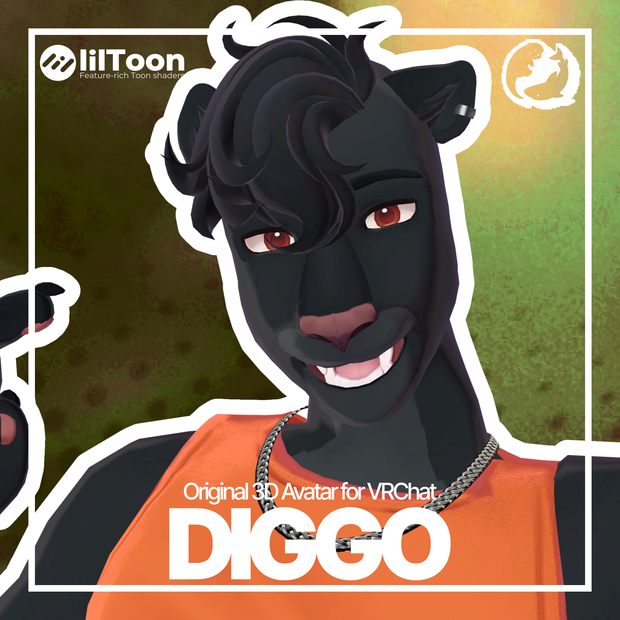
「ディゴ - Diggo -」はクールでスタイリッシュなブラックパンサーのVRChatアバターです。
軽量で使いやすく、Questにも対応しています。
Diggo is a cool and stylish black panther VRChat avatar.
Sleek, optimized, and Quest-compatible.
----
SNSで投稿するときは、
#DiggoVRC タグをつけてシェアしよう!
When posting on social media,
make sure to tag it with #DiggoVRC!
◆モデルの特徴 ◇ Features◆
- 都会的でクールなデザインのブラックパンサーアバター
- アクセサリーや衣装のオン/オフ切り替え機能
- 衣装や瞳のカラーを変更できるスライダー
- スキン用のカラーパレットも搭載
- クールでダイナミックなアニメーション表情
- フルボディトラッキングに快適対応
- MMD用ブレンドシェイプ搭載
- 髪、耳、尻尾に自然なPhysBone挙動
- 耳の動きを自由に操れるコントローラー搭載
- ヘッドパットインタラクション対応
----
- Sleek, urban black panther design
- Toggles for clothes and accessories
- Color sliders for clothes and eyes, customizable inside VRChat
- Alternative skin color palette included
- Cool animated expressions
- Comfortable with full-body tracking
- Blendshapes for MMD compatibility
- PhysBone dynamics on hair, ears, and tail
- Ear controller for custom movement
- Headpat interactions
◆モデルデータ ◇ Model info◆
△ ポリゴン数: 34,966
- マテリアル: 4
- 使用シェーダー: lilToon (最新版推奨)
必要パッケージ:
- VRChat Avatar SDK (最新)
- lilToon Shader: https://lilxyzw.github.io/
パフォーマンス:
- PC対応 🖥
- ランク (衣装あり): 🟠 Medium
- ランク (衣装なし): 🟢 Good
- HUEスライダー 🌈
サイズ: 106 MB
パッケージ内容:
- Unity Package(アップロード準備済み)
- 衣装&髪用PSDファイル 2つ
----
△ Polygon count: 34,966
- Materials: 4
- Shader used: lilToon (latest version recommended)
Required packages:
- VRChat Avatar SDK (latest)
- lilToon Shader: https://lilxyzw.github.io/
Performance:
- Platform: PC 🖥
- Rank (with clothes): 🟠 Medium
- Rank (no clothes): 🟢 Good
- HUE slider 🌈
File size: 106 MB
Package includes:
- Unity Package (easy to install, upload-ready)
- Two PSD files (clothes & hair)
◆インストール手順 ◇ Installation◆
必要パッケージ:
- lilToon: https://lilxyzw.github.io/
- VRChat Avatar SDK (最新バージョン推奨)
インストール手順:
1. 「VRC Creator Companion」で新しいアバタープロジェクトを作成してください。
2. lilToon をインストール。
3. `Diggo_v1.0.4.unitypackage` をプロジェクトにインポート。
4. `_Diggo` フォルダにある `Diggo.prefab` を Unity のヒエラルキーにドラッグ&ドロップ。
5. ヒエラルキーから選択し、VRChatにアップロードすれば完了!
----
Required packages:
- lilToon: https://lilxyzw.github.io/
- VRChat Avatar SDK (latest recommended)
Steps:
1. Create a new Avatar project with "VRC Creator Companion".
2. Install lilToon.
3. Import `Diggo_v1.0.4.unitypackage` into your Unity project.
4. Go to the `_Diggo` folder and drag & drop `Diggo.prefab` into the Unity Hierarchy.
5. Select it in the Hierarchy and upload to VRChat – done!
◆連絡先 ◇ Contact◆
Creator: bobi_arts
Twitter: https://twitter.com/bobi_arts
our circle SNS:
#samekawavrc
Twitter: https://x.com/samekawa_vrc
site: https://samekawa-vrc.carrd.co/
◆Note◆
※ この説明文は機械翻訳を使用しています。不自然な表現が含まれている場合があります。
모든 리뷰
더보기리뷰 등록
리뷰를 작성하려면 로그인이 필요합니다.
로그인하고 리뷰 쓰기