'%3e%3cg%20clip-path='url(%23roundHexB)'%3e%3cpath%20fill='%236D5DFC'%20d='M256%2040%20443%20148%20443%20364%20256%20472%2069%20364%2069%20148Z'/%3e%3cpath%20fill='%239C93FB'%20d='M69%20148%20256%2040%20443%20148%20256%20256Z'/%3e%3cpath%20fill='%234A3FD1'%20d='M256%20256%20443%20148%20443%20364%20256%20472Z'/%3e%3c/g%3e%3c!--%20top%20face:%20filled%20round%20magnifier%20--%3e%3cg%20transform='matrix(0.8660254,-0.5,0.8660254,0.5,69,148)'%3e%3cg%20transform='matrix(0.935,0,0,0.935,7.02,7.02)'%3e%3ccircle%20cx='88'%20cy='88'%20r='52'%20fill='%23FFFFFF'/%3e%3ccircle%20cx='88'%20cy='88'%20r='28'%20fill='%239C93FB'/%3e%3cpath%20d='M124%20124%20164%20164'%20stroke='%23FFFFFF'%20stroke-width='26'%20stroke-linecap='round'/%3e%3c/g%3e%3c/g%3e%3cg%20transform='matrix(0.8660254,0.5,0,1,69,148)'%3e%3cpath%20d='M96.1,61.08%20L45.9,128.92%20Q34,145%2054,145%20L162,145%20Q182,145%20170.1,128.92%20L119.9,61.08%20Q108,45%2096.1,61.08%20Z'%20fill='%23FFFFFF'/%3e%3c/g%3e%3c!--%20right%20face:%20filled%20bubble%20--%3e%3cg%20transform='matrix(0.8660254,-0.5,0,1,256,256)'%3e%3cg%20transform='matrix(0.855,0,0,0.855,15.66,15.66)'%3e%3cpath%20d='M60%2042H156a28%2028%200%200%201%2028%2028V158Q184%20168%20174.47%20164.96L124.53%20149.04Q115%20146%20105%20146H60a28%2028%200%200%201-28-28V70a28%2028%200%200%201%2028-28Z'%20fill='%23FFFFFF'/%3e%3c/g%3e%3c/g%3e%3c/g%3e%3c/svg%3e)
 Dad's Shop
상품 설명
INFO:
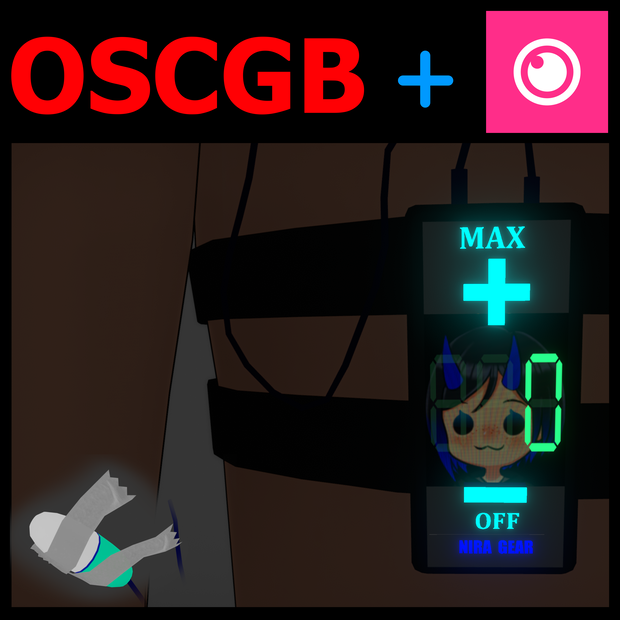
Hello! This is a thigh controller vibrator i made for myself and i just wanted to send it out to others as i see a distinct lack of it anywhere else. This has a changing LCD screen with customizable slots for textures so you can give it a different color background or even your own image. Just overwrite my texture with your own. Includes all textures so you can freely change the theming to anything you want easily in image editing programs. This also has a cool function of linking with OSCGoesBrrr, to make IRL "props" work with this prop when its interacted with in game. More about that at the bottom.
Please try your best to follow this guide as I'm new to doing stuff like this and there's many better tutorials both on the VRChat site and YouTube alike. KEEP IN MIND, this model was made, molded and bent to fit my model, it may not fit yours correctly with some basic adjustments in blender.
JUST SO YOU KNOW, its a very simple process and I've included all needed assets for this aside from the obvious Blender, unity, brainpower to do this :D
Step by Step : (I promise this is fairly easy and VERY useful so you can make your own stuff and never have to pay people for super obscure items you really want but cant make. )
- Extract the files
- open the blender save (i saved it in v3.6)
- import your model of choice to fit it to
- edit mode and use PROPORTIONAL EDITING, change the size of the circle if you need to, then select 1 or more of the vertices and move it to move the wire, egg, and thigh-straps to fit your model.
- Presto, done.
- Export the FBX with the same name to a basic folder temporarily (just until you import it to your unity)
- Turn the model off in unity and press play, import the new FBX over the old one and replace.
- Once done get out of play mode and you should be good to go.
PARENTING:
This is fairly straight forward, just place the item prefab on your model so it is like with the clothing in your hierarchy. For example
[Model]
->[Armature]
->[Hips]
[Body]
[Clothes]
[Clothes]
[THIGH VIBE] <-----
PLACEMENT:
As far as placement goes, place the prop where you want it to lock to and it'll do the rest as far as parenting to the leg and hips. Just be sure it is directly on your model in the hierarchy, not on the armature, or hips, or legs, etc. It will also add some neato parameters, states, FX layers, FX parameters, sounds etc.
Keep in mind, if you re-scale the prop, you'll need to re-scale the contact receivers as well as they will shrink with the prop. Just select a receiver to change its size and make the "radius" slightly larger, or smaller to your liking.
OTHER PARTS:
This model adds a cool function to work with OSCGoesBrrr, which is a haptics routing program for VRChat. Basically it means this prop can control the real deal IRL or similar items.
If you wish to try this, you'll need:
- Initface Central
- OSCGoesBrrr
- Some sort of bluetooth connection either on your pc or phone.
- some basic settings in the settings section of OSCGoesBrrr to make it link to the parameter this model adds. Mine look like this. You can copy past this in and it should work fine for you and cover other things like the use of SPS/TPS too.
all.penSelf=1
all.touchSelf=0
all.touchOthers=1
all.penOthers=1
all.key=ThighBrrrStrength
If you need help ill be making a discord in the future but for now feel free to just message me and ill try my best to help you when i can. Do not forget, ChatGPT, google, YouTube and the VRChat website have MUCH better help than i can give so be sure to check those too if you need any help. <3 <3
Do not claim this as your own or edit then re-upload etc etc. You're free to use the model as its intended, i just ask you don't claim you made it. You're can edit it anyway you'd like. <3
모든 리뷰
더보기리뷰 등록
리뷰를 작성하려면 로그인이 필요합니다.
로그인하고 리뷰 쓰기