'%3e%3cg%20clip-path='url(%23roundHexB)'%3e%3cpath%20fill='%236D5DFC'%20d='M256%2040%20443%20148%20443%20364%20256%20472%2069%20364%2069%20148Z'/%3e%3cpath%20fill='%239C93FB'%20d='M69%20148%20256%2040%20443%20148%20256%20256Z'/%3e%3cpath%20fill='%234A3FD1'%20d='M256%20256%20443%20148%20443%20364%20256%20472Z'/%3e%3c/g%3e%3c!--%20top%20face:%20filled%20round%20magnifier%20--%3e%3cg%20transform='matrix(0.8660254,-0.5,0.8660254,0.5,69,148)'%3e%3cg%20transform='matrix(0.935,0,0,0.935,7.02,7.02)'%3e%3ccircle%20cx='88'%20cy='88'%20r='52'%20fill='%23FFFFFF'/%3e%3ccircle%20cx='88'%20cy='88'%20r='28'%20fill='%239C93FB'/%3e%3cpath%20d='M124%20124%20164%20164'%20stroke='%23FFFFFF'%20stroke-width='26'%20stroke-linecap='round'/%3e%3c/g%3e%3c/g%3e%3cg%20transform='matrix(0.8660254,0.5,0,1,69,148)'%3e%3cpath%20d='M96.1,61.08%20L45.9,128.92%20Q34,145%2054,145%20L162,145%20Q182,145%20170.1,128.92%20L119.9,61.08%20Q108,45%2096.1,61.08%20Z'%20fill='%23FFFFFF'/%3e%3c/g%3e%3c!--%20right%20face:%20filled%20bubble%20--%3e%3cg%20transform='matrix(0.8660254,-0.5,0,1,256,256)'%3e%3cg%20transform='matrix(0.855,0,0,0.855,15.66,15.66)'%3e%3cpath%20d='M60%2042H156a28%2028%200%200%201%2028%2028V158Q184%20168%20174.47%20164.96L124.53%20149.04Q115%20146%20105%20146H60a28%2028%200%200%201-28-28V70a28%2028%200%200%201%2028-28Z'%20fill='%23FFFFFF'/%3e%3c/g%3e%3c/g%3e%3c/g%3e%3c/svg%3e)
 grinnvalesti
상품 설명
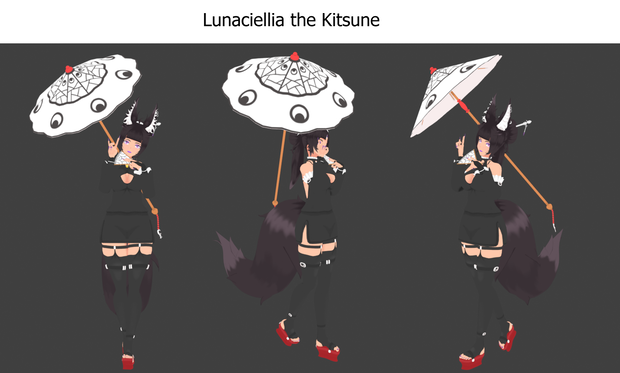
Lunaciellia the Kitsune is an original 3D character that can be used in VRChat, animations, personal projects and more. Comes with 2 props, an umbrella and a hand fan that can be used with the model, or other models if desired.
Package contains:
Character:
- Blender File made in v 4.3.1
- .FBX file (KitsuneComplete)
- 3 Texture files (Body texture, Hair texture and a Outfit texture)
- Unity Prefab file VRChat (KitsuneCompletePackage)
Props:
- Umbrella prop + Texture File
- Hand fan prop + Texture File
Format: .Zip
Total file size: Uncompressed: 37 MB Archived: 24.4 MB
Model and VRChat information
Basic information:
- Faces: 44,567
- Triangles: 88,396
11 Meshes:
- Body mesh
- Bra mesh
- Earrings mesh
- Gloves mesh
- Hair mesh
- Hair ornaments mesh
- Shoes mesh
- Sleeves outer mesh
- Stockings mesh
- Top mesh
- Underwear mesh
3 Material PNG's:
- Body texture
- Hair texture
- Outfit texture
Full rig, consisting of 179 bones + Bone constraints within blender, limiting bone movement and making it easier to pose.
VRChat information: Rating: Very poor. (Due to the Triangle count and skinned meshes.)
- Tested on PC
- SDK 3.0
- Eyelook
- Visemes
- Height: - 1.8m
- Bounds: (1.46, 2.27, 1.42)
- Skinned meshes: 12
- 11 Material slots
- 9 Physbone components with 69 Physbone transforms
Facial menu:
- Angry Face
- Lewd Face
- Fainted Face
- Happy Face
- Shocked Face
Clothing menu:
- Hide the outer sleeves only.
- Hide the outer and inner sleeves.
- Hide only the stockings.
- Hide the stockings, inner and outer sleeves.
- Hide everything, minus the underwear (Bra and panties) and the shoes.
Psybones:
- Tail physics for movement.
- Ear physics for movement.
- Breast physics for movement.
- Hair physics for movement.
- Hair ornament chain physics for movement.
Collider:
- 1 for the torso to help prevent hair clipping.
How to use
To use the Blender file. Simply open the .Blend file using a version 4.3 of Blender or higher to avoid potential issues.
- To use the armature, select it and change it from Object mode to Pose mode. Then select the bone you want to move and rotate it to move the limb. The green bones are using constraints, and may move a little weird. If you don't like them, you can safely delete them.
- To use the blendshapes, select the body mesh and go into the data tab on the right. Then under shape keys select the shape key you want, and change it's value from 0.000 to 1, or any value between them.
--Warning--
If you plan on changing parts of the body mesh, ensure you have the "Basis" shapekey selected. Changing parts of the mesh with another keyshape selected will only apply those changes to that selected shapekey.
To use the unity prefab package. Simply drag and drop the package into the asset window and load the contents. Once loaded, drag the prefab file named (KitsuneCompletePackage) into the scene viewer to load the model, it's textures and the VRChat data such as Phybones and colliders.
Trouble shooting.
If the textures do not load properly and look purple, try the following.
For Blender:
Select a mesh, either the body, the hair or the outfit. Go to the material tab on the right and check there is a material present. Example, the body mesh should have a material node called body texture etc. If this is not the case for some reason, Click the + icon to add a new material, rename it so it matches the mesh it is associated with. then go into the shading tab. From here delete the BSDF node, add a image texture node, then connect the colour output of the image texture to the surface input of the material output node. Then in the Image texture node, select the open image option and select the correct texture PNG. Afterwards, ensure you are in the material preview shading option and the texture should be loaded. Do this for the other meshes if needed.
For unity:
Go into the materials folder in the asset window. Inside should be 3 material nodes, and 3 PNG files. If none are present, right click in the Asset / Material window, go to create then material, do this 3 times. Then rename each node to the following: Body texture, Outfit, Hair. Next drag and drop the 3 PNG files included in the download folder into the Asset / Material window where your created nodes are. Select one of the material nodes, then in the inspector window on the right side of the screen change the shader type to a Unlit / texture. Then drag and drop a texture PNG into the box that says "none (Texture)". Lastly, drag the material node onto the correct mesh in the scene viewer to apply it. Repeat these steps for the other meshes and materials if need be.
Terms of Service
By puchasing this model, you agree to the below terms and conditions. The content of the following terms may be subject to change, and the lastest version of the terms takes precedence.
Permitted
- Personal use in activities that are either commercial or non-profit-seeking.
- Corporate use in activities that are either commercial or non-profit-seeking.
- Uploading images or videos of the model to social communication platforms.
- Uploading to online gaming platforms, assuming the original files are not provided.
- Use for sexual expressions or activitites. Content rating is required, along with consent from all present parties.
- Use for expressions of violence. Content rating is required, along with consent from all present parties.
- Adjusting the model.
- Modifying the model.
- Modifying the model with other digital content, so long as the other digital content permits this.
- Outsourcing the model for modification processes, but is only allowed between the user(s), and assuming the digital content used is not redistributed.
- Use in video production, live-streaming and broadcasts.
- Use in publications and electronic publications.
- Creation of costume data by using the parameters of meshes and weights.
- Creation of new digital content on textures and costumes that comply with the data format, without diverting the parameters of meshes and weights.
- Creation of derivative works based on the digital content.
- Credit notation. Not Necessary, but is greatly appreciated.
Not permitted
- Allowing third parties to use the content within online services.
- Using the work in any kind of political or religious activitities.
- Use for tangible goods.
- Distributing or reselling the files either with changes or no changes.
- Integration into software as product development.
- Assignment of rights and obligations.
- Do not upload the model to public rooms.
- Use in any AI training.
If you have any questions or concerns about these terms, please contact me. However, it may be difficult for me to offer help or support if the original model has been modified, tweaked or settings have been altered.
Due to the nature of downloaded content over physical content, I cannot accept refunds, returns or exchanges once the item has been purchased.
The author "Grinnvalesti" is not responsible for any potential problems, losses or damages caused when using this model.
Update information
23/07/2025 - Initial release
모든 리뷰
더보기리뷰 등록
리뷰를 작성하려면 로그인이 필요합니다.
로그인하고 리뷰 쓰기