'%3e%3cg%20clip-path='url(%23roundHexB)'%3e%3cpath%20fill='%236D5DFC'%20d='M256%2040%20443%20148%20443%20364%20256%20472%2069%20364%2069%20148Z'/%3e%3cpath%20fill='%239C93FB'%20d='M69%20148%20256%2040%20443%20148%20256%20256Z'/%3e%3cpath%20fill='%234A3FD1'%20d='M256%20256%20443%20148%20443%20364%20256%20472Z'/%3e%3c/g%3e%3c!--%20top%20face:%20filled%20round%20magnifier%20--%3e%3cg%20transform='matrix(0.8660254,-0.5,0.8660254,0.5,69,148)'%3e%3cg%20transform='matrix(0.935,0,0,0.935,7.02,7.02)'%3e%3ccircle%20cx='88'%20cy='88'%20r='52'%20fill='%23FFFFFF'/%3e%3ccircle%20cx='88'%20cy='88'%20r='28'%20fill='%239C93FB'/%3e%3cpath%20d='M124%20124%20164%20164'%20stroke='%23FFFFFF'%20stroke-width='26'%20stroke-linecap='round'/%3e%3c/g%3e%3c/g%3e%3cg%20transform='matrix(0.8660254,0.5,0,1,69,148)'%3e%3cpath%20d='M96.1,61.08%20L45.9,128.92%20Q34,145%2054,145%20L162,145%20Q182,145%20170.1,128.92%20L119.9,61.08%20Q108,45%2096.1,61.08%20Z'%20fill='%23FFFFFF'/%3e%3c/g%3e%3c!--%20right%20face:%20filled%20bubble%20--%3e%3cg%20transform='matrix(0.8660254,-0.5,0,1,256,256)'%3e%3cg%20transform='matrix(0.855,0,0,0.855,15.66,15.66)'%3e%3cpath%20d='M60%2042H156a28%2028%200%200%201%2028%2028V158Q184%20168%20174.47%20164.96L124.53%20149.04Q115%20146%20105%20146H60a28%2028%200%200%201-28-28V70a28%2028%200%200%201%2028-28Z'%20fill='%23FFFFFF'/%3e%3c/g%3e%3c/g%3e%3c/g%3e%3c/svg%3e)
 LiaWare Works
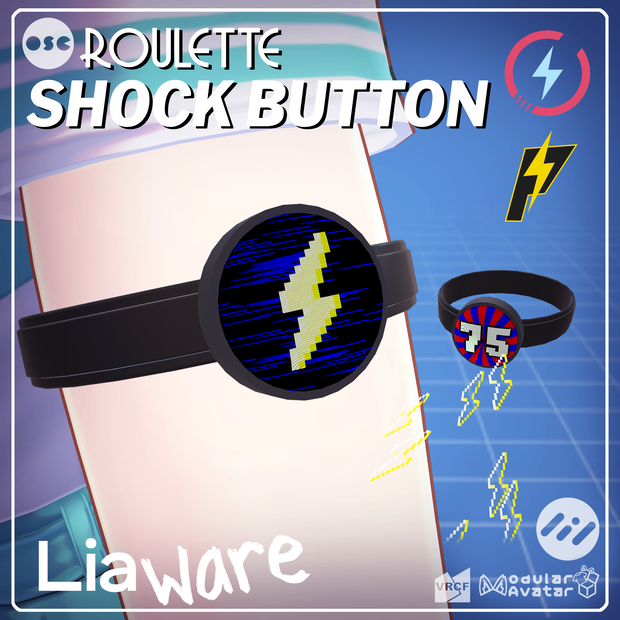
 【VRChat】OSC Roulette Shock Button | OSC対応ルーレット感電ボタン / PiShock & OpenShock Compatible
상품 설명
ルーレットにインスパイアされたアバター用ショックボタン。
PiShockやOpenShockに接続して、ボタンを押すと感電します。
ギャンブルに行こう!
---
A Roulette-inspired Shock Button for your avatar.
Connects to your PiShock or OpenShock to shock you when the button is pressed.
Let's go gambling!
情報
感電ボタンのFBXモデル
感電ボタンのテクスチャとアイコン
感電ボタンのスクリーンのカスタムシェーダー
感電ボタンを制御するカスタムアニメーター
感電ボタン制御とPiShock/OpenShockへの接続用カスタムソフトウェア
アバターの手足に巻きつけるループ付き。
ポリゴン数:
- 感電ボタン:604Δ
- ループ:1542Δ
パラメータスペース:10-11ビット
Physbone数:0
マテリアルスロット数:
- 感電ボタンのボディ:1
- 感電ボタンのスクリーン:1
- ループ:1
メインボディテクスチャサイズ:512x512
メインボディシェーダー:liltoon
https://lilxyzw.booth.pm/items/3087170
Modular AvatarまたはVRCFuryが必要。
※ このギミックを使用するには、付属の外部プログラムが必要です。このプログラムとギミックを使用するにはWindowsが必要です。
安全性
いくつかの安全装備も含まれている:
● VRCがAFKまたはオーバーレイ(XSOverlay/OVR Toolkit)のオープンを検出した場合、感電ボタンのコンタクトは自動的に無効になります。
➤ 検出は完全ではありません。どうか当てにしないでほしい。
➤ 「Overlay Detection」が問題の原因になっている場合は、アニメーターでオーバーレイ検出を無効にすることができます。
● 誤って押してしまうことを防ぐため、自分の感電ボタンを押すことはできません。
➤ この動作は、コンタクトの設定で変更できます。
● 新しいワールドに参加したり、アバターを変更したりすると、感電ボタンはオフになります。
➤ この動作は、Expression Parameterで変更することができる。
※ 本物のショッカーを首や心臓や脊椎の近くに置かないでください。PiShock/OpenShockのサイトの安全に関する詳細をご参照ください。
セットアップガイド
【JP】
https://drive.google.com/file/d/1bb6WGRDchyimk3QhbjLa3HuAViBG8pAP
【EN】
https://drive.google.com/file/d/1iljB1Y6-bKxO_9Mr9tjcwMRS-Zigqdim
利用規約
【JP】
https://drive.google.com/file/d/1dYm8MLM_mQ6FQtN5AAVtDJ0oLk9L8luA
【EN】
https://drive.google.com/file/d/1CfLt9ikvyGrkO4GCnKduZYo2kc6fx6Mw
同梱ファイル
- Roulette Shock Button.unitypackage
- VRC Shock Button.exe
- LICENSE.ja.pdf
- LICENSE.en.pdf
- SETUP_GUIDE.ja.pdf
- SETUP_GUIDE.en.pdf
- CHANGELOG.txt
変更履歴
2025-06-02
V1.0
- 初期リリース
Specifications
FBX Model of the Shock Button
Textures & Icons for the Shock Button
Custom Shader for the Shock Button screen
Custom Animator to control the Shock Button
Custom software for controlling Shock Button and connecting to PiShock/OpenShock
Comes with band to wrap around avatar limbs.
Polygon Count:
- Shock Button: 604Δ
- Band: 1542Δ
Parameter Space: 10-11 bits
Physbone Count: 0
Material Slots:
- Shock Button Body: 1
- Shock Button Screen: 1
- Band: 1
Main Body Texture Size: 512x512
Main Body Shader: liltoon
https://lilxyzw.booth.pm/items/3087170
Modular Avatar or VRCFury is required.
※ The included external program is required to use this asset. Windows is required to use this program and asset.
Safety
Several safety features are included:
● The Shock Button contact is automatically disabled if VRC detects you are AFK or have your overlay (XSOverlay/OVR Toolkit) open.
➤ The detection may not be perfect. Please do not rely on it.
➤ You may disable Overlay Detection in the animator if this is causing you issues.
● Pressing your own Shock Button is disabled to prevent accidental presses.
➤ You may modify this behavior in the Contact settings.
● The Shock Button turns off when you join a new world or change avatar.
➤ You may modify this behavior in the expression parameters.
※ Do not put real-life shockers on your neck or near your heart/spine. Please refer to safety details on the PiShock/OpenShock websites.
Setup Guide
【EN】
https://drive.google.com/file/d/1iljB1Y6-bKxO_9Mr9tjcwMRS-Zigqdim
【JP】
https://drive.google.com/file/d/1bb6WGRDchyimk3QhbjLa3HuAViBG8pAP
Terms of Use
【EN】
https://drive.google.com/file/d/1CfLt9ikvyGrkO4GCnKduZYo2kc6fx6Mw
【JP】
https://drive.google.com/file/d/1dYm8MLM_mQ6FQtN5AAVtDJ0oLk9L8luA
Files Included
- Roulette Shock Button.unitypackage
- VRC Shock Button.exe
- LICENSE.ja.pdf
- LICENSE.en.pdf
- SETUP_GUIDE.ja.pdf
- SETUP_GUIDE.en.pdf
- CHANGELOG.txt
Changelog
2025-06-02
V1.0
- Initial Release
모든 리뷰
더보기리뷰 등록
리뷰를 작성하려면 로그인이 필요합니다.
로그인하고 리뷰 쓰기