'%3e%3cg%20clip-path='url(%23roundHexB)'%3e%3cpath%20fill='%236D5DFC'%20d='M256%2040%20443%20148%20443%20364%20256%20472%2069%20364%2069%20148Z'/%3e%3cpath%20fill='%239C93FB'%20d='M69%20148%20256%2040%20443%20148%20256%20256Z'/%3e%3cpath%20fill='%234A3FD1'%20d='M256%20256%20443%20148%20443%20364%20256%20472Z'/%3e%3c/g%3e%3c!--%20top%20face:%20filled%20round%20magnifier%20--%3e%3cg%20transform='matrix(0.8660254,-0.5,0.8660254,0.5,69,148)'%3e%3cg%20transform='matrix(0.935,0,0,0.935,7.02,7.02)'%3e%3ccircle%20cx='88'%20cy='88'%20r='52'%20fill='%23FFFFFF'/%3e%3ccircle%20cx='88'%20cy='88'%20r='28'%20fill='%239C93FB'/%3e%3cpath%20d='M124%20124%20164%20164'%20stroke='%23FFFFFF'%20stroke-width='26'%20stroke-linecap='round'/%3e%3c/g%3e%3c/g%3e%3cg%20transform='matrix(0.8660254,0.5,0,1,69,148)'%3e%3cpath%20d='M96.1,61.08%20L45.9,128.92%20Q34,145%2054,145%20L162,145%20Q182,145%20170.1,128.92%20L119.9,61.08%20Q108,45%2096.1,61.08%20Z'%20fill='%23FFFFFF'/%3e%3c/g%3e%3c!--%20right%20face:%20filled%20bubble%20--%3e%3cg%20transform='matrix(0.8660254,-0.5,0,1,256,256)'%3e%3cg%20transform='matrix(0.855,0,0,0.855,15.66,15.66)'%3e%3cpath%20d='M60%2042H156a28%2028%200%200%201%2028%2028V158Q184%20168%20174.47%20164.96L124.53%20149.04Q115%20146%20105%20146H60a28%2028%200%200%201-28-28V70a28%2028%200%200%201%2028-28Z'%20fill='%23FFFFFF'/%3e%3c/g%3e%3c/g%3e%3c/g%3e%3c/svg%3e)
 YMR SHOP
 メーターギミック for PCS/LMS
상품 설명
Dismay Custom様の「Penetration Contact System(PCS)」および「Lovestick Massages SFX(LMS)」と連携したメーター表示用のシェーダーと操作アニメーションを同梱したアバターギミックです。
LMSに同梱されているメーターに着想を得ました。
Modular Avatarを利用しており、PCSやLMSを設定したアバターのルート直下にプレハブを設置し、位置調整をするだけで動作します。
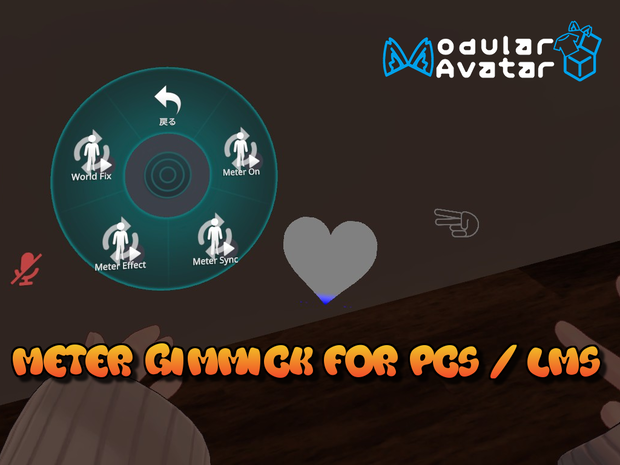
エクスプレッションメニューから表示のON/OFF、PCSおよびLMSのパラメータとの連携の一時停止や再開、ワールド固定のON/OFF、追加イフェクト(発光や大きさの変化アニメーション)のON/OFFが設定できます。
マテリアル設定で初期のハート型から任意のテクスチャを用いることでメーターの形、ゲージが0%、50%、100%時の色、透明度、発光の強さなどが変更できます。
[EN]
This avatar gimmick includes a shader for displaying meters and operation animations that work with Dismay Custom's "Penetration Contact System (PCS)" and "Lovestick Massages SFX (LMS)".
It was inspired by the meter included with LMS.
It uses Modular Avatar, so it works just by placing a prefab directly under the root of an avatar with PCS or LMS set and adjusting its position.
From the expression menu, you can turn the display on/off, pause or resume the link with PCS and LMS parameters, turn world fixation on/off, and turn additional effects (glowing and size change animation) on/off.
By using any texture from the default heart shape in the material settings, you can change the shape of the meter, the color when the gauge is 0%, 50%, and 100%, transparency, and glow intensity.
前提パッケージ -Prerequired Packages-
このギミックはDismay Custom様の「Lovestick Massages SFX」または「Penetration Contact System」との連携を前提としているため、購入とアバターへの導入をお願いいたします。
また、Modulat Avatarの導入が必須となっております。
[EN]
This gimmick requires the use of Dismay Custom's "Lovestick Massages SFX" or "Penetration Contact System", so please purchase and install it into your avatar.
Modulat Avatar must also be installed.
Lovestick Massages SFX
https://booth.pm/ja/items/5192386
Penetration Contact System
https://booth.pm/ja/items/5001027
Modular Avatar
https://modular-avatar.nadena.dev/
導入方法 -How to Install-
・DLした本商品のUnity Packageをインストールします。
・明るさの変更やサイズの変更などの視覚効果のない[YMR_Meter_Essential]と簡単な視覚効果を追加した[YMR_Meter_Effect]の2種類のプレハブを同梱しています。
・[Assets→_YMR_VRC→YMR_Meter→Prefab]の中にある[YMR_Meter_Essential]か[YMR_Meter_Effect]を【PCSやLMSが導入されている】アバター内に設置してください。
・Hierarchyから[YMR_Meter_Essential or YMR_Meter_Effect→Position→Hand_R]の中にある[target]の位置を調節します(商品画像3枚目参照)
・アバターのサムネイルやSafety表示時にMeterメッシュが表示されるのが気になる場合はアップロード前に[Meter]メッシュをHierarchy上から非表示に設定してください。
・アバターをアップロードしてください。
[EN]
・Install the Unity Package for this product that you downloaded.
・Two types of prefabs are included: [YMR_Meter_Essential] which does not have visual effects such as changing brightness or size, and [YMR_Meter_Effect] which adds simple visual effects.
・Place [YMR_Meter_Essential] or [YMR_Meter_Effect] in [Assets → _YMR_VRC → YMR_Meter → Prefab] in an avatar with a PCS or LMS installed.
・Adjust the position of [target] in [YMR_Meter_Essential or YMR_Meter_Effect → Position → Hand_R] in the Hierarchy (see the third product image).
・If you are concerned about the Meter mesh being displayed in the avatar thumbnail or when displaying Safety, set the [Meter] mesh to hidden in the Hierarchy before uploading.
・Upload your avatar.
ゲーム内での使い方 -How to use in game-
・エクスプレッションメニューに[YMR_Meter_Essential]か[YMR_Meter_Effect]が追加されています。
・[Meter On]で表示のON/OFFを切り替えます。
・[Meter Sync]でPCS or LMSのパラメータとの連携のON/OFFを切り替えます。
・[World Fix]でワールド固定と右手への追随を切り替えます。
・[YMR_Meter_Effect]の場合は[Meter Effect]が追加されており、こちらで視覚効果のON/OFFを切り替えます。
[EN]
・[YMR_Meter_Essential] or [YMR_Meter_Effect] has been added to the expression menu.
・[Meter On] turns the display ON/OFF.
・[Meter Sync] turns linkage with PCS or LMS parameters ON/OFF.
・[World Fix] switches between fixing to the world and following the right hand.
・In the case of [YMR_Meter_Effect], [Meter Effect] has been added, and is used to turn the visual effect ON/OFF.
改造のヒント -Modding Tips-
※Unityの使い方やアニメーションの変更方法などの知識がある前提です。
・形状、色、透明度などの調整をしたい場合は、[Assets/YMR_VRC/YMR_Meter/Material]の中にある[HeartFilling]マテリアルのプロパティをインスペクタから調整してください。
・デフォルトではハートのテクスチャを使っていますが、描画範囲を黒で塗った透過PNGテクスチャに差し替えることでメーターの形を変更できます。
・視覚効果を変更したい場合は[Assets/YMR_VRC/YMR_Meter/Animator]の[YMR_Meter_Effect:コントローラーと[Assets/YMR_VRC/YMR_Meter/Animation]内のアニメーションファイルを調整してください。
・シェーダーを流用することでLMSやPCS以外でもExpression Parameterと連携するゲージのようなギミックを作成できます。
[EN]
*This assumes knowledge of how to use Unity and how to change animations.
-If you want to adjust the shape, color, transparency, etc., adjust the properties of the [HeartFilling] material in [Assets/YMR_VRC/YMR_Meter/Material] in the Inspector.
-A heart texture is used by default, but you can change the shape of the meter by replacing the drawing area with a transparent PNG texture with black painted on it.
-If you want to change the visual effect, adjust the [YMR_Meter_Effect:Controller] in [Assets/YMR_VRC/YMR_Meter/Animator] and the animation file in [Assets/YMR_VRC/YMR_Meter/Animation].
-By reusing the shader, you can create gauge-like gimmicks that work with Expression Parameters outside of LMS and PCS.
利用規約-Terms-
※本データの利用をもって利用規約に同意したものとみなします。
※利用規約の内容は変更する場合があり、最新のものが適用されます。
・ファイルの修正・改変
許可
・商用利用
許可
・R-18コンテンツ
許可
・利用時のクレジット表記
不要
・禁止事項
製作者を偽る行為
本データの二次配布および再配布
政治活動および宗教活動への使用
特定個人や団体への誹謗中傷を目的とした使用
[EN]
*By using this data, you agree to the terms of use.
*The terms of use may change, and the latest version applies.
・Modification or alteration of files
Permitted
・Commercial use
Permitted
・R-18 content
Permitted
・Credit when using
Not required
・Prohibited actions
Fake identity
Secondary or redistribution of this data
Use for political or religious activities
Use with the purpose of slandering specific individuals or groups
クレジット -Credit-
まずは、ベースとなる素晴らしいプロダクトを世に出していただいたDismayさんに感謝いたします。
ギミックの実験を手伝っていただいたフレンドさん、およびグループのユーザさんにも感謝いたします。
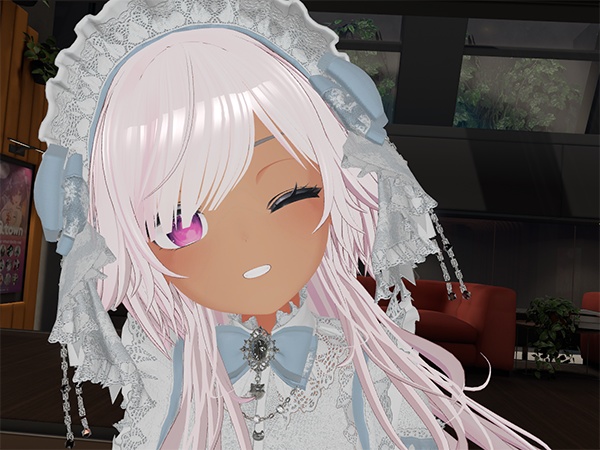
説明用のスクリーンショットと予め設定されてある初期位置、動作確認はポンデロニウム研究所様の「しなの」を利用させていただきました。
[EN]
First of all, I would like to thank Dismay for bringing the wonderful base product to the world.
I would also like to thank my friends and group users who helped me with the gimmick experiments.
I used Ponderonium Laboratory's "Shinano" for the screenshots, the preset initial positions, and the operation check.
[Ponderonium Laboratory] "Shinano" -SHINANO-
https://ponderogen.booth.pm/items/6106863
【ポンデロニウム研究所様】『しなの』-SHINANO-
https://ponderogen.booth.pm/items/6106863
更新履歴
2025/05/18 初期バージョン
[EN]
2025/05/18 Initial Version
모든 리뷰
더보기리뷰 등록
리뷰를 작성하려면 로그인이 필요합니다.
로그인하고 리뷰 쓰기