'%3e%3cg%20clip-path='url(%23roundHexB)'%3e%3cpath%20fill='%236D5DFC'%20d='M256%2040%20443%20148%20443%20364%20256%20472%2069%20364%2069%20148Z'/%3e%3cpath%20fill='%239C93FB'%20d='M69%20148%20256%2040%20443%20148%20256%20256Z'/%3e%3cpath%20fill='%234A3FD1'%20d='M256%20256%20443%20148%20443%20364%20256%20472Z'/%3e%3c/g%3e%3c!--%20top%20face:%20filled%20round%20magnifier%20--%3e%3cg%20transform='matrix(0.8660254,-0.5,0.8660254,0.5,69,148)'%3e%3cg%20transform='matrix(0.935,0,0,0.935,7.02,7.02)'%3e%3ccircle%20cx='88'%20cy='88'%20r='52'%20fill='%23FFFFFF'/%3e%3ccircle%20cx='88'%20cy='88'%20r='28'%20fill='%239C93FB'/%3e%3cpath%20d='M124%20124%20164%20164'%20stroke='%23FFFFFF'%20stroke-width='26'%20stroke-linecap='round'/%3e%3c/g%3e%3c/g%3e%3cg%20transform='matrix(0.8660254,0.5,0,1,69,148)'%3e%3cpath%20d='M96.1,61.08%20L45.9,128.92%20Q34,145%2054,145%20L162,145%20Q182,145%20170.1,128.92%20L119.9,61.08%20Q108,45%2096.1,61.08%20Z'%20fill='%23FFFFFF'/%3e%3c/g%3e%3c!--%20right%20face:%20filled%20bubble%20--%3e%3cg%20transform='matrix(0.8660254,-0.5,0,1,256,256)'%3e%3cg%20transform='matrix(0.855,0,0,0.855,15.66,15.66)'%3e%3cpath%20d='M60%2042H156a28%2028%200%200%201%2028%2028V158Q184%20168%20174.47%20164.96L124.53%20149.04Q115%20146%20105%20146H60a28%2028%200%200%201-28-28V70a28%2028%200%200%201%2028-28Z'%20fill='%23FFFFFF'/%3e%3c/g%3e%3c/g%3e%3c/g%3e%3c/svg%3e)
 三号スタジオ / Sangou Studio
 【VRChat】AOShieldContact【MA対応】
상품 설명
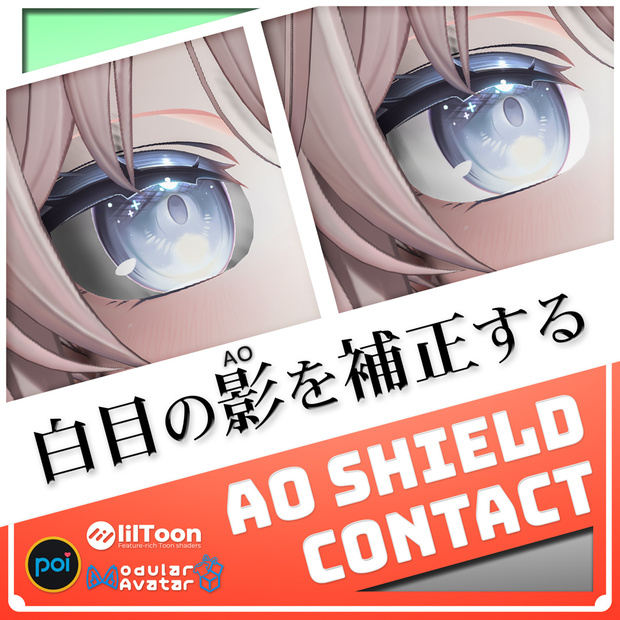
🛡️ 白目の『影(AO)』を補正する
🌍 English below
ワールドによって、白目が黒くなること、ありませんか?
それを防げるコンタクト、作りました。
📣 メディア掲載
メタカル最前線で紹介されました
https://metacul-frontier.com/?p=24124
特集 月刊BOOTH3Dカテゴリ 25年6月号で紹介されました
https://booth.pm/topics/monthly3d_2506
同 2025年総集号にも収録されています
https://booth.pm/topics/monthly3d_2025
📌 主な機能・特徴
■ 白目の影を『補正』
凹んだ白目にワールドのAOがかかると生じる不自然な影をコンタクト状の3Dモデルで自然な形に整えます。
アバター全体でAOをブロックすると、ワールドとの間に合成したような差異が生じますが、部分的な補正によりAOによる立体感を生かすことができます。
■ ワールド内でも、Unity内でも
VRChatのワールド内でも、Unityプロジェクト内でも使用可能。
Unity内で効果を確認できる『サンプルシーン』付き。
■ アバターに合わせて調整可能
90個以上のシェイプキーにより多くのアバターで使用可能です。
オプションで特定のアバター向けにあらかじめ調整したPrefabのセットもありますが、一覧に無いアバターでも、本アセットは調整してお使いいただけます。
■ Poiyomi、lilToon、どちらでも
両方のマテリアルが入っています。すでに使っている方を選べるので、この商品のために別のシェーダーを入れる必要はありません。
━━━━━━━━━━━━━━━━━━━━━━━━━━━━━━
※ ワールドのポストプロセスは、VRChatのAndroid版・iOS版(Quest単体・スマートフォン等)ではVRChatの仕様で無効化されます。補正の対象となるAOの影は、PC版でのみ発生します。
━━━━━━━━━━━━━━━━━━━━━━━━━━━━━━
🖥️ 動作環境・必要なアセット
■ 必須アセット
・Modular Avatar
https://modular-avatar.nadena.dev/ja
・lilToon
https://booth.pm/ja/items/3087170
・Poiyomi Toon Shader
https://poiyomi.booth.pm/items/4841309
※ PoiyomiとlilToonのどちらか一方だけで使用できます
■ 動作確認環境
・Windows 11
・VRChat(PC / Windows)
・Unity 2022.3.22f1
・VRChat SDK 3.10.4
・Modular Avatar 1.18.7
・Poiyomi Toon Shader 9.3.64
・lilToon 2.3.4
📁 製品内容・仕様
■ 入っているもの
・コンタクト用3Dモデル
・マテリアル(Poiyomi Toon Shader)
・マテリアル(lilToon)
・AOShieldContactの有効と無効を切り替えるギミック
・UnityでAOの効果を確認できるサンプルシーンとモデル等
・Unity用ツール MirrorTransformEditor
【MirrorTransformEditor について】
Unityエディタ上でオブジェクトの座標・回転・スケールを反転コピーできる便利な自作ツールです。左右対称な設定やトランスフォームの調整を素早く行えます。
テスト済みですが、動作の保証は行っておりません。
本体とは別のUnitypackageに分かれています。不要な場合はインポートせず、手動または他の方法で導入してください。
■ 仕様
・三角形面:およそ928
・マテリアル数:1
・スキンメッシュ数:1
・同期パラメーター:1bit
⚠️ ご購入前の注意
【 必ずお読みください 】
・『凹型の白目』を持つアバター向けです。
・『ワールドの』ポストプロセスによるアンビエントオクルージョン向けです。また、それを無効化するものではありません。
・全てのアバターへの対応は保証できません。
・アバターの頭部や表情パーツで透過マテリアルが使用されている場合、正しく描画されないことがあります。調整例は導入方法の動画の最後にあります。
・ワールドや環境によっては効果が不十分だったり描画が乱れたりする可能性があります。
・画像や動画に写っている当商品以外のアバターやアセットは付属しません。
■ お問い合わせ
・不具合報告はBOOTHのメッセージ機能からお願いします。
・全てに対応できるとは限りません。あらかじめご了承ください。
・ツール・アプリケーションの使用方法や改変に関する個別の質問にはお答えできません。
■ その他
・本商品はダウンロード販売です。返品・返金・交換には対応できません。
・多言語で表現されている場合、日本語版を優先します。
・導入前にUnityプロジェクトを必ずバックアップしてください。
━━━━━━━━━━━━━━━━━━━━━━━━━━━━━━
※必ず事前に『利用規約』をご確認いただき、同意の上でご購入ください。
━━━━━━━━━━━━━━━━━━━━━━━━━━━━━━
🗒️ 導入・操作手順
■ 導入手順概要
1. Prefabをアバターに配置します。
2. 左目用コンタクトをアバターの目に合わせて調整します。
3. 目を閉じた状態でコンタクトがはみ出さないか確認します。
4. 右目用のコンタクトに同梱のMirrorTransformEditorで位置と回転を反転コピーします。
5. コンタクトのマテリアルを変更します。
詳しくは、ページ下部の『導入方法の動画』をご覧ください。
■ 説明書
https://docs.sangoustudio.com/AOShieldContact/
📄 利用規約 / Terms of Use
三号スタジオ アバター向けアセット利用規約 第1.0版
https://legal.sangoustudio.com/asset/
本規約は、あしやまひろこ(@hiroko_TB)氏が作成したVN3ライセンス(https://www.vn3.org/ )のテンプレートを使用しています。
🧩 オプション(別売)
【アバターセミ対応パッケージ】
Unityでアバターごとに調整したAOShieldContactのPrefabのセットです。
未改変なら『置くだけ』で導入完了。
顔つきを改変済みでも調整のベースにすることで、手間を減らすことができます。
・使用にはAOShieldContact本体が必要です。
・シェイプキーは「まばたき用」のみ干渉を確認しています。多少はみ出ても大きな問題はないため、他のシェイプキーでは確認していません。
・ハイライトなどのパーツがコンタクトからはみ出ている場合がありますが、実用上問題はありません。
・マテリアルはlilToon版が標準で適用されています。
👤 このパッケージが対応するアバター(五十音順)
愛莉 / Airi
ウォルフラム / Wolfram
エク / Eku
輝夜 / Kaguya
桔梗 / Kikyo
キプフェル / Kipfel
しお / Sio
しなの / Shinano
セレスティア / Selestia
ソフィナ / Sophina
ネモ / Nemo
ひきくまりのクマリ / Kumaly
プラム / Plum
墨惺 / Bokusei
マヌカ / Manuka
まめひなた / Mamehinata
まよ / Mayo
マロン / Marron
海咲 / Misaki
瑞希 / Mizuki
ミュオン/ Muon
ミルティナ / Milltina
ミルフィ/ Milfy
萌 / Moe
ラシューシャ / Lasyusha
リフレイン / Refrain
ルキフェル / Lucifer
ルミナ / Lumina
ルルネ / rurune
ルルリア / Luruleah
ワラビ / Warabi
New NecoMaid
🕰️ 更新履歴
【本体】
2026/09/04 1.0.1、対応確認、readmeを刷新、説明書をウェブページへ移行
2026/09/01 商品情報の一部変更(規約変更を告知など)
2026/01/08 1.0.0、対応確認、フォルダ構成変更、バージョン表記変更
2025/05/20 005、対応確認、Poiyomi Toon版の修正
2025/05/20 004、Poiyomi Toon版を修正
2025/05/15 003、lilToonに対応
2025/05/13 002、Fallback Shaderを変更
2025/05/12 001、公開
【オプション:アバターセミ対応パッケージ】
2026/09/04 1.1.0、7アバター対応、readmeを刷新、説明書をウェブページへ移行
2026/01/08 1.0.1、ひきくまりのクマリ対応
2026/01/08 1.0.0、公開
🏷️ 推奨するハッシュタグ
#AOShieldContact #SangouStudio
🌐 English
【Overview】
Does the white of your eye look dark in some worlds?
This is a contact-lens-shaped 3D model that fixes it.
A concave eye white catches the world's ambient occlusion (AO) and takes on an unnatural, sunken-looking shadow. Placing this model over it reshapes that shadow into a natural one.
It does not turn AO off, so the depth AO gives your face is kept.
【Key features】
■ Corrects the shadow instead of blocking it
Blocking AO on the whole avatar makes you look pasted onto the world. This corrects only the part that needs it, so the sense of depth from AO remains.
■ Works in a world, and in Unity
Usable inside VRChat worlds and inside a Unity project. A sample scene for checking the effect in Unity is included.
■ Over 90 blendshapes, so it fits many avatars
Adjust it to your avatar with the blendshapes. There is also a separate paid option with Prefabs pre-adjusted for specific avatars, but avatars not on that list can still be adjusted by hand.
■ Poiyomi or lilToon, whichever you already use
Materials for both are included, so you do not have to add a shader just for this product.
* The world's post processing is disabled by VRChat on Android and iOS (standalone Quest, smartphones, and so on). The AO shadow this product corrects only occurs on the PC version.
【Please read before purchase】
・For avatars whose eye whites are concave.
・For ambient occlusion from the world's post processing. It does not disable AO.
・Not all avatars can be supported.
・If a transparent material is used on the head or face parts, it may not render correctly. An example adjustment is shown at the end of the installation video.
・Depending on the world or the environment, the effect may be insufficient or the rendering may break.
・The avatars and assets shown in the images and videos are not included.
・This is a digital download. Returns, refunds and exchanges are not available.
・Where several languages are given, the Japanese version takes precedence.
・Back up your Unity project before installing.
【Required assets】
・Modular Avatar
・lilToon
・Poiyomi Toon Shader
* Either lilToon or Poiyomi is enough. You do not need both.
【Tested environment】
・Windows 11
・VRChat (PC / Windows)
・Unity 2022.3.22f1
・VRChat SDK 3.10.4
・Modular Avatar 1.18.7
・Poiyomi Toon Shader 9.3.64
・lilToon 2.3.4
【What you get / specifications】
・Contact 3D model
・Material (Poiyomi Toon Shader)
・Material (lilToon)
・A gimmick that turns AOShieldContact on and off
・A sample scene and models for checking the AO effect in Unity
・MirrorTransformEditor, a Unity editor tool
It mirrors position, rotation and scale in the Unity editor. It has been tested, but its operation is not guaranteed. It comes as a separate unitypackage, so you can simply not import it if you do not need it.
Triangles: about 928 / Materials: 1 / Skinned meshes: 1 / Synced parameters: 1 bit
【Option, sold separately】
"Avatar Semi-Support Package" — a set of Prefabs adjusted for individual avatars.
AOShieldContact itself is required. The supported avatars are listed above under 🧩.
【Manual】
The manual also contains the installation steps.
https://docs.sangoustudio.com/AOShieldContact/en/
【Terms of Use】
Sangou Studio Avatar Asset Terms of Use, Version 1.0
https://legal.sangoustudio.com/asset/
The Japanese version is the official text. Versions in other languages (for reference) are on the page above.
【Contact】
Please report problems through the BOOTH message function. We cannot promise to answer everything, and we cannot answer individual questions about how to use or modify tools and applications.
紹介用の動画
導入方法の動画
📋 クレジット
オリジナル3Dモデル「愛莉」 キュビ
https://booth.pm/ja/items/6082686
VRChat向けオリジナル3Dモデル「Wolfram」Quest Resonite対応 FLASTORE
https://booth.pm/ja/items/5769373
【オリジナル3Dモデル】エク - Eku #Eku3D ©sep-neko-ya, septem47
https://booth.pm/ja/items/7328764
九尾オリジナル3Dモデル「輝夜」-kaguya- ©Paryi
https://paryi.booth.pm/items/8562330
オリジナル3Dモデル「桔梗」 @ぽんでろ
https://booth.pm/ja/items/3681787
キプフェル Kipfel / オリジナル3Dモデル ©もち山金魚
https://booth.pm/ja/items/5813187
【オリジナル3Dモデル】 Sio / しお ©Chocolate_rice
https://booth.pm/ja/items/5650156
オリジナル3Dモデル「しなの」 @ぽんでろ
https://booth.pm/ja/items/6106863
オリジナル3Dモデル「セレスティア」 ©ジンゴ
https://booth.pm/ja/items/4035411
ギミック搭載オリジナル3Dモデル「ソフィナ-Sophina-」 ©2022 Luku me
https://booth.pm/ja/items/4044305
VRChat向けオリジナル3Dモデル「Nemo」Quest対応 FLASTORE
https://booth.pm/ja/items/6855392
プラム -Plum-【オリジナル3Dモデル】 ©komado
https://booth.pm/ja/items/7770415
【オリジナル3Dモデル】墨惺 ©ROKO SHOP
https://booth.pm/ja/items/5727810
オリジナル3Dモデル「マヌカ」 ©ジンゴ
https://booth.pm/ja/items/5058077
まめひなた Mamehinata / オリジナル3Dモデル ©もち山金魚
https://booth.pm/ja/items/4340548
【オリジナル3Dモデル】 Mayo / まよ ©Chocolate_rice
https://chocolaterice.booth.pm/items/8122803
オリジナル3Dモデル『マロン』 ©長兎路こより
https://nagatorokoyori.booth.pm/items/1105063
【オリジナル3Dモデル】海咲-Misaki- VISIONTOKYO
https://visiontokyo.booth.pm/items/8325804
オリジナル3Dモデル「瑞希」メニューギミック搭載 ©Paryi
https://booth.pm/ja/items/5132797
オリジナル3Dモデル『ミルティナ』 @DOLOS_VRChat
https://booth.pm/ja/items/6538026
ミルフィ Milfy / オリジナル3Dモデル ©有坂みと
https://booth.pm/ja/items/6571299
VRChat向けオリジナル3Dモデル「ミュオン」Resonite対応 FLASTORE
https://booth.pm/ja/items/4613679
オリジナル3Dモデル「萌」 キュビ
https://booth.pm/ja/items/4667400
【オリジナル3Dモデル】Lasyusha〈ラシューシャ〉 Keenoo
https://booth.pm/ja/items/4825073
オリジナル3Dモデル 『Refrain -リフレイン-』 びきたん
https://bbkktn.booth.pm/items/3450381
オリジナル3Dモデル 「ルキフェル -Lucifer-」 #Lucifer3D Cなっふな堂 香坂もち
https://nyahuuu.booth.pm/items/4358123
オリジナル3Dアバター『ルミナ - LUMINA』 EXTENSION CLOTHING
https://extension.booth.pm/items/7502898
サメっ子オリジナル3Dモデル「rurune」-ルルネ- ©Paryi
https://booth.pm/ja/items/5957830
オリジナル3Dモデル「ルルリア-Luruleah-」#Luruleah3D Cなっふな堂 香坂もち
https://nyahuuu.booth.pm/items/3708060
VRChat向けオリジナル3Dモデル「Warabi」 FLASTORE
https://booth.pm/ja/items/5517146
【オリジナル3Dモデル】New NecoMaid QuQu
https://sonovr.booth.pm/items/4252664
オリジナル3Dモデル「ひきくまりのクマリ」 ©ジンゴ
https://booth.pm/ja/items/7928592
AOシールドコンタクト エーオーシールドコンタクト えーおーしーるどこんたくと AOコンタクト エーオーコンタクト
모든 리뷰
더보기리뷰 등록
리뷰를 작성하려면 로그인이 필요합니다.
로그인하고 리뷰 쓰기