'%3e%3cg%20clip-path='url(%23roundHexB)'%3e%3cpath%20fill='%236D5DFC'%20d='M256%2040%20443%20148%20443%20364%20256%20472%2069%20364%2069%20148Z'/%3e%3cpath%20fill='%239C93FB'%20d='M69%20148%20256%2040%20443%20148%20256%20256Z'/%3e%3cpath%20fill='%234A3FD1'%20d='M256%20256%20443%20148%20443%20364%20256%20472Z'/%3e%3c/g%3e%3c!--%20top%20face:%20filled%20round%20magnifier%20--%3e%3cg%20transform='matrix(0.8660254,-0.5,0.8660254,0.5,69,148)'%3e%3cg%20transform='matrix(0.935,0,0,0.935,7.02,7.02)'%3e%3ccircle%20cx='88'%20cy='88'%20r='52'%20fill='%23FFFFFF'/%3e%3ccircle%20cx='88'%20cy='88'%20r='28'%20fill='%239C93FB'/%3e%3cpath%20d='M124%20124%20164%20164'%20stroke='%23FFFFFF'%20stroke-width='26'%20stroke-linecap='round'/%3e%3c/g%3e%3c/g%3e%3cg%20transform='matrix(0.8660254,0.5,0,1,69,148)'%3e%3cpath%20d='M96.1,61.08%20L45.9,128.92%20Q34,145%2054,145%20L162,145%20Q182,145%20170.1,128.92%20L119.9,61.08%20Q108,45%2096.1,61.08%20Z'%20fill='%23FFFFFF'/%3e%3c/g%3e%3c!--%20right%20face:%20filled%20bubble%20--%3e%3cg%20transform='matrix(0.8660254,-0.5,0,1,256,256)'%3e%3cg%20transform='matrix(0.855,0,0,0.855,15.66,15.66)'%3e%3cpath%20d='M60%2042H156a28%2028%200%200%201%2028%2028V158Q184%20168%20174.47%20164.96L124.53%20149.04Q115%20146%20105%20146H60a28%2028%200%200%201-28-28V70a28%2028%200%200%201%2028-28Z'%20fill='%23FFFFFF'/%3e%3c/g%3e%3c/g%3e%3c/g%3e%3c/svg%3e)
 Apathy Shop
상품 설명
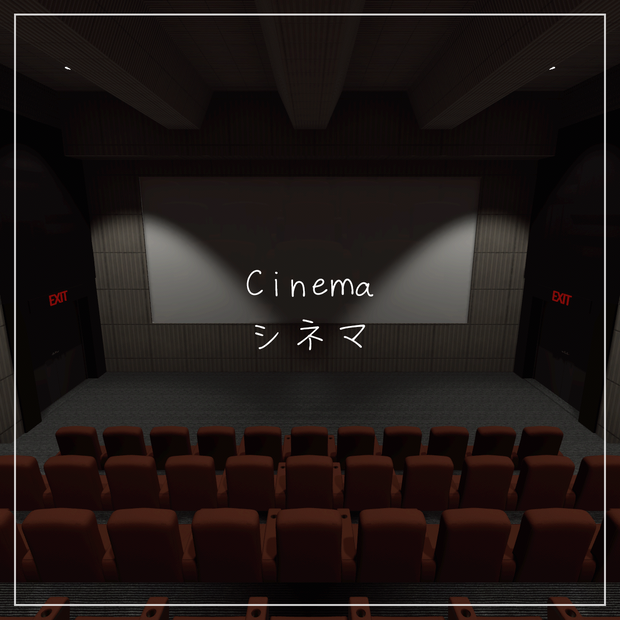
Simple Cinema
シンプルシネマ
Cinema | シネマ Demo
https://vrchat.com/home/world/wrld_1c60f5f2-45ff-4844-a4d3-ca4a6200b4a2
Unity Scene has Post-processing.
Unity シーンにはポストプロセスがあります。
This asset contains a cinema prefab and some decorations.
このアセットには、映画館のプレハブといくつかの装飾が含まれています。
Installation:
1) Download VCC from the VRchat website
https://vrchat.com/download/vcc
2) Install VRChat Creator Companion (VCC) and Install Unity version 2022.3.22f1 by following the VCC Instruction
3) Create a new project in VCC and choose the template Unity 2022 World Project
4) Import the Unity Package inside Unity and open the "Cinema" Unity scene
5) Set up Layers for VRchat in the Control Panel on the VRchatSDK tab
6) Build and upload it into your VRC account
インストール:
1) VRchat ウェブサイトから VCC をダウンロードします
https://vrchat.com/download/vcc
2) VRChat Creator Companion (VCC) をインストールし、VCC の手順に従って Unity バージョン 2022.3.22f1 をインストールします
3) VCC で新しいプロジェクトを作成し、テンプレート Unity 2022 World Project を選択します
4) Unity 内で Unity パッケージをインポートし、「Cinema」Unity シーンを開きます
5) コントロール パネルの VRchatSDK タブで VRchat のレイヤーを設定します
6) ビルドして VRC アカウントにアップロードします
Terms of use:
- You're not allowed to redistribute this product in any way
- You can modify, recolor, or make it compatible with Quest on the assets.
- You cannot resell the assets.
- You can be uploaded as a public VRChat World.
利用規約
- この製品の再配布は一切禁止されています。
- アセット上のQuestを修正、再カラーリング、互換性を持たせることは可能です。
- アセットを転売することはできません。
- 公開VRChatワールドとしてアップロードできます。
Created using textures from ambientCG.com,
licensed under the Creative Commons CC0 1.0 Universal License.
ambientCG.comのテクスチャを使用して作成、
クリエイティブ・コモンズ CC0 1.0 ユニバーサル・ライセンスの下でライセンスされています。
(Using DeepL for Translation | 翻訳にDeepLを使用)
모든 리뷰
더보기리뷰 등록
리뷰를 작성하려면 로그인이 필요합니다.
로그인하고 리뷰 쓰기