'%3e%3cg%20clip-path='url(%23roundHexB)'%3e%3cpath%20fill='%236D5DFC'%20d='M256%2040%20443%20148%20443%20364%20256%20472%2069%20364%2069%20148Z'/%3e%3cpath%20fill='%239C93FB'%20d='M69%20148%20256%2040%20443%20148%20256%20256Z'/%3e%3cpath%20fill='%234A3FD1'%20d='M256%20256%20443%20148%20443%20364%20256%20472Z'/%3e%3c/g%3e%3c!--%20top%20face:%20filled%20round%20magnifier%20--%3e%3cg%20transform='matrix(0.8660254,-0.5,0.8660254,0.5,69,148)'%3e%3cg%20transform='matrix(0.935,0,0,0.935,7.02,7.02)'%3e%3ccircle%20cx='88'%20cy='88'%20r='52'%20fill='%23FFFFFF'/%3e%3ccircle%20cx='88'%20cy='88'%20r='28'%20fill='%239C93FB'/%3e%3cpath%20d='M124%20124%20164%20164'%20stroke='%23FFFFFF'%20stroke-width='26'%20stroke-linecap='round'/%3e%3c/g%3e%3c/g%3e%3cg%20transform='matrix(0.8660254,0.5,0,1,69,148)'%3e%3cpath%20d='M96.1,61.08%20L45.9,128.92%20Q34,145%2054,145%20L162,145%20Q182,145%20170.1,128.92%20L119.9,61.08%20Q108,45%2096.1,61.08%20Z'%20fill='%23FFFFFF'/%3e%3c/g%3e%3c!--%20right%20face:%20filled%20bubble%20--%3e%3cg%20transform='matrix(0.8660254,-0.5,0,1,256,256)'%3e%3cg%20transform='matrix(0.855,0,0,0.855,15.66,15.66)'%3e%3cpath%20d='M60%2042H156a28%2028%200%200%201%2028%2028V158Q184%20168%20174.47%20164.96L124.53%20149.04Q115%20146%20105%20146H60a28%2028%200%200%201-28-28V70a28%2028%200%200%201%2028-28Z'%20fill='%23FFFFFF'/%3e%3c/g%3e%3c/g%3e%3c/g%3e%3c/svg%3e)
 SaragusDigital
 アニメーション配信背景&オーバーレイ、VTuber・ストリーマー向けステージライトエフェクト、DJ・カラオケ・歌手向けビデオループ / Animated Stream Backgrounds and Overlays, Stage Light Effects for Vtuber, Streamer, Video Loops for DJ, Karaoke, Singer
상품 설명
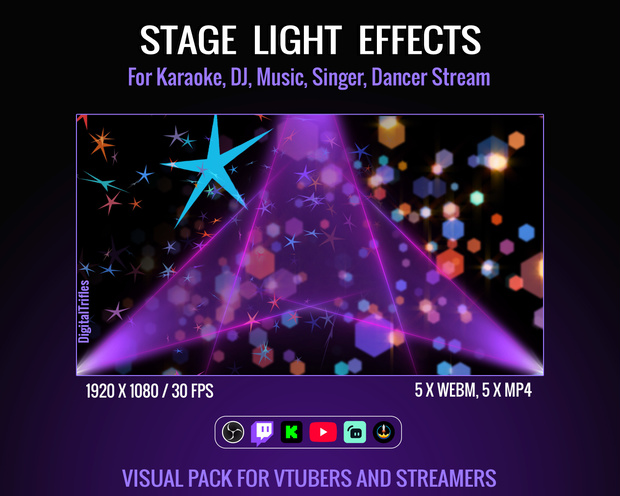
Animated stream package of stage light effects. Ready to use video loops, easy to install, and customizable in OBS Studio. Whether you're a Twitch streamer, VTuber, DJ, VJ, singer, or dancer, these animated overlays and backgrounds will instantly upgrade your visual presence.
Want your audience to feel like they’re at a live show? These loops are made for creators who perform, not just stream. Let your visuals work with your music — and turn every stream into a show.
ストリーマー向けステージライトエフェクト
✅ What’s Included:
Format: 5 WEBM files with transparency and 5 MP4 files, 6-12 sec., in ZIP archives
Resolution: HD 1920 x 1080
Loop Type: Seamless, perfect for continuous playback
✅ Made for Music-Focused Streamers and VTubers:
🎧 DJ and VJ performances or music sets
🎤 Karaoke, vocal covers, and livestream concerts
🕺💃 Dance or choreography content
🎭 Fits any vibe: pop, rock, EDM, lo-fi, J-pop, trippy and more
🌟Stage backgrounds
✅ Perfect for:
Twitch, YouTube streams
VTuber intros and stage scenes
Virtual concerts & karaoke parties
✅ Easy Use in OBS Studio:
Just drop loops into your scenes and trigger them live with hotkeys
➤ Drag and drop the loop into your scene in OBS studio. Alternatively, click the "+" button in the "Sources" menu, select "Media Source" in the dropdown menu. You can scale the background as needed. No plugins or extra software needed
➤ Don't forget to enable "loop" option to make it seamless
➤ Assign to hotkeys for real-time control
➤ To make the overlay as visually impactful as possible, use an appropriate blending mode: right-click on the overlay layer and, in the menu that opens, select "Blending Mode." Then, choose either “Normal”, "Add" or "Screen". It will be better if you use a dark background for transparent WEBM files
➤ You can also adjust the overlay's opacity to suit your preferences and creative vision. To do this, right-click on the overlay layer, select "Filters," then click the "+" button to add the "Colour Key" filter. Use it to fine-tune the transparency
➤ You can speed up the playback to match your music track
➤ Mix and match the light effects in any combination. Don’t be afraid to experiment!
重要なお知らせ 利用規約
- これはデジタル商品です。物理的な製品は発送されません。
- 購入後、デジタル形式の画像が提供されます。
- デジタル商品のため、返品、交換、またはキャンセルは受け付けていません。
- お使いのモニターにより、色の見え方が異なる場合がございます。
- 素材または素材を編集・加工したものの2次配布、販売不可
모든 리뷰
더보기리뷰 등록
리뷰를 작성하려면 로그인이 필요합니다.
로그인하고 리뷰 쓰기