'%3e%3cg%20clip-path='url(%23roundHexB)'%3e%3cpath%20fill='%236D5DFC'%20d='M256%2040%20443%20148%20443%20364%20256%20472%2069%20364%2069%20148Z'/%3e%3cpath%20fill='%239C93FB'%20d='M69%20148%20256%2040%20443%20148%20256%20256Z'/%3e%3cpath%20fill='%234A3FD1'%20d='M256%20256%20443%20148%20443%20364%20256%20472Z'/%3e%3c/g%3e%3c!--%20top%20face:%20filled%20round%20magnifier%20--%3e%3cg%20transform='matrix(0.8660254,-0.5,0.8660254,0.5,69,148)'%3e%3cg%20transform='matrix(0.935,0,0,0.935,7.02,7.02)'%3e%3ccircle%20cx='88'%20cy='88'%20r='52'%20fill='%23FFFFFF'/%3e%3ccircle%20cx='88'%20cy='88'%20r='28'%20fill='%239C93FB'/%3e%3cpath%20d='M124%20124%20164%20164'%20stroke='%23FFFFFF'%20stroke-width='26'%20stroke-linecap='round'/%3e%3c/g%3e%3c/g%3e%3cg%20transform='matrix(0.8660254,0.5,0,1,69,148)'%3e%3cpath%20d='M96.1,61.08%20L45.9,128.92%20Q34,145%2054,145%20L162,145%20Q182,145%20170.1,128.92%20L119.9,61.08%20Q108,45%2096.1,61.08%20Z'%20fill='%23FFFFFF'/%3e%3c/g%3e%3c!--%20right%20face:%20filled%20bubble%20--%3e%3cg%20transform='matrix(0.8660254,-0.5,0,1,256,256)'%3e%3cg%20transform='matrix(0.855,0,0,0.855,15.66,15.66)'%3e%3cpath%20d='M60%2042H156a28%2028%200%200%201%2028%2028V158Q184%20168%20174.47%20164.96L124.53%20149.04Q115%20146%20105%20146H60a28%2028%200%200%201-28-28V70a28%2028%200%200%201%2028-28Z'%20fill='%23FFFFFF'/%3e%3c/g%3e%3c/g%3e%3c/g%3e%3c/svg%3e)
 F/A インダストリーズ
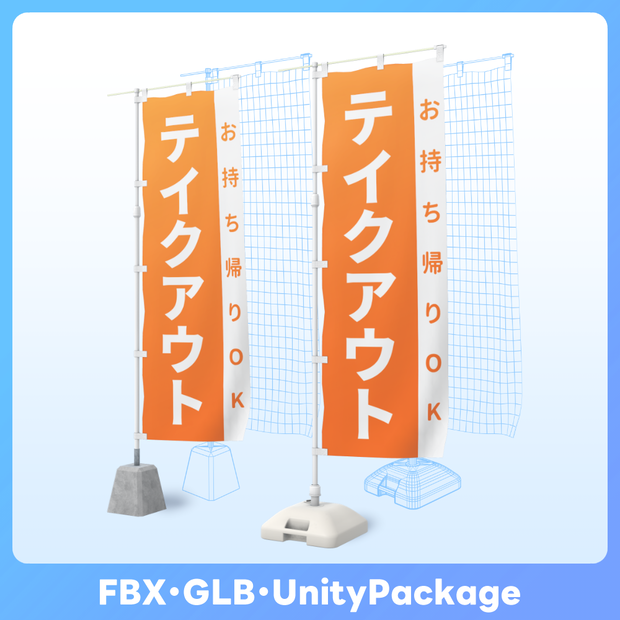
 【FBX GLB】情報量が多い のぼり旗 nobori flag set
상품 설명
土台(タンク・コンクリート)
スタンド
旗(テクスチャ57種)
がセットになったのぼり旗。
途中で筆が乗ってしまい旗のデザインが57種類にもなってしまいました。
街や神社など、色々な場所で使えると思いますのでぜひワールド内に散りばめてみてください。
FBX(Standard Unlitシェーダー) に加えてGLBモデルを同梱していますので、VRM撮影アプリに読み込んだり、武器としても使えます。
◆バリエーションについて
Standard Ver.
→通常の商品です
個人による画像や動画の投稿、配信・VRプラットフォームでの活動などに利用できます。私的・営利利用が可能です。
Boost Ver.
→内容が同一の支援バージョンです
可能であれば応援していただけると励みになります✨️
また、アプリ・ゲーム等への組み込みが可能となります。
※個人によるソフト・ゲーム等への組み込みに利用する場合はこちらをご購入ください。必ず規約にある利用条件をご確認ください。
Corporate Ver.
→全てのバリエーションが同梱された、法人などの企業や団体で利用できるバージョンです。
※企業や団体などの組織内での使用や共有および組み込み用途で利用する場合は、こちらをご購入ください。また、利用事例の報告義務はありませんが、どのように活用いただけるか教えていただけると嬉しいです。
◆内容
UnityPackage
(マテリアルstandard,Unlit設定済み・Standard/UnlitベースのCullOffシェーダー同梱)
・nobori_flag.unitypackage
Prefab
※◯◯の部分はconcrete、tankのいずれかが入ります
※配下のディレクトリにあるUnlit版も下記と同じ仕様になります
・Nobori_cloth_〇〇
→clothコンポーネント設定済
・Nobori_physbone_rigged_〇〇
→physbone設定済
・Nobori_static_〇〇
→固定 マテリアル設定済
・Nobori_wavy_〇〇
→波型 マテリアル設定済
FBX
・nobori_base_concrete.fbx
・nobori_base_tank.fbx
・nobori_flag_cloth.fbx
・nobori_flag_rigged.fbx
・nobori_flag_static.fbx
・nobori_flag_wavy.fbx
・nobori_stand.fbx
GLB(〇〇部分は旗の差分が入ります)
・concrete_〇〇.glb
・tank_〇〇.glb
テクスチャ
・Diffuse
・Normal
・Unlit
・flag
◆仕様
※マテリアル、テクスチャは各カラーあたりの数
※土台2種・スタンドのマテリアルは共通
【土台・スタンド】
タンク
Tris:1,886
コンクリート
Tris:102
スタンド
Tris:1,404
使用マテリアル数:1
テクスチャ数
Diffuse:1
Normal:1
【旗】
static (固定、平面)
Tris:2
wavy (固定、なびいた形状)
Tris:1,024
cloth (clothコンポーネント用)
Tris:1,024
rigged (physボーン用)
Tris:256
ボーン数:3
使用マテリアル数:1
テクスチャ数:
Diffuse:1
◆利用方法
[unitypackage,FBX]
,unitypackageをUnityにインポートし、PrefabファイルやFBXをシーン内に配置・調整してください
デフォルトでは同梱のCullOffシェーダーを割り当てておりますので、必要に応じて任意のシェーダー・マテリアルに設定、調整してください。
[GLB]
付属の.glbファイルを対応するソフトウェアやアプリにインポートしてください。
[改変する場合]
Textures→UVsフォルダに含まれるDiffuseやAO、UVマップをご活用ください。
旗部分のテクスチャをオリジナルデザインなどに変更する場合は1:3の画像を用意して同梱のUVマップに合わせて配置してください。
◆Japanese-style "Nobori" flag set.
The set includes:
Base (Tank, Concrete)
Stand
Flag (57 texture variations)
The flag design ended up with 57 different variations due to the brushstrokes getting a bit carried away along the way.
Feel free to scatter them throughout worlds like streets or other environments!
◆About Variations
Standard Ver.
→ This is the regular product.
Boost Ver.
→ This is a support version with identical content.
Your support would be greatly appreciated if possible! ✨️
Please purchase this version if you are an individual using it for embedding in software, games, etc.
Corporate Ver.
→ This version includes all variations and is intended for use within corporations or organizations.
If you plan to use, share, or embed it within a company, organization, or similar entity, please purchase this version.
◆ Specifications
Material and Texture count for each color variant
The base materials for the two types of stands are the same.
[Base & Stand]
Tank
Tris: 1,886
Concrete
Tris: 102
Stand
Tris: 1,404
Material count: 1
Texture count:
Diffuse: 1
Normal: 1
[Flag]
Static (Fixed, flat)
Tris: 2
Wavy (Fixed, fluttering shape)
Tris: 1,024
Cloth (For cloth component)
Tris: 1,024
Rigged (For physics bone)
Tris: 256
Bone count: 3
Material count: 1
Texture count:
Diffuse: 1
◆Included
UnityPackage
(Materials: Standard, Unlit settings; includes Standard/Unlit-based CullOff shaders)
・nobori_flag.unitypackage
FBX
・nobori_base_concrete.fbx
・nobori_base_tank.fbx
・nobori_flag_cloth.fbx
・nobori_flag_rigged.fbx
・nobori_flag_static.fbx
・nobori_flag_wavy.fbx
・nobori_stand.fbx
GLB (The "〇〇" part indicates the variation of the flag)
・concrete_〇〇.glb
・tank_〇〇.glb
Textures
・Diffuse
・Normal
・Unlit
・Flag
◆How to Use
[Unitypackage]
Import the .unitypackage into Unity and place the FBX or Prefab into the scene. The flag object has the included StandardCullOff and Unlit/TextureCullOff shaders assigned, but you can use or adjust materials as needed for your application.
[FBX, GLB]
Import into your preferred compatible application or software.
[For Modification]
Please use the Diffuse, AO, and UV maps included in the Textures → UVs folder.
If you want to change the flag texture to an original design or other modification, prepare an image with a 1:3 aspect ratio and place it according to the included UV map
利用規約
購入およびダウンロード前に下記のリンク先にある利用規約をご確認ください。
『F/Aインダストリーズ』配布・販売データに関する利用規約 - pixivFANBOX
→ https://faindustries.fanbox.cc/posts/3586042
Terms of Use
Please review the Terms of Use available at the following link before purchasing or downloading.
[ENG]Terms of Use for "F/A Industries" Distribution and Sales Assets - pixivFANBOX
모든 리뷰
더보기리뷰 등록
리뷰를 작성하려면 로그인이 필요합니다.
로그인하고 리뷰 쓰기