'%3e%3cg%20clip-path='url(%23roundHexB)'%3e%3cpath%20fill='%236D5DFC'%20d='M256%2040%20443%20148%20443%20364%20256%20472%2069%20364%2069%20148Z'/%3e%3cpath%20fill='%239C93FB'%20d='M69%20148%20256%2040%20443%20148%20256%20256Z'/%3e%3cpath%20fill='%234A3FD1'%20d='M256%20256%20443%20148%20443%20364%20256%20472Z'/%3e%3c/g%3e%3c!--%20top%20face:%20filled%20round%20magnifier%20--%3e%3cg%20transform='matrix(0.8660254,-0.5,0.8660254,0.5,69,148)'%3e%3cg%20transform='matrix(0.935,0,0,0.935,7.02,7.02)'%3e%3ccircle%20cx='88'%20cy='88'%20r='52'%20fill='%23FFFFFF'/%3e%3ccircle%20cx='88'%20cy='88'%20r='28'%20fill='%239C93FB'/%3e%3cpath%20d='M124%20124%20164%20164'%20stroke='%23FFFFFF'%20stroke-width='26'%20stroke-linecap='round'/%3e%3c/g%3e%3c/g%3e%3cg%20transform='matrix(0.8660254,0.5,0,1,69,148)'%3e%3cpath%20d='M96.1,61.08%20L45.9,128.92%20Q34,145%2054,145%20L162,145%20Q182,145%20170.1,128.92%20L119.9,61.08%20Q108,45%2096.1,61.08%20Z'%20fill='%23FFFFFF'/%3e%3c/g%3e%3c!--%20right%20face:%20filled%20bubble%20--%3e%3cg%20transform='matrix(0.8660254,-0.5,0,1,256,256)'%3e%3cg%20transform='matrix(0.855,0,0,0.855,15.66,15.66)'%3e%3cpath%20d='M60%2042H156a28%2028%200%200%201%2028%2028V158Q184%20168%20174.47%20164.96L124.53%20149.04Q115%20146%20105%20146H60a28%2028%200%200%201-28-28V70a28%2028%200%200%201%2028-28Z'%20fill='%23FFFFFF'/%3e%3c/g%3e%3c/g%3e%3c/g%3e%3c/svg%3e)
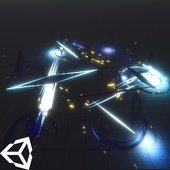
![[VRChat] Crystal Spring Joints](https://booth.pximg.net/c/620x620/74f8961a-5cc1-4084-a2d2-9ad02385a05f/i/6679297/1ee2596f-7f5b-44d5-8581-caf6e62db93e.png)
 yoshimarovfx
상품 설명
[VRChat] Crystal Spring Joints – VFX Pack
💎 A stunning set of 10 animated crystal spring joints for VRChat!
Designed for dynamic, rotating energy effects, this pack includes both standalone crystals and a multi-joint system for up to 10 rotating elements around a central point.
✨ Features:
✅ 10 unique crystal spring joint variations – Each with distinct visual styles.
✅ Standalone Crystals – Use them individually for flexible placements.
✅ Multi-Joint System – A prebuilt setup with up to 10 crystals rotating around a center.
✅ Fully optimized for VRChat – Works on avatars, props, or world effects.
✅ Shuriken-based particle effects – Designed for VRChat’s built-in render pipeline (BIRP).
📥 What’s Included?
📂 10 Crystal Spring Joint Prefabs (Standalone)
📂 Multi-Joint Prefab (Pre-placed empty slots for 10 crystals)
📂 Preconfigured Materials & Animations
Terms of Service
Personal Use Only – Do whatever you want, as long as it’s non-commercial.
Commercial Use? Contact me for licensing: 📩 [email protected]
Disclaimer
Disclaimer: This asset pack does not include, sell, or redistribute any Hatsune Miku assets. Hatsune Miku is used in promotional materials under the guidelines of the Piapro Character License (https://piapro.jp/license/pcl/summary). All rights to Hatsune Miku belong to Crypton Future Media, Inc. This preview video is for demonstration purposes only and is not an endorsement by Crypton Future Media, Inc.
Want to use my asset library to make your own commercial projects? Grab a license here: https://yoshimarovfx.gumroad.com/l/bcpzcr
README
📌 README
🔧 Setup Instructions
1️⃣ Attach a "SPRINGJOINT RIGIDBODY TARGET" (from the YoshimaroVFX Asset Library) to any joint you want to use as the anchor.
2️⃣ Choose your setup:
- Single Crystal Spring Joint: Attach P_CrystalPack_SpringJoint_AllTypes as a child of your avatar’s GameObject.
- Orbiting Crystal Bundle: Attach P_CrystalPack_SpringJoint_OrbittingBundle to your avatar’s GameObject, positioning it at the center where the crystals should orbit.
3️⃣ In the Spring Joint script, set the "Connected Body" parameter to the SPRINGJOINT RIGIDBODY TARGET from Step 1.
4️⃣ Copy the Expression Parameters, Menu, and FX Layer to your avatar using VRCFury (found in the YoshimaroVFX Asset Library) or manually through AV3.
✅ You're all set! Your crystal spring joints should now animate properly in VRChat.
📩 Need help? Contact me at [email protected]
Asset Library
https://yoshimarovfx.gumroad.com/l/bcpzcr
Support Me!
patreon.com/ysmrVFX
모든 리뷰
더보기리뷰 등록
리뷰를 작성하려면 로그인이 필요합니다.
로그인하고 리뷰 쓰기