'%3e%3cg%20clip-path='url(%23roundHexB)'%3e%3cpath%20fill='%236D5DFC'%20d='M256%2040%20443%20148%20443%20364%20256%20472%2069%20364%2069%20148Z'/%3e%3cpath%20fill='%239C93FB'%20d='M69%20148%20256%2040%20443%20148%20256%20256Z'/%3e%3cpath%20fill='%234A3FD1'%20d='M256%20256%20443%20148%20443%20364%20256%20472Z'/%3e%3c/g%3e%3c!--%20top%20face:%20filled%20round%20magnifier%20--%3e%3cg%20transform='matrix(0.8660254,-0.5,0.8660254,0.5,69,148)'%3e%3cg%20transform='matrix(0.935,0,0,0.935,7.02,7.02)'%3e%3ccircle%20cx='88'%20cy='88'%20r='52'%20fill='%23FFFFFF'/%3e%3ccircle%20cx='88'%20cy='88'%20r='28'%20fill='%239C93FB'/%3e%3cpath%20d='M124%20124%20164%20164'%20stroke='%23FFFFFF'%20stroke-width='26'%20stroke-linecap='round'/%3e%3c/g%3e%3c/g%3e%3cg%20transform='matrix(0.8660254,0.5,0,1,69,148)'%3e%3cpath%20d='M96.1,61.08%20L45.9,128.92%20Q34,145%2054,145%20L162,145%20Q182,145%20170.1,128.92%20L119.9,61.08%20Q108,45%2096.1,61.08%20Z'%20fill='%23FFFFFF'/%3e%3c/g%3e%3c!--%20right%20face:%20filled%20bubble%20--%3e%3cg%20transform='matrix(0.8660254,-0.5,0,1,256,256)'%3e%3cg%20transform='matrix(0.855,0,0,0.855,15.66,15.66)'%3e%3cpath%20d='M60%2042H156a28%2028%200%200%201%2028%2028V158Q184%20168%20174.47%20164.96L124.53%20149.04Q115%20146%20105%20146H60a28%2028%200%200%201-28-28V70a28%2028%200%200%201%2028-28Z'%20fill='%23FFFFFF'/%3e%3c/g%3e%3c/g%3e%3c/g%3e%3c/svg%3e)
 VELLIE
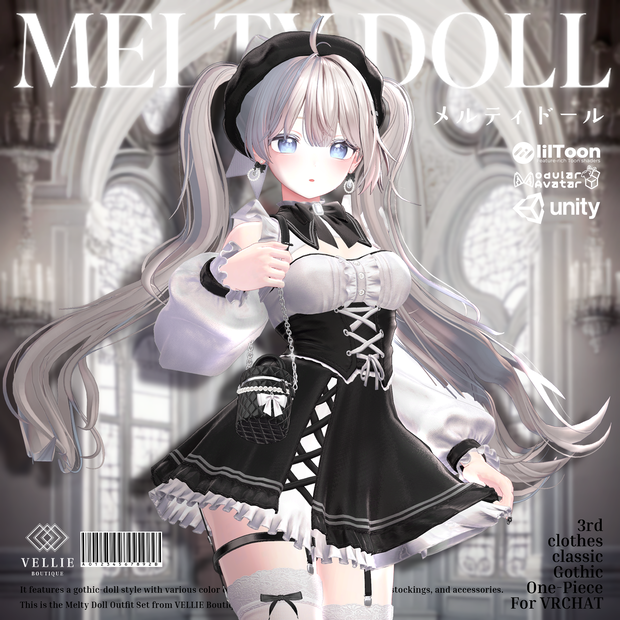
 🎀【VRC 衣装】Melty Doll - Gothic
상품 설명
✨【UPDATE HISTORY】
-2026-03-27
Airi Collar mesh cliping fixed.
-2026-02-13
KUMALY Update
-2025-03-08
*Melty Doll_Milltina_v1.01
Melty Doll Milltinaのメッシュタイツが膝を曲げたときに破れないように修正しました。
*Melty Doll_MaterialPack_v1.01
ブラウスとトップの透明なマテリアル同士が重なった際に、体が透けて見えてしまう問題を修正しました。
-2025-03-09
*ストッキングのリボンが脚を貫通して動く問題を修正しました。
-2025-08-29
*Melty Doll_Ichigo_v1.0
イチゴアバターが追加されました 🍓
2025-11-28
Melty Doll_Lumina_v1.01
コルセット部分の穴のウェイト異常を修正しました。
✨【お知らせ】✨📢
🌟 コーデポイント 🌟
️⃣ 🎀 ベレー帽&リボンアクセサリー
カラーごとに雰囲気がガラッと変わるベレー帽とリボン!
清楚系からゴシック、ガーリーまで自由自在💖
2️⃣ ✨ パフスリーブトップス&ビスチェ
ふんわり感とタイトなシルエットのコントラストが魅力的!
カラーに合わせて可愛くもクールにも演出可能💫
3️⃣ レースガーターベルト&フリルスカート
細部までこだわったレースとフリルデザインで、どの角度から見ても完璧✨
カラーによって甘さ와セクシーさのバランスも変わります!🔥
4️⃣ 小物までトータルコーデ
バッグやアクセサリーもセットで、全身を統一感あるおしゃれに✨
カラーバリエーションごとに雰囲気の変化を楽しんでください💫
5️⃣ 🖤 自分だけの「Melty Doll」を完成させよう!
お気に入りのカラーで、自分だけの特別なコーデを作ってください💖
どの色を選んでも注目度バツグン!🥰✨
🌟 導入方法 🌟
💻 作業環境: VCC / Unity 2022.3.22f1 / Modular Avatar / lilToon
1️⃣ Unityプロジェクトを開始! 🚀
2️⃣ アバター、lilToon、Modular Avatarをインポート ✨
3️⃣ 本パッケージデータを Material → Prefab の順でインポートしてください! 💖
4️⃣ アバタープリファブをHierarchyにドラッグ&ドロップ! 🧑🎨
5️⃣ その下の階層に衣装プリファブをドラッグ&ドロップ! 👗
🎀 帽子、イヤリング、メガネの位置やサイズを調整するには、必ず「Head Bone」を使用してください! 🕶️👒✨
👗 服で隠れる部分に小さな貫通が発生した場合は、「Shrink」シェイプキーをぜひご利用ください! ✨
=============================
💡 これでセットアップ完了!新しいスタイルを楽しみましょう! 💃🎉💕
✨【Supported Shader】 liltoon Shader
https://booth.pm/en/items/3087170
#対応アバター15種リスト 🐾✨
●【クマリ】 [KUMALY]
https://jingo1016.booth.pm/items/7928592
●【イチゴ】 [Ichigo]
https://hamini.booth.pm/items/7328789
●【しなの】 [Shinano]
https://ponderogen.booth.pm/items/6106863
●【愛莉】 [Airi]
https://booth.pm/ja/items/6082686
●【森羅】 [Shinra]
https://mio3works.booth.pm/items/4707634
●【マヌカ】 [Manuka]
https://booth.pm/ja/items/5058077
●【萌】 [Moe]
https://kyubihome.booth.pm/items/4667400
●【セレスティア】 [Selestia]
https://jingo1016.booth.pm/items/4035411
●【ショコラ】 [Chocolat]
https://booth.pm/ja/items/6405390
●【シフォン】 [Chiffon]
https://booth.pm/ja/items/5354471
●【ライム】 [Lime]
https://komado.booth.pm/items/4876459
●【しお】 [Sio]
https://chocolaterice.booth.pm/items/5650156
●【桔梗】 [Kikyo]
https://ponderogen.booth.pm/items/3681787
●【ミルティナ】 Miltina
https://dolosart.booth.pm/items/6538026
●【ルルネ】 Rurune
https://booth.pm/ja/items/5957830
●【瑞希】 Mizuki
https://paryi.booth.pm/items/5132797
●【ゆうぎり】 Yugiri
https://entas.booth.pm/items/6612192
●【エク】 [Eku]
https://septem47.booth.pm/items/7328764
●【ルミナ】 [LUMINA]
https://extension.booth.pm/items/7502898
●【ラムネ】 Ramune
https://emolab.booth.pm/items/7699667
● 【まよ】 [Mayo]
https://chocolaterice.booth.pm/items/8122803
✨【ShapeKey】✨
✨【ShapeKey】✨
【しなの】 [Shinano] : Breasts_Big, Hip_Big, Corset
【ショコラ】 [Chocolat]: Breast_Big, Breast_small, Waist_slim
【マヌカ】 [Manuka] : Breast_Big, Breast_Big_Plus, Waist_corset
【愛莉】 [Airi] : Breast_Big, Breast_Small, Waist_corset
【萌】 [Moe] : Big_Breast, Small_Breast, Corset
【セレスティア】 [Selestia] : Breast Big, Breast Small, Waist_corset
【シフォン】 [Chiffon] : Breasts_big, Breasts_small, Waist_slim
【ライム】 [Lime] : Breasts_big, Breasts_small, Waist_slim
【しお】 [Sio] : Breast Big, Breast Small
【桔梗】 [Kikyo] : Breast Big, Breast Small
【森羅】 [Shinra] : Breast Big, Breast Small
【瑞希】 [Mizuki] : Breast_Big_____胸_大, Breast_small_____胸_小, Waist_thin_____腰_細く
【ルルネ】 [Rurune] : Breast_Big_____胸_大[mizuki], Breast_small_____胸_小, Waist_thin_____腰_細く
【ミルティナ】 Miltina : (Wear bra)Breasts_Cow, (Wear bra)Breasts_big, (No bra)Breasts_Small, (No bra)Breasts_Cow
【ゆうぎり】 Yugiri :Breast Big, Breast Small,Yugiri_Waist_corset
【イチゴ】[Ichigo] : Breasts_Big_(Default),Waist_corset,Panty_Kuikomi
【ミルフィ】 [Milfy] : Breast_Big,Breast_Small,Hutomomo_big
【エク】 [Eku] : Breast_Big, Breast_Small,Hutomomo_big
【ルミナ】 [LUMINA] : Big_Breast,Small_Breast,Waist_Corset
【クマリ】 [KUMALY] : Breast_big, Breast_small, Breast_flat, Breast_big_fit, Breast_default_fit, Waist_corset, Diet_upper, Diet-lower
● 【まよ】 [Mayo] : Breast_big, Breast_small, Waist_slim
✨🐾 VELLIE 利用規約 / License 🐾✨
✨🐾 VELLIE 利用規約 / License 🐾✨
VN3ライセンス( https://www.vn3.org )を採用させていただいています
【日本語】
https://drive.google.com/file/d/17WYUZKwiGNHGmSVw25r995pgf8x0YVXJ/view?usp=drive_link
【English】
https://drive.google.com/file/d/1GN3Re_yaUQIW1IfyuWRpmxKz97Nqd34J/view?usp=drive_link
【한국어】
https://drive.google.com/file/d/1WVl_58XUp4p1wFCNV57avZsvRhed08jt/view?usp=drive_link
[한국어 설명]
🌟 코디 포인트 🌟
1️⃣ 🎀 베레모 & 리본 액세서리
컬러마다 완전히 달라지는 분위기!
청순, 고딕, 러블리까지 원하는 스타일로 연출 가능💖
2️⃣ ✨ 퍼프소매 톱 & 비스체
볼륨감 있는 퍼프소매와 타이트한 비스체의 조합이 매력 포인트!
컬러에 따라 귀엽거나, 시크하거나 다양한 느낌으로 연출할 수 있어요💫
3️⃣ 레이스 가터벨트 & 프릴 스커트
디테일까지 신경 쓴 레이스와 프릴 디자인으로, 어떤 각도에서도 완벽한 핏✨
컬러에 따라 러블리함과 섹시함의 비율도 달라져요🔥
4️⃣ 소품까지 완벽한 구성
가방과 액세서리까지 풀세트로, 통일감 있는 스타일 완성✨
컬러별로 달라지는 분위기를 즐겨보세요💫
5️⃣ 🖤 나만의 "Melty Doll"을 완성해보세요!
마음에 드는 컬러로 나만의 특별한 코디를 완성하세요💖
어떤 컬러를 선택해도 시선 집중 보장!🥰✨
====================
🌟 착용 방법 안내 🌟
💻 작업 환경: VCC / Unity 2022.3.22f1 / Modular Avatar / lilToon
1️⃣ 새로운 Unity 프로젝트 시작! 🚀
2️⃣ 아바타, lilToon, Modular Avatar 순서대로 임포트 ✨
3️⃣ 패키지 데이터를 Material → Prefab 순서로 임포트하세요! 💖
4️⃣ 아바타 프리팹을 Hierarchy에 드래그&드롭! 🧑🎨
5️⃣ 아바타 아래 계층에 의상 프리팹을 드래그&드롭! 👗
🎀 모자, 귀걸이, 안경 위치와 크기를 조정할 때는 반드시 Head Bone을 사용하세요! 🕶️👒✨
👗 의상과 몸이 살짝 겹치는 부분이 보인다면, 꼭 "Shrink" 쉐이프키를 활용하세요! ✨
=============================
💡 이제 준비 완료! 새로운 스타일을 마음껏 즐겨보세요! 💃🎉💕
[English Description]
🌟 Coordination Points 🌟
1️⃣ 🎀 Beret & Ribbon Accessories
Each color brings a completely different vibe!
From pure and elegant to gothic or girly — you can style it however you like💖
2️⃣ ✨ Puff Sleeve Top & Bustier
The soft puff sleeves and tight bustier create an irresistible contrast!
Depending on the color, you can go for cute, cool, or something in between💫
3️⃣ Lace Garter Belt & Frill Skirt
Intricate lace and frill designs crafted with care — looking perfect from every angle✨
The balance between sweetness and sexiness also changes by color!🔥
4️⃣ Complete Coordination with Accessories
The set includes bags and accessories to complete the cohesive look✨
Enjoy the fun of switching vibes with each color💫
5️⃣ 🖤 Create Your Own "Melty Doll"!
Choose your favorite color and make your unique fashion statement💖
No matter which color you choose, you’ll stand out for sure!🥰✨
====================
🌟 How to Apply 🌟
💻 Recommended Environment: VCC / Unity 2022.3.22f1 / Modular Avatar / lilToon
1️⃣ Start a new Unity project! 🚀
2️⃣ Import Avatar, lilToon, and Modular Avatar in order✨
3️⃣ Import the package data in this order: Material → Prefab 💖
4️⃣ Drag & drop the avatar prefab into the Hierarchy! 🧑🎨
5️⃣ Drag & drop the outfit prefab under the avatar! 👗
🎀 To adjust the position and size of the hat, earrings, or glasses, be sure to use the Head Bone! 🕶️👒✨
👗 If there is slight clipping between the outfit and body, please use the "Shrink" shape key to fix it! ✨
=============================
💡 All set! Enjoy your new look to the fullest! 💃🎉💕
모든 리뷰
더보기리뷰 등록
리뷰를 작성하려면 로그인이 필요합니다.
로그인하고 리뷰 쓰기