'%3e%3cg%20clip-path='url(%23roundHexB)'%3e%3cpath%20fill='%236D5DFC'%20d='M256%2040%20443%20148%20443%20364%20256%20472%2069%20364%2069%20148Z'/%3e%3cpath%20fill='%239C93FB'%20d='M69%20148%20256%2040%20443%20148%20256%20256Z'/%3e%3cpath%20fill='%234A3FD1'%20d='M256%20256%20443%20148%20443%20364%20256%20472Z'/%3e%3c/g%3e%3c!--%20top%20face:%20filled%20round%20magnifier%20--%3e%3cg%20transform='matrix(0.8660254,-0.5,0.8660254,0.5,69,148)'%3e%3cg%20transform='matrix(0.935,0,0,0.935,7.02,7.02)'%3e%3ccircle%20cx='88'%20cy='88'%20r='52'%20fill='%23FFFFFF'/%3e%3ccircle%20cx='88'%20cy='88'%20r='28'%20fill='%239C93FB'/%3e%3cpath%20d='M124%20124%20164%20164'%20stroke='%23FFFFFF'%20stroke-width='26'%20stroke-linecap='round'/%3e%3c/g%3e%3c/g%3e%3cg%20transform='matrix(0.8660254,0.5,0,1,69,148)'%3e%3cpath%20d='M96.1,61.08%20L45.9,128.92%20Q34,145%2054,145%20L162,145%20Q182,145%20170.1,128.92%20L119.9,61.08%20Q108,45%2096.1,61.08%20Z'%20fill='%23FFFFFF'/%3e%3c/g%3e%3c!--%20right%20face:%20filled%20bubble%20--%3e%3cg%20transform='matrix(0.8660254,-0.5,0,1,256,256)'%3e%3cg%20transform='matrix(0.855,0,0,0.855,15.66,15.66)'%3e%3cpath%20d='M60%2042H156a28%2028%200%200%201%2028%2028V158Q184%20168%20174.47%20164.96L124.53%20149.04Q115%20146%20105%20146H60a28%2028%200%200%201-28-28V70a28%2028%200%200%201%2028-28Z'%20fill='%23FFFFFF'/%3e%3c/g%3e%3c/g%3e%3c/g%3e%3c/svg%3e)
 nekotosoraのお店
상품 설명
必要シェーダー
【liltoon】
VCC版→ https://lilxyzw.github.io/lilToon/ja_JP/
Booth版→ https://booth.pm/ja/items/3087170
必要ツール
【Modular Avatar】
https://modular-avatar.nadena.dev/ja
※VRChat想定で作成しておりますので他のプラットフォームでの動作確認は致しておりません。
機能
マテリアルの入れ替え
※解凍ファイル内にテクスチャの入れ替え方法記載してます
メニューのオン/オフ
右手/左手持ち替え
表/裏への回転
サイズの拡大
ワールド固定
ワールド固定中の回転は機能しません、サイズは変わります
導入方法
Modular Avatarが導入されているUnityアセットに【メニューギミック.unitypackage】を入れる
Assetsにある【メニューギミック】→【メニュー表_Prefab】←このPrefabをHietarchyへドラッグ&ドロップする
Hierarchyにある【メニュー表_Prefab】をアバターの直下に入れる(ドラッグ&ドロップ)
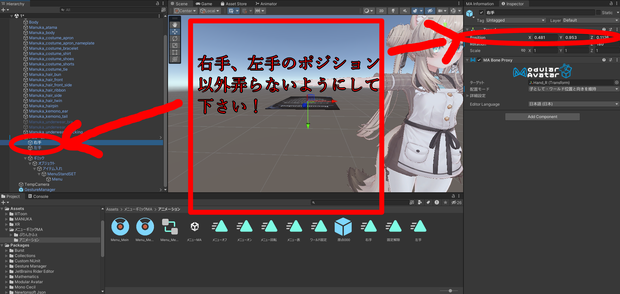
位置は初めマヌカサイズに合わせてますので
Hierarchyの中にある
メニュー表_Prefab→【R_Hand】【L_Hand】この二つのPositionを弄って調整して下さい
出来る事
メニュー表のFBXを別のアイテムに置き換えても使えます
これでワールド固定と持ち替えが簡単に出来るね!(サイズ変更も)
-----------------------------------------------------------
本商品にアバターはついてきません
撮影用に【STUDIO JINGO】様のマヌカ【https://booth.pm/ja/items/5058077】
を使用させて頂きました。
-----------------------------------------------------------
※壊れる条件※
これは絶対しないでね!
・名前を変更する(Unity君が見失ってしまうので)
-------------------------------------------------------------
Required shaders
【liltoon】
VCC version → https://lilxyzw.github.io/lilToon/ja_JP/ Booth
version → https://booth.pm/ja/items/3087170
Required tools
【Modular Avatar】
https:// modular-avatar.nadena.dev/en
Functional
material replacement *Texture replacement method is described in the unzipped file
Menu on/off
Right/lefthandRotate
front/back
Sizeexpansion
Worldfixed
Rotation during world fixation does not work
How to install
Add “メニュー表ギミック .unitypackage” to the Unity assets where Modular Avatar is installed.
Drag and drop【Prefab】in the Hierarchy directly under the avatar (drag and drop). You
can also replace the FBX in the menu table with other items
! (Also resize)
*Conditions for breakage*
Do not do this!
Rename the item (Unity will lose track of it).
利用規約
【禁止事項】
二次配布などの再配布
自作発言
荒らし行為を目的とした使用
本データを利用した政治、宗教活動、その他個人や団体に対する権利及び名誉や印象等を害する行為を禁止します
何か不具合等ございましたら
Discord nekotosora
X @Nekoto_sora
までご連絡をお願いします
やろうと思えばできる事例
・武器の出し入れ
・写真の掲示
・小物の掲示 etc...
結構色々と使えます!
更新履歴
2025/2/11 製品公開
모든 리뷰
더보기리뷰 등록
리뷰를 작성하려면 로그인이 필요합니다.
로그인하고 리뷰 쓰기