'%3e%3cg%20clip-path='url(%23roundHexB)'%3e%3cpath%20fill='%236D5DFC'%20d='M256%2040%20443%20148%20443%20364%20256%20472%2069%20364%2069%20148Z'/%3e%3cpath%20fill='%239C93FB'%20d='M69%20148%20256%2040%20443%20148%20256%20256Z'/%3e%3cpath%20fill='%234A3FD1'%20d='M256%20256%20443%20148%20443%20364%20256%20472Z'/%3e%3c/g%3e%3c!--%20top%20face:%20filled%20round%20magnifier%20--%3e%3cg%20transform='matrix(0.8660254,-0.5,0.8660254,0.5,69,148)'%3e%3cg%20transform='matrix(0.935,0,0,0.935,7.02,7.02)'%3e%3ccircle%20cx='88'%20cy='88'%20r='52'%20fill='%23FFFFFF'/%3e%3ccircle%20cx='88'%20cy='88'%20r='28'%20fill='%239C93FB'/%3e%3cpath%20d='M124%20124%20164%20164'%20stroke='%23FFFFFF'%20stroke-width='26'%20stroke-linecap='round'/%3e%3c/g%3e%3c/g%3e%3cg%20transform='matrix(0.8660254,0.5,0,1,69,148)'%3e%3cpath%20d='M96.1,61.08%20L45.9,128.92%20Q34,145%2054,145%20L162,145%20Q182,145%20170.1,128.92%20L119.9,61.08%20Q108,45%2096.1,61.08%20Z'%20fill='%23FFFFFF'/%3e%3c/g%3e%3c!--%20right%20face:%20filled%20bubble%20--%3e%3cg%20transform='matrix(0.8660254,-0.5,0,1,256,256)'%3e%3cg%20transform='matrix(0.855,0,0,0.855,15.66,15.66)'%3e%3cpath%20d='M60%2042H156a28%2028%200%200%201%2028%2028V158Q184%20168%20174.47%20164.96L124.53%20149.04Q115%20146%20105%20146H60a28%2028%200%200%201-28-28V70a28%2028%200%200%201%2028-28Z'%20fill='%23FFFFFF'/%3e%3c/g%3e%3c/g%3e%3c/g%3e%3c/svg%3e)
 太陽とウミガメ
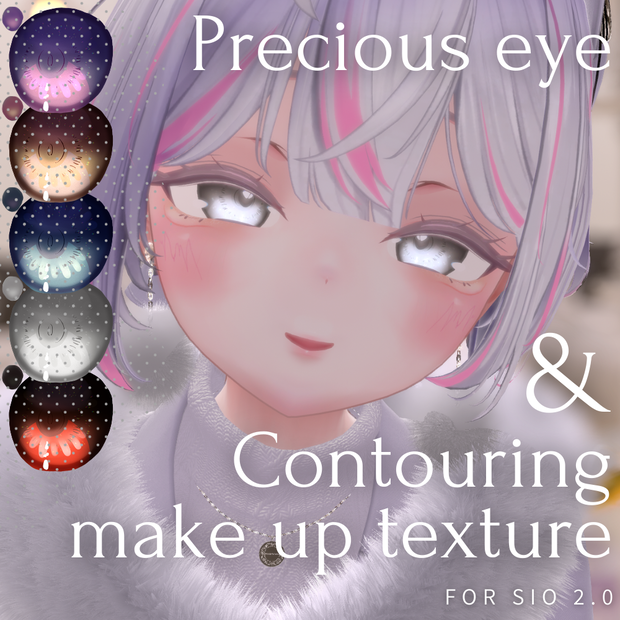
 【Sio用】メイク&アイテクスチャ【ver.2.0対応】 -Precious eye and Contouring make up texture-
상품 설명
【内容物】
○FULLPACK(+PSD)
・アイテクスチャ 5種
・発光テクスチャ 5種
・メイクテクスチャ 2種*
・PSDファイル
○eye texture only
・アイテクスチャ 5種
・発光テクスチャ 5種
○make up texture only
・メイクテクスチャ 2種*
*メイクテクスチャはeyelash(まつげ)あり・なしの2種です。
しおver.2.0を想定して作成していますが、以前のバージョンにも対応しています。
↓アバターはこちら↓
【オリジナル3Dモデル】 Sio / しお / ver.2.00
https://booth.pm/ja/items/5650156
Contents
FULLPACK (+PSD)
Eye textures: 5 kinds
Light emitting textures: 5 kinds
Makeup textures: 2 types*
PSD file
Eye texture only
Eye textures: 5 kinds
Light emitting texture: 5 kinds
Make up texture only
Makeup textures: 2 types*
*Make-up textures are available with and without eyelashes.
The avatars are designed for Sio ver. 2.0, but previous versions are also supported.
Avatar is here↓↓.
https://booth.pm/ja/items/5650156
使い方
【liltoon】
Body(メッシュ)のFace(マテリアル)を詳細設定で開きます。
「メインカラー/透過設定(色替え)」内の「メインカラー2nd/3rd」にチェックを入れ、Precious_eyeのお好みのカラー/Contouring_makeupのお好みの画像を挿入します。
*アイテクスチャありの場合
「発光設定」を開き、Precious_eye>Emission内の、カラーに対応した発光テクスチャに置き換えます。
[liltoon]
Open the Body (mesh) Face (material) in Advanced Settings.
Check “Main Color 2nd/3rd” in “Main Color/Transparency Settings (Color Change)” and insert your favorite color for Precious_eye and your favorite image for Contouring_makeup.
*In case of with eye texture
Open “Luminescence Settings” and replace the color with the corresponding luminescence texture in Precious_eye>Emission.
利用規約
日本語(正文)
https://drive.google.com/file/d/1ulA2pGIheD2WG1XpVv9j52IprnnGIV1o/view?usp=drive_link
Terms of use(EN)
https://drive.google.com/file/d/1pornvux0P_LHtKdQ5RoFvX9ou1ZmnX4T/view?usp=drive_link
이용약관(KO)
https://drive.google.com/file/d/1r5SmjzDwz2xAchCamwd8FzVHU0uKPE7o/view?usp=drive_link
使用条款(ZH)
https://drive.google.com/file/d/1T7kYDa9VnNhnZ7X1gIXPm-1_UPPKcAt0/view?usp=drive_link
更新履歴
○2024/12/22
・リリース
모든 리뷰
더보기리뷰 등록
리뷰를 작성하려면 로그인이 필요합니다.
로그인하고 리뷰 쓰기