'%3e%3cg%20clip-path='url(%23roundHexB)'%3e%3cpath%20fill='%236D5DFC'%20d='M256%2040%20443%20148%20443%20364%20256%20472%2069%20364%2069%20148Z'/%3e%3cpath%20fill='%239C93FB'%20d='M69%20148%20256%2040%20443%20148%20256%20256Z'/%3e%3cpath%20fill='%234A3FD1'%20d='M256%20256%20443%20148%20443%20364%20256%20472Z'/%3e%3c/g%3e%3c!--%20top%20face:%20filled%20round%20magnifier%20--%3e%3cg%20transform='matrix(0.8660254,-0.5,0.8660254,0.5,69,148)'%3e%3cg%20transform='matrix(0.935,0,0,0.935,7.02,7.02)'%3e%3ccircle%20cx='88'%20cy='88'%20r='52'%20fill='%23FFFFFF'/%3e%3ccircle%20cx='88'%20cy='88'%20r='28'%20fill='%239C93FB'/%3e%3cpath%20d='M124%20124%20164%20164'%20stroke='%23FFFFFF'%20stroke-width='26'%20stroke-linecap='round'/%3e%3c/g%3e%3c/g%3e%3cg%20transform='matrix(0.8660254,0.5,0,1,69,148)'%3e%3cpath%20d='M96.1,61.08%20L45.9,128.92%20Q34,145%2054,145%20L162,145%20Q182,145%20170.1,128.92%20L119.9,61.08%20Q108,45%2096.1,61.08%20Z'%20fill='%23FFFFFF'/%3e%3c/g%3e%3c!--%20right%20face:%20filled%20bubble%20--%3e%3cg%20transform='matrix(0.8660254,-0.5,0,1,256,256)'%3e%3cg%20transform='matrix(0.855,0,0,0.855,15.66,15.66)'%3e%3cpath%20d='M60%2042H156a28%2028%200%200%201%2028%2028V158Q184%20168%20174.47%20164.96L124.53%20149.04Q115%20146%20105%20146H60a28%2028%200%200%201-28-28V70a28%2028%200%200%201%2028-28Z'%20fill='%23FFFFFF'/%3e%3c/g%3e%3c/g%3e%3c/g%3e%3c/svg%3e)

 AuxRapt0r
상품 설명
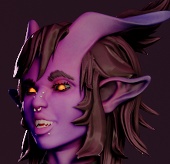
PC VR Avatar Ready for VRChat.
Not optimized for the Quest.
This Monster is ready for your next adventures:
Features include:
Facial expressions
Tail control
Tongue + neck toggles
Body proportion sliders
Color sliders
Poison spray toggle animation
Physic bones and custom shaders
_______________________________________________________
Requires:
Unity 2022.3.22f1
VRChat SDK - recommend creator companion
https://vrchat.com/home/download
Install: the latest Poiyomi shader package before importing.
https://github.com/poiyomi/PoiyomiToonShader/releases
______________________
For any questions contact: [email protected]
________________________________________________________
Terms of Service
This digital asset is for personal use only and may not be resold, redistributed, or shared in any form.
Private uploads are required do not make public.
Modifications for personal use are permitted, but give proper credit for any media incorporating this avatar.
All sales are final.
By purchasing, you acknowledge and agree to the terms and conditions.
Instructions
Download the creator companion for ease of use. And/or download and install Unity 2022.3.22f1 with an updated and proper VRchat SDK and the latest Poiyomi toon shader before uploading. https://github.com/poiyomi/PoiyomiToonShader/releases
Make sure your VRChat account has been granted access to upload avatars. This means you need to spend some time within the game for verification to occur for your account.
https://docs.vrchat.com/docs/frequently-asked-questions#why-cant-i-upload-conten...
Once you have be allowed to upload follow these steps:
Using the Creator Companion and follow the directions in the video on this page:
Upload Project creation time stamp: -
This avatar uses Unity 2022.3.6f1
To upload an Avatar after having installed the VRchat SDK and Poiyomi shaders:
Import Avatar Package | Assets -> Import Package -> Custom Package
Locate the Avatar package and after the window appears, click import all at the bottom right corner.
Open the provided unity package's Avatar.unity scene
In the bottom half window named Project, expand the folder Assets[Character Name]/ then select Scenes(folder), open the unity scene file in that folder.
Open the VRChat Control Panel(Within Unity):
Expand VRChat SDK(dropdown near the top) -> Show Control Panel
Using the VRChat Control Panel(Popup window):
Authentication Tab: Log in to your VRChat account (Email and password)
Builder tab: go to the bottom and click Build & Publish, to upload.
In the Game tab that opens up:
set your avatar name and enter an avatar description (optional).
Check the “Upload Image” box if you would like to set a thumbnail from the camera.
Be sure to keep the model set to Private.
Click Upload and you're done once it finishes.
모든 리뷰
더보기리뷰 등록
리뷰를 작성하려면 로그인이 필요합니다.
로그인하고 리뷰 쓰기