'%3e%3cg%20clip-path='url(%23roundHexB)'%3e%3cpath%20fill='%236D5DFC'%20d='M256%2040%20443%20148%20443%20364%20256%20472%2069%20364%2069%20148Z'/%3e%3cpath%20fill='%239C93FB'%20d='M69%20148%20256%2040%20443%20148%20256%20256Z'/%3e%3cpath%20fill='%234A3FD1'%20d='M256%20256%20443%20148%20443%20364%20256%20472Z'/%3e%3c/g%3e%3c!--%20top%20face:%20filled%20round%20magnifier%20--%3e%3cg%20transform='matrix(0.8660254,-0.5,0.8660254,0.5,69,148)'%3e%3cg%20transform='matrix(0.935,0,0,0.935,7.02,7.02)'%3e%3ccircle%20cx='88'%20cy='88'%20r='52'%20fill='%23FFFFFF'/%3e%3ccircle%20cx='88'%20cy='88'%20r='28'%20fill='%239C93FB'/%3e%3cpath%20d='M124%20124%20164%20164'%20stroke='%23FFFFFF'%20stroke-width='26'%20stroke-linecap='round'/%3e%3c/g%3e%3c/g%3e%3cg%20transform='matrix(0.8660254,0.5,0,1,69,148)'%3e%3cpath%20d='M96.1,61.08%20L45.9,128.92%20Q34,145%2054,145%20L162,145%20Q182,145%20170.1,128.92%20L119.9,61.08%20Q108,45%2096.1,61.08%20Z'%20fill='%23FFFFFF'/%3e%3c/g%3e%3c!--%20right%20face:%20filled%20bubble%20--%3e%3cg%20transform='matrix(0.8660254,-0.5,0,1,256,256)'%3e%3cg%20transform='matrix(0.855,0,0,0.855,15.66,15.66)'%3e%3cpath%20d='M60%2042H156a28%2028%200%200%201%2028%2028V158Q184%20168%20174.47%20164.96L124.53%20149.04Q115%20146%20105%20146H60a28%2028%200%200%201-28-28V70a28%2028%200%200%201%2028-28Z'%20fill='%23FFFFFF'/%3e%3c/g%3e%3c/g%3e%3c/g%3e%3c/svg%3e)
 SUPER PUCHO 3D
상품 설명
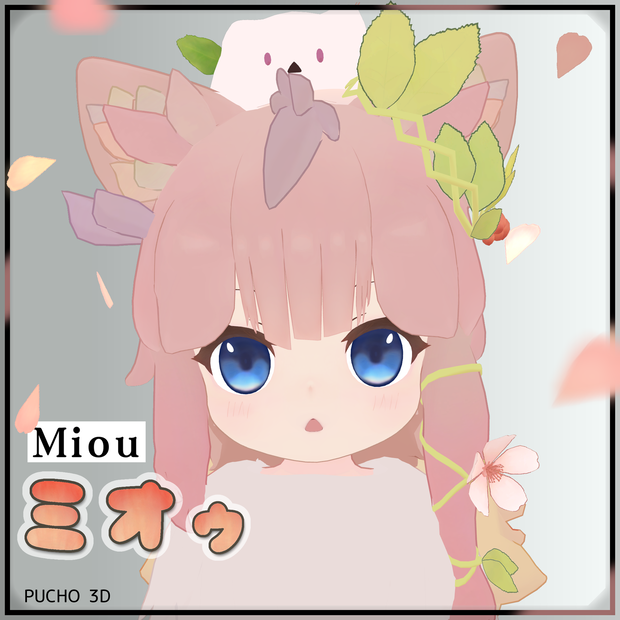
VRM対応アプリやVRChatアバターとして使える、3Dキャラクターです。
頭にはギミック付きペットの「ぷにゃ太郎」を乗せてます(ペット乗せ換え用のモジュラーアバター付属)
カラーリング二種類に対応した二体分+Quest用のプレハブをセッティング済です。
・桜モチーフ(春カラー)
・狐ケモノ風(秋カラー)
(VRM版もそれぞれ二種類のカラーを同梱しています)
ペットのMAには花吹雪・木の葉・紅葉風の木の葉・粉雪のパーティクルギミックが含まれます
衣装作成・改変用素体+シェイプキー
テクスチャーや表情改変を意識したpsdとFBXを同梱してます
また、サンプルアバターをアバターミュージアム11の右から入って12番目にて展示して頂いてます。
◆仕様・説明
<VRChat PC版>
ポリゴン数 : 56106 +(ぷにゃ太郎:1772)
動作確認済 : VRChatデスクトップ/VR
ブレンドシェイプ : 合計200種類以上(類似・重複あり)リップシンク・ハンドサイン表情変化・メニュー内表情固定・他改変用Shrinkなど
アニメーション:「ぷにゃ太郎」の操作(散歩モード・ハンドサインでの方向指示)ハンドサインでの桜(木の葉)パーティクルなど
EXメニュー:詳しくは後述
パフォーマンスランク:Medium
備考:Avatar3.0通常版2カラー分+Quest対応版2カラー分の4種類を同梱。
<VRChat Quest(Android)版>
ポリゴン数 : 19596 +(ぷにゃ太郎LowPoly:256)
動作確認済 : VR/Android
パフォーマンスランク:Poor
備考:PC版との違いはポリゴン数削減に伴う見た目の簡略化、ブレンドシェイプの簡略化、PBの簡略化など。
<VRM版(従来型)>
ポリゴン数 : 57878
動作確認済 : cluster,VRM Live Viewer
<VRM1.0版>
準備中
足の形状は特徴的なケモノ足となっていますが、ボーン構造は通常のヒューマノイドアバターと同様です。
アニメーションも通常のヒューマノイドのものが使用できます。
VRM版はVRoidHubでも確認できます
◆キャラクター
アニメ調のファンタジー世界に登場するキャラクターをイメージしています
「ミオゥ」
植物を操る自称猫の小さい女の子(3頭身~4頭身)
「ぷにゃ太郎」
モチモチした猫のような見た目の植物(?)フワフワしていてとても軽い
◆内容物[Miou_Avatar_v1.0.0]
┗Readme.txt
はじめにご一読下さい
┗アバター導入改変用マニュアル(ja).txt
┗Avatar_Setup_Manual(en).txt
アバター導入の解説や改変時に注意することや役に立つ仕様など
[VRM]
┗vrm_Miou.vrm
VRM形式(従来型)の3Dモデルデータ
VRM対応アプリケーション等でご利用可能です
┗[modified_version]
┗vrm_Miou_fox.vrm
絵柄違いの狐ケモノ風(秋カラー)
[VRChat]
┗MiouAvatar_Pucho_v1.0.0.unitypackage
VRChat用のunityパッケージ
[FBX]
┗MiouAvatar_PC.fbx
VRChat向けに最適化済のFBXファイル
┗MiouAvatar_Quest.fbx
Quest(Android)用のローポリ版
┗MiouAvatar_All.fbx
改変用に全部入りのFBXファイル(別パターンの素体など追加)
┗Punya.fbx
ぷにゃ太郎のFBXファイル
┗Punya_LoPoly.fbx
ローポリ版
[Texture]
┗[Color_A]
┗[Color_B]
メインのテクスチャ7枚
┗[Color_ToonLit]
Quest用にアトラス化済のテクスチャ
┗[Mask]
マスクやその他の画像7枚
┗[psd]
改変用のpsdファイル
┗[Punya]
ぷにゃ太郎とギミックのパーティクル用テクスチャ
◆VRChat対応アバターの仕様とEXメニュー解説
Miou_PC(Miou_PC_B) : PC版(アバターギミックを使用する前提である程度最適化しています)
Miou_Quest(Miou_Quest_B): Quest版(ポリゴンやPBなどを大幅削減、簡略化しています)
Miou_PC_All : PC版(改変用にメッシュ全部入りの状態)
VRCアバターではVRC内Expression Menu操作による表情固定やアバターカスタム機能などがあります。
<ハンドサインの表情>
右手:目の表情 左手:口、その他の表情
更に「Left Hand」を特定の表情にした状態で「Right Hand」をFist(グーの形)
にすることで別の表情を割り当てられるようにしています
<メニュー説明>
RecallFace:直前に使用した「Face」を使います。表情固定中は矢印が回転するので確認用に良いかも。
Face:選択した表情に固定します(21種類+)
Emoto:VRChat標準のエモートを設定してます。
Custom:耳と尻尾の伸縮・一部メッシュのオン/オフ・髪型の簡単な変更機能など
Settings:
1.座り姿勢の高さ調整(座りモーション時に調整できます)
2.耳アニメーションのオン/オフ切り替え
3.尻尾アニメーションのオン/オフ切り替え
4.ハンドサインをパターン2へ切り替え
<ぷにゃ太郎メニュー>
[Show] : 表示 オン/オフ
FreeMode : 空中をゆっくり追従するようになる
Gun : パーティクル指から飛ばす(左手「Fist」 の状態で 右手を「Point」から「Gun」にする)
Action : 動きのあるアニメーション
Color : 体の色とパーティクルの変更
Settings
1.Particle : パーティクル オン/オフ
2.Fist(L)+ : ハンドサインによる特殊操作 オン/オフ
3.pointX : 方向指示・パーティクルの向きを変更
4.pointY : 方向指示・パーティクルの向きを変更
QR : QR表示
◆VRChat導入方法
同梱されている「アバター導入改変用マニュアル.txt」を参照してください
<目次>
1.簡易アバター導入方法(忙しい人向け)
2.アバター導入方法(そこそこ改変する人向け)
3.簡易的な形状と色改変方法
4.表情追加・改変・ブレンドシェイプ解説
5.ペットの乗せ換え
6.対応衣装の着せ方
7.非対応衣装の着せ方
◆VRChat導入に必要な物
Avatar3.0導入とアップロードできる環境
lilToon
→ https://booth.pm/ja/items/3087170
Modular Avatar(ペット・パーティクルギミックの乗せ換え用)
→ https://modular-avatar.nadena.dev/ja
◆利用規約(ja)
https://drive.google.com/file/d/1hGFRv_sZAqUkksnILMQsEmy70kd1iQmC/view?usp=sharing
◆Terms of Use(en)
https://drive.google.com/file/d/1yKPjflM4tjAaa5IcTr4rk5FK6zo8Uh5I/view?usp=sharing
◆不具合の報告、連絡先など
モデルの不具合や不備を見つけた場合は、こちらのフォームで報告頂けると助かります。
実装して欲しい機能などの要望もこちらで募集しています。
(緊急な場合や返信が必要な場合はBOOTHのメッセージをご利用ください)
Googleフォーム:<不具合報告、ご意見ご要望フォーム(3Dモデル)>
https://forms.gle/EBvLEpTNcxhj5mHN9
BOOTH「SUPER PUCHO 3D」
制作者 : ぷちょう/Pucho
X(twitter) : @pucho_neko
Miou【Original 3D model】
This 3D character can be used as a VRM-compatible app or VRChat avatar.
The gimmicked pet “Punyataro” is placed on the avatar’s head (a modular avatar for pet swapping is included).
Prefabs for two characters with two different color variations are preconfigured, along with a prefab optimized for Quest.
"Cherry blossom motif (spring color)."
"Fox beast style (autumn color)."
(VRM version also comes in two colors)
MA for pets includes particle gimmicks of flurries, tree leaves, autumn leaf wind, and powder snow
Body + Shape Keys for costume creation and modification
psd and fbx included for texture and expression modification
◆Specifications/description
<VRChat PC version>
Polygon count : 56106 + (Punyataro : 1772)
Operation confirmed : VRChat desktop/VR
Blend Shapes: Total 200+ (similar and duplicated), including Lip-sync, hand-sign facial expression changes,
fixed facial expressions in the menu, and shrink adjustments to modify mesh shapes
Animation : “Punyataro” operation (walk mode, hand-sign direction indication), hand-sign cherry blossom (leaves) particle, etc.
EX Menu: See below for details.
Performance Rank : Medium
Remarks: 4 types of Avatar 3.0 (2-color standard version + 2-color Quest-compatible version) included.
<VRChat Quest (Android) version>
Number of polygons : 19596 + (Punyataro LowPoly: 256)
Operation confirmed : VR/Android
Performance Rank : Poor
Remarks : differences from PC version include simplified appearance due to reduced polygon count, simplified blendshapes, simplified PB, etc.
<VRM version (conventional)>
Polygon count : 57878
Operation check : cluster,VRM Live Viewer
<VRM1.0 version>
In preparation
The legs and feet have the characteristic animal feet, but the bone structure is the same as that of normal humanoid avatars.
Animations of normal humanoid avatars can also be used.
VRM version is also available on VRoidHub
◆Character
The character is based on the image of a character in a fantasy world with a cartoon style
Mio-u”.
A small girl (3-4 heads) who calls herself a cat and manipulates plants.
Punyataro
A plant (?) resembling a soft and squishy cat. Fluffy and lightweight.
◆Contents [Miou_Avatar_v1.0.0]
┗Readme.txt
Please read this first.
┗アバター導入改変用マニュアル(ja).txt
┗Avatar_Setup_Manual(en).txt
Includes instructions for setting up the avatar, points of caution for modifications, and helpful details about the specifications.
[VRM]
┗vrm_Miou.vrm
3D model data in VRM format (traditional type).
Compatible with VRM-supported applications.
┗[modified_version]
┗vrm_Miou_fox.vrm
A variation with a fox-animal design (autumn colors).
[VRChat]
┗MiouAvatar_Pucho.unitypackage
Unity package for VRChat.
[FBX]
┗MiouAvatar_PC.fbx
FBX file optimized for VRChat.
┗MiouAvatar_Quest.fbx
Low-poly version for Quest (Android).
┗MiouAvatar_All.fbx
Comprehensive FBX file for modifications, including alternate base models.
┗Punya.fbx
FBX file for Punya Taro.
┗Punya_LoPoly.fbx
Low-poly version.
[Texture]
┗[Color_A]
┗[Color_B]
Seven main textures.
┗[Color_ToonLit]
Atlas-optimized textures for Quest.
┗[Mask]
Seven mask and additional images.
┗[PSD]
PSD files for modifications.
┗[Punya]
Textures for Punya Taro and particles used in gimmicks.
◆VRChat compatible avatar (preconfigured Unity prefab) specifications and EX menu explanation
Miou_PC : PC version (optimized to some extent on the assumption that avatar gimmicks are used)
Miou_Quest : Quest version (Polygon, PB, etc. are greatly reduced and simplified)
Miou_PC_All : PC version (all meshes are included for modification)
VRC avatars have fixed facial expressions and avatar customization functions by manipulating the Expression Menu in VRC.
<Hand Signature Expression>
Right hand: eye expressions Left hand: mouth and other expressions
In addition, with the “Left Hand” set to a specific expression,
the “Right Hand” can be set to a fist (goo shape) to assign a different expression.
(Goo shape) with the “Left Hand” set to a specific facial expression.
<Menu Description>
RecallFace: Uses the “Face” used immediately before. The arrow rotates to indicate an active flag while the expression remains fixed,
which can help in confirming the selection.
Face: Fixes the selected facial expression (14+ types)
Emoto: Sets the standard VRChat emoticon.
Custom: Ears and tail extension/contraction, some mesh on/off, ability to easily change hairstyle, etc.
Settings:
1. Sitting posture height adjustment (can be adjusted during sitting motion)
2. Ear animation on/off toggle
3. Tail animation on/off switch
4. Switch hand sign to pattern 2
<Punyataro Menu>.
[Show] : Display on/off
FreeMode : Slowly floats in the air.
Gun : Fly the particle from your finger (left hand “Fist”, right hand “Point” to “Gun”)
Action : Animation with movement
Color : Change body color and particles
Settings
Particle : Particle on/off
Fist(L)+ : Special operation by hand sign On/Off
3. pointX : Direction indication, change particle direction
4. pointY : Direction indication/change particle direction
QR : QR display
◆How to install Miou VRChat version
Please refer to the included “Avatar Installation and Modification Manual.txt”.
<Table of Contents>
1. Simple avatar introduction method (for busy people)
2. How to install an avatar (for those who modify avatars)
3. Simple shape and color modification method
4. How to add expressions, modify, and blend shapes
5. How to change pets
6. How to put on compatible costumes
7. How to put on unsupported costumes
◆What you need to install Miou VRChat version
Avatar3.0 installation and uploading environment
lilToon
→ https://booth.pm/ja/items/3087170
Modular Avatar (to replace pet and particle gimmick)
→ https://modular-avatar.nadena.dev/
◆利用規約(ja)
https://drive.google.com/file/d/1hGFRv_sZAqUkksnILMQsEmy70kd1iQmC/view?usp=sharing
◆Terms of Use(en)
https://drive.google.com/file/d/1yKPjflM4tjAaa5IcTr4rk5FK6zo8Uh5I/view?usp=sharing
◆Reporting defects, contact information, etc.
If you find any defects or flaws in the model, we would appreciate it if you could report them using this form.
We are also looking for requests for features that you would like to see implemented here.
(If it is urgent or you need a reply, please use BOOTH message)
Google Form: <Report Bugs, Feedback Form (3D Models)>
https://forms.gle/EBvLEpTNcxhj5mHN9
"Related words: meow, pink hair, Fairy, cute, 妖精, 美桜, ミオウ."
BOOTH「SUPER PUCHO 3D」
Produced by : ぷちょう/Pucho
X(twitter) : @pucho_neko
更新履歴
2025/01/03 1.0.2 Quest版前髪のPB修正など
2024/12/29 1.0.1 Quest版の修正
2024/12/28 1.0.0 公開
모든 리뷰
더보기리뷰 등록
리뷰를 작성하려면 로그인이 필요합니다.
로그인하고 리뷰 쓰기