'%3e%3cg%20clip-path='url(%23roundHexB)'%3e%3cpath%20fill='%236D5DFC'%20d='M256%2040%20443%20148%20443%20364%20256%20472%2069%20364%2069%20148Z'/%3e%3cpath%20fill='%239C93FB'%20d='M69%20148%20256%2040%20443%20148%20256%20256Z'/%3e%3cpath%20fill='%234A3FD1'%20d='M256%20256%20443%20148%20443%20364%20256%20472Z'/%3e%3c/g%3e%3c!--%20top%20face:%20filled%20round%20magnifier%20--%3e%3cg%20transform='matrix(0.8660254,-0.5,0.8660254,0.5,69,148)'%3e%3cg%20transform='matrix(0.935,0,0,0.935,7.02,7.02)'%3e%3ccircle%20cx='88'%20cy='88'%20r='52'%20fill='%23FFFFFF'/%3e%3ccircle%20cx='88'%20cy='88'%20r='28'%20fill='%239C93FB'/%3e%3cpath%20d='M124%20124%20164%20164'%20stroke='%23FFFFFF'%20stroke-width='26'%20stroke-linecap='round'/%3e%3c/g%3e%3c/g%3e%3cg%20transform='matrix(0.8660254,0.5,0,1,69,148)'%3e%3cpath%20d='M96.1,61.08%20L45.9,128.92%20Q34,145%2054,145%20L162,145%20Q182,145%20170.1,128.92%20L119.9,61.08%20Q108,45%2096.1,61.08%20Z'%20fill='%23FFFFFF'/%3e%3c/g%3e%3c!--%20right%20face:%20filled%20bubble%20--%3e%3cg%20transform='matrix(0.8660254,-0.5,0,1,256,256)'%3e%3cg%20transform='matrix(0.855,0,0,0.855,15.66,15.66)'%3e%3cpath%20d='M60%2042H156a28%2028%200%200%201%2028%2028V158Q184%20168%20174.47%20164.96L124.53%20149.04Q115%20146%20105%20146H60a28%2028%200%200%201-28-28V70a28%2028%200%200%201%2028-28Z'%20fill='%23FFFFFF'/%3e%3c/g%3e%3c/g%3e%3c/g%3e%3c/svg%3e)
 nexaverge
상품 설명
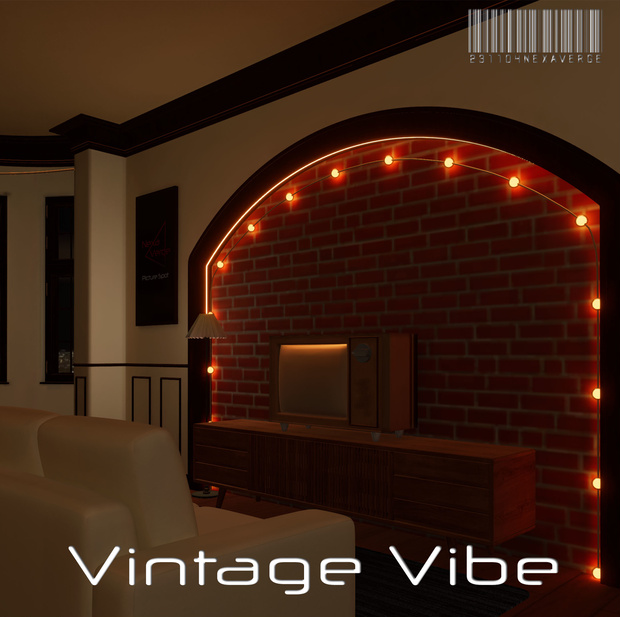
Vintage Vibe
Classic and old vibe room
Demo World URL
Note: The demo world might be already customized in the future since it is going to be published to public
How To Install
- Download VRChat Creator Companion here https://hello.vrchat.com/
- Create New Project and choose Unity 2022 world project
- Extract zip file and click unity package to your unity scene
- Use our unity scene if you not planning to re-bake lighting.
- if you plan to re-bake the lighting, you can re-bake the lighting using unity before upload and done!
(Note:use new lighting setting at lighting baked folder and use lightingdata for lighting data asset at vrcdefaultscene folder)
I recommended you to install this media player by yamadev
【VRChat】YamaPlayer - VRChat向け動画プレイヤー【Video Player】
https://booth.pm/ja/items/4768863
Note: Optional
I recomended to rebake lighting using Bakery - GPU Lightmapper
System Requirements
■ VCC Compatible
■ Unity 2022.3.22f1
■ VRCSDK3.7.0
Terms of use
- Can be modified
- Can be used for streaming
- Can be made public
- Redistribution or sale of product data is prohibited
Credits
Starlit Wanderings
Fake Glass
https://booth.pm/en/items/2336731
temporal
Note: Skybox on preview not included,
you can buy it here https://umisugiya.booth.pm/items/5930642
Version Information
[2024.23.15: Ver1.0.0]
Initial Release
모든 리뷰
더보기리뷰 등록
리뷰를 작성하려면 로그인이 필요합니다.
로그인하고 리뷰 쓰기