'%3e%3cg%20clip-path='url(%23roundHexB)'%3e%3cpath%20fill='%236D5DFC'%20d='M256%2040%20443%20148%20443%20364%20256%20472%2069%20364%2069%20148Z'/%3e%3cpath%20fill='%239C93FB'%20d='M69%20148%20256%2040%20443%20148%20256%20256Z'/%3e%3cpath%20fill='%234A3FD1'%20d='M256%20256%20443%20148%20443%20364%20256%20472Z'/%3e%3c/g%3e%3c!--%20top%20face:%20filled%20round%20magnifier%20--%3e%3cg%20transform='matrix(0.8660254,-0.5,0.8660254,0.5,69,148)'%3e%3cg%20transform='matrix(0.935,0,0,0.935,7.02,7.02)'%3e%3ccircle%20cx='88'%20cy='88'%20r='52'%20fill='%23FFFFFF'/%3e%3ccircle%20cx='88'%20cy='88'%20r='28'%20fill='%239C93FB'/%3e%3cpath%20d='M124%20124%20164%20164'%20stroke='%23FFFFFF'%20stroke-width='26'%20stroke-linecap='round'/%3e%3c/g%3e%3c/g%3e%3cg%20transform='matrix(0.8660254,0.5,0,1,69,148)'%3e%3cpath%20d='M96.1,61.08%20L45.9,128.92%20Q34,145%2054,145%20L162,145%20Q182,145%20170.1,128.92%20L119.9,61.08%20Q108,45%2096.1,61.08%20Z'%20fill='%23FFFFFF'/%3e%3c/g%3e%3c!--%20right%20face:%20filled%20bubble%20--%3e%3cg%20transform='matrix(0.8660254,-0.5,0,1,256,256)'%3e%3cg%20transform='matrix(0.855,0,0,0.855,15.66,15.66)'%3e%3cpath%20d='M60%2042H156a28%2028%200%200%201%2028%2028V158Q184%20168%20174.47%20164.96L124.53%20149.04Q115%20146%20105%20146H60a28%2028%200%200%201-28-28V70a28%2028%200%200%201%2028-28Z'%20fill='%23FFFFFF'/%3e%3c/g%3e%3c/g%3e%3c/g%3e%3c/svg%3e)
【SDK3】E-Book | Persistence Support
상품 설명
简单的电子书脚本,只需将编写好的页面拖入列表中,即可使用。
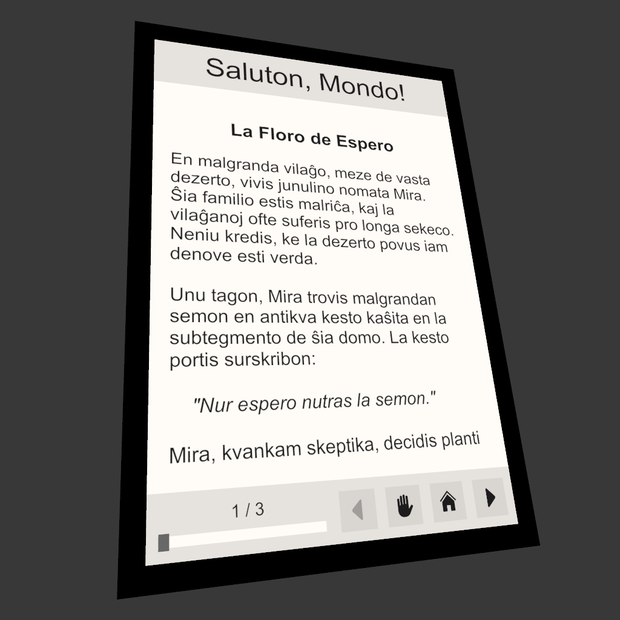
A simple e-book script that works by simply dragging the prepared pages into the list.
簡単な電子書籍スクリプトで、作成したページをリストにドラッグするだけで使用できます。
E-Book Wiki (Only Chinese):
https://hrenact.github.io/HrenactNET/E-Book/HowToUse
简体中文
支持的功能:
1. 显示当前页数
2. 通过滑块切换页数
3. 按下按钮来回到初始页
4. 打开或关闭可拾取
5. 保存页数并自动加载
6. 根据 *.txt 文件自动填充文本
更新日志:
2024/11/20 - 首次发布
2024/11/21 - 重新制作了 Book_Sample.prefab,添加了更多的示例页面
2024/11/25 - 添加了 Book_Sample_Persistence.prefab
2024/11/26 - 修改了持久化代码,重新制作了 Book_Sample_Persistence.prefab,新增 Wiki 网址。
2024/12/11 - 添加暗黑模式预制件,重构了辅助工具和文件目录。
其它:
1. Pickup Locker 的代码由 VizVid 播放器的 Pickupable Screen 修改而来
2. 如果页面数量偏多,你可以先清空 Book Pages 列表,然后全选页面并拖入 Book Pages
3. 介绍由 ChatGPT 翻译而来,如有疏忽,请谅解
English
Supported Features:
1. Display the current page number
2. Switch pages using a slider
3. Return to the initial page with a button
4. Enable or disable pickup functionality
5. Save the current page and auto-load it
6. Auto-fill text based on *.txt files
Changelog:
2024/11/20 - Initial release
2024/11/21 - Reworked Book_Sample.prefab, added more sample pages
2024/11/25 - Added Book_Sample_Persistence.prefab
2024/11/26 - Modified persistence code, reworked Book_Sample_Persistence.prefab, and added a Wiki URL
2024/12/11- Added a dark mode prefab, refactored tools and file directories.
Others:
1. The Pickup Locker code is adapted from the Pickupable Screen in the VizVid Player
2. If there are too many pages, you can clear the `Book Pages` list first, then select all pages and drag them into `Book Pages`
3. This introduction was translated by ChatGPT. Apologies for any oversight
모든 리뷰
더보기리뷰 등록
리뷰를 작성하려면 로그인이 필요합니다.
로그인하고 리뷰 쓰기