'%3e%3cg%20clip-path='url(%23roundHexB)'%3e%3cpath%20fill='%236D5DFC'%20d='M256%2040%20443%20148%20443%20364%20256%20472%2069%20364%2069%20148Z'/%3e%3cpath%20fill='%239C93FB'%20d='M69%20148%20256%2040%20443%20148%20256%20256Z'/%3e%3cpath%20fill='%234A3FD1'%20d='M256%20256%20443%20148%20443%20364%20256%20472Z'/%3e%3c/g%3e%3c!--%20top%20face:%20filled%20round%20magnifier%20--%3e%3cg%20transform='matrix(0.8660254,-0.5,0.8660254,0.5,69,148)'%3e%3cg%20transform='matrix(0.935,0,0,0.935,7.02,7.02)'%3e%3ccircle%20cx='88'%20cy='88'%20r='52'%20fill='%23FFFFFF'/%3e%3ccircle%20cx='88'%20cy='88'%20r='28'%20fill='%239C93FB'/%3e%3cpath%20d='M124%20124%20164%20164'%20stroke='%23FFFFFF'%20stroke-width='26'%20stroke-linecap='round'/%3e%3c/g%3e%3c/g%3e%3cg%20transform='matrix(0.8660254,0.5,0,1,69,148)'%3e%3cpath%20d='M96.1,61.08%20L45.9,128.92%20Q34,145%2054,145%20L162,145%20Q182,145%20170.1,128.92%20L119.9,61.08%20Q108,45%2096.1,61.08%20Z'%20fill='%23FFFFFF'/%3e%3c/g%3e%3c!--%20right%20face:%20filled%20bubble%20--%3e%3cg%20transform='matrix(0.8660254,-0.5,0,1,256,256)'%3e%3cg%20transform='matrix(0.855,0,0,0.855,15.66,15.66)'%3e%3cpath%20d='M60%2042H156a28%2028%200%200%201%2028%2028V158Q184%20168%20174.47%20164.96L124.53%20149.04Q115%20146%20105%20146H60a28%2028%200%200%201-28-28V70a28%2028%200%200%201%2028-28Z'%20fill='%23FFFFFF'/%3e%3c/g%3e%3c/g%3e%3c/g%3e%3c/svg%3e)
 はむ屋
はむ屋상품 설명
【商品説明】
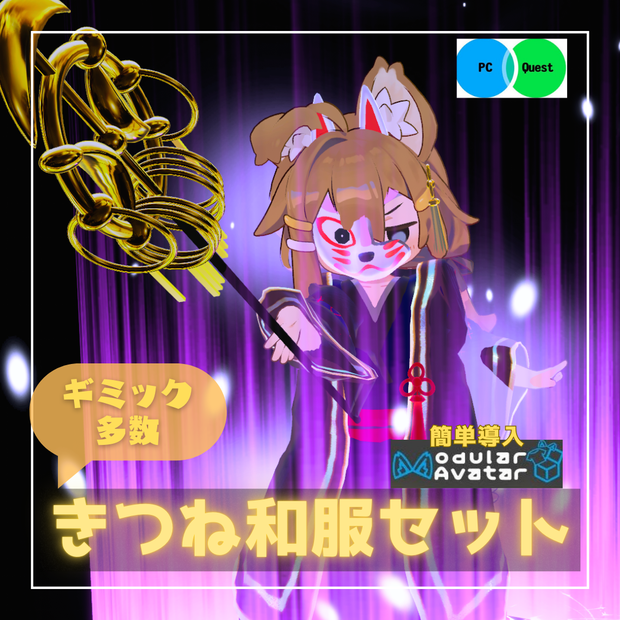
VRChatアバター まめひなた対応衣装3Dモデルです。
Xに商品説明動画があります。https://x.com/hamnchu_pococha/status/1858787376325140613
Quest単体ユーザーでも変換すれば着用可能です。
VRCQuestTools https://booth.pm/ja/items/2436054
本商品には商品画像にあるアバター本体は含まれておりません。
https://booth.pm/ja/items/4340548 まめひなた
暗闇展開&パーティクルだけ欲しい方はこちらの商品をどうぞ
https://hamnchu.booth.pm/items/6303681
シェーダーはlilToonを使用しています。
導入前にlilToonをシェーダーをご用意ください。
lilToon https://booth.pm/ja/items/3087170
アバターに商品を着せる際にModular Avatarを利用するとhierarchyのアバター直下にPrefabを入れるだけで導入可能です。
Modular Avatar https://modular-avatar.nadena.dev/ja
【商品内容】
・UnityPackage
・FBX
・Texture
・Material
・Prefab
・Animation
・Particle
【導入手順】(PC)
(前提)lilToon,Modular Avatar,まめひなたを導入済み
1.unitypakageを開く
2.Assets/はむ屋/はむ屋/prehab/PC/きつね和服セット.prefabをhierarchy内のアバター直下に置く
【導入手順】(Quest)
(前提)上記の2まで実施
1.VRCQuestToolsにてPC版で完成させたアバターを変換
2.変換されたアバター内の本製品prefabを削除する
2.Assets/はむ屋/はむ屋/prehab/Quest/きつね和服セット.prefabをhierarchy内のアバター直下に置く(注意:Questフォルダです)
【禁止事項】
◆改変の有無にかかわらず、本モデルの再配布、再販売およびアバターペデスタルなどで購入者以外のユーザーが使用できる行為を禁止します。
◆政治、宗教、人種、他人に対する誹謗目的のための使用を禁止します。
【利用規約】
◆本モデルのデータの修正及び改造、個人利用に限り許可します。
◆個人利用の範囲であれば、収益化されるものを含めた二次創作・配信を許可します。
◆購入者(もしくはギフトで受け取った方)同士に限り、モデルの受け渡しや個人的な範囲(コミッション含む)での改変代行を許可します。
【免責事項】
◆当商品を使用することで使用者側に不利な問題が生じた場合、それがいかなるものであっても配布元は一切責任を負いません。
【著作権】
◆修正、改造の有無にかかわらず、本モデルの付随するすべてのデータの著作権は製作者に帰属します。
【注意事項】
◆商品の仕様上、動きによっては貫通することがあります。
◆Phys Bone未設定です。
【クレジット】
・K10-Arsenal 様
【CC0】Matcapテクスチャ50枚
https://booth.pm/ja/items/2998107
・おはぎ 様
【無料】金色マットキャップ
https://ohagi-yabatan.booth.pm/items/4244253
・kuren 様
錫杖原案
・あまのはる 様
ホットドックキャラクターデザイン
・ふーちゃ。 様
仕様テスト
【更新履歴】
2024/11/19
【MA対応・まめひなた】きつね和服セット【ギミック付・Quest対応】v1.0.0
販売開始
2025/01/11
【MA対応・まめひなた】きつね和服セット【ギミック付・Quest対応】v1.0.1
Expressionメニューの操作性向上
🦊 Fox Kimono Set for Mamehinata 🦊
3D model outfit designed for VRChat avatar "Mamehinata."
Watch the product demonstration video on X: https://x.com/hamnchu_pococha/status/1858787376325140613
This outfit can be worn by Quest standalone users after conversion.
VRCQuestTools: https://booth.pm/ja/items/2436054
Note: The avatar body shown in product images is not included. You can purchase it here:
Mamehinata: https://booth.pm/ja/items/4340548
If you only need the "Darkness Expansion & Particles," please check this product:
https://hamnchu.booth.pm/items/6303681
🛠 Prerequisites
Please prepare the following before installation:
・lilToon Shader: https://booth.pm/ja/items/3087170
・Modular Avatar (MA): https://modular-avatar.nadena.dev/ja
(With MA, you can simply place the Prefab under your avatar to complete setup.)
📦 Product Contents
・UnityPackage / FBX / Texture / Material / Prefab / Animation / Particle
📖 Installation Guide
[PC Version]
(Prerequisites: lilToon, Modular Avatar, and Mamehinata imported)
1. Open the .unitypackage file.
2. Drag Assets/はむ屋/はむ屋/prehab/PC/きつね和服セット.prefab directly under your avatar in the Hierarchy.
[Quest Version]
(Prerequisites: Complete the PC setup steps above)
1. Use VRCQuestTools to convert the completed PC avatar.
2. Delete the PC version prefab from the converted avatar hierarchy.
3. Drag Assets/はむ屋/はむ屋/prehab/Quest/きつね和服セット.prefab directly under the converted avatar in the Hierarchy. (Caution: Be sure to use the one in the Quest folder.)
⚠️ Terms & Policies
[Prohibitions]
・Redistribution or resale of this model (modified or not) is prohibited.
・Usage that allows non-purchasers to use the model (e.g., Avatar Pedestals) is prohibited.
・Use for political, religious, racial, or defamatory purposes is prohibited.
[Terms of Use]
・Modification and transformation for personal use are permitted.
・Secondary creations and streaming (including monetized content) are permitted for personal use.
・Sharing data or commissioning modifications is permitted only between owners/gift recipients of this model.
[Disclaimer]
・The creator shall not be held liable for any disadvantage or issues arising from the use of this product, regardless of the nature of the issue.
[Copyright]
・All copyrights of the data associated with this model belong to the creator, regardless of any modifications.
📝 Important Notes
・Due to the nature of the model, clipping may occur depending on movement.
・Phys Bone is not configured.
📜 Credits
・K10-Arsenal: [CC0] 50 Matcap Textures (https://booth.pm/ja/items/2998107)
・Ohagi: [Free] Gold Matcap (https://ohagi-yabatan.booth.pm/items/4244253)
・kuren: Original Shakujo (Scepter) concept
・Amanoharu: Hot dog character design
・Fucha: Specification testing
🕒 Update History
・2024/11/19 (v1.0.0): Initial Release
・2025/01/11 (v1.0.1): Improved Expression Menu usability
VRChat 아바타 '마메히나타' 대응 의상 3D 모델입니다.
X(Twitter)에서 상품 소개 영상을 확인하실 수 있습니다: https://x.com/hamnchu_pococha/status/1858787376325140613
Quest 단독 사용자도 변환 과정을 거치면 착용 가능합니다.
VRCQuestTools: https://booth.pm/ja/items/2436054
본 상품에는 상품 이미지에 있는 아바타 본체는 포함되어 있지 않습니다. 아바타는 아래 링크에서 구매해 주세요:
마메히나타(まめひなた): https://booth.pm/ja/items/4340548
암흑 전개 및 파티클만 필요하신 분은 이 상품을 확인해 주세요:
https://hamnchu.booth.pm/items/6303681
🛠 선행 작업
・도입 전에 다음 셰이더와 툴을 준비해 주세요:
・lilToon Shader: https://booth.pm/ja/items/3087170
・Modular Avatar (MA): https://modular-avatar.nadena.dev/ja
(MA를 이용하면 계층 구조의 아바타 바로 아래에 프리팹을 넣는 것만으로 도입이 가능합니다.)
📦 상품 내용
・UnityPackage / FBX / Texture / Material / Prefab / Animation / Particle
📖 도입 방법
[PC 도입]
(전제조건: lilToon, Modular Avatar, 마메히나타 도입 완료)
・.unitypackage 파일을 엽니다.
・Assets/はむ屋/はむ屋/prehab/PC/きつね和服セット.prefab 파일을 계층 구조(Hierarchy)의 아바타 바로 아래에 배치합니다.
[Quest 도입]
(전제조건: 위의 PC 도입 2번까지 완료)
・VRCQuestTools를 사용하여 PC 버전으로 완성된 아바타를 변환합니다.
・변환된 아바타 내의 본 제품 프리팹을 삭제합니다.
・Assets/はむ屋/はむ屋/prehab/Quest/きつね和服セット.prefab 파일을 아바타 바로 아래에 배치합니다. (주의: 반드시 Quest 폴더 내의 파일을 사용해 주세요.)
⚠️ 이용 약관
[금지 사항]
・개조 여부와 관계없이 본 모델의 재배포, 재판매 및 아바타 페데스탈 등 구매자 이외의 사용자가 사용할 수 있는 행위를 금지합니다.
・정치, 종교, 인종 차별, 타인에 대한 비방 목적으로 사용하는 것을 금지합니다.
[이용 규정]
・본 모델 데이터의 수정 및 개조를 개인적인 용도에 한해 허가합니다.
・개인적인 범위 내에서라면 수익화가 포함된 2차 창작 및 방송 활동을 허가합니다.
・구매자(또는 선물 받은 분)끼리에 한하여 모델 전달 및 개인적인 범위(커미션 포함) 내에서의 개조 대행을 허가합니다.
[면책 사항]
・본 상품 사용으로 인해 사용자 측에 불리한 문제가 발생하더라도 배포처는 일체 책임지지 않습니다.
[저작권]
・수정 및 개조 여부에 관계없이 본 모델의 모든 데이터 저작권은 제작자에게 귀속됩니다.
📝 주의사항
・상품 사양상 움직임에 따라 뚫림(Clapping) 현상이 발생할 수 있습니다.
・Phys Bone은 설정되어 있지 않습니다.
📜 크레딧
K10-Arsenal: [CC0] Matcap 텍스처 50매 (https://booth.pm/ja/items/2998107)
Ohagi: [무료] 금색 매트캡 (https://ohagi-yabatan.booth.pm/items/4244253)
kuren: 석장(錫杖) 원안
Amanoharu: 핫도그 캐릭터 디자인
Fucha: 사양 테스트
🕒 업데이트 내역
2024/11/19 (v1.0.0): 판매 개시
2025/01/11 (v1.0.1): Expression 메뉴 조작성 향상
适配 VRChat 角色“まめひなた”的 3D 服装模型。
可在 X 上查看商品演示视频:https://x.com/hamnchu_pococha/status/1858787376325140613
Quest 一体机用户经过转换后亦可穿着。
VRCQuestTools: https://booth.pm/ja/items/2436054
注意:本商品不包含展示图中的角色模型本体。请通过以下链接购买:
まめひなた: https://booth.pm/ja/items/4340548
如果仅需要“暗黑领域扩展与粒子效果”,请移步至此商品:
https://hamnchu.booth.pm/items/6303681
🛠 环境准备
・导入前请先准备好以下着色器与工具:
・lilToon Shader: https://booth.pm/ja/items/3087170
・Modular Avatar (MA): https://modular-avatar.nadena.dev/ja
(使用 MA 仅需将 Prefab 放入角色对象下即可快速完成安装。)
📦 商品内容
・UnityPackage / FBX / Texture / Material / Prefab / Animation / Particle
📖 安装步骤
[PC 版]
(前提:已安装 lilToon, Modular Avatar 并在工程中导入了まめひなた)
1. 打开 .unitypackage 文件。
2. 将 Assets/はむ屋/はむ屋/prehab/PC/きつね和服セット.prefab 拖入 Hierarchy 窗口中您的角色对象下。
[Quest 版]
(前提:已完成上述 PC 版的步骤 2)
1. 使用 VRCQuestTools 转换已完成的 PC 版角色。
2. 在转换后的角色层级中,删除原有的本产品 Prefab。
3. 将 Assets/はむ屋/はむ屋/prehab/Quest/きつね和服セット.prefab 拖入 Hierarchy 窗口中已转换的角色对象下。(注意: 请务必选择 Quest 文件夹下的版本。)
⚠️ 使用条款
[禁止事项]
・无论是否经过修改,严禁二次分发、转售本模型,或通过模型展示台(Pedestal)等方式允许非购买者使用的行为。
・严禁用于政治、宗教、种族歧视或诽谤他人的目的。
[许可事项]
・允许在个人使用范围内对本模型数据进行修正与改造。
・允许在个人使用范围内进行包含收益化的二次创作及直播活动。
・仅限购买者(或受赠者)之间进行模型数据传递,或在个人范围内(含委托代工)进行改单代行。
[免责声明]
・因使用本商品而导致的任何对使用者不利的问题,原发布者概不承担任何责任。
[版权说明]
・无论是否经过修正或改造,本模型附带的所有数据版权均归原作者所有。
📝 注意事项
・受限于模型规格,部分动作可能会出现穿模现象。
・未设置 Phys Bone。
📜 制作名单与鸣谢
K10-Arsenal: [CC0] 50张 Matcap 贴图 (https://booth.pm/ja/items/2998107)
Ohagi: [免费] 金色 Matcap (https://ohagi-yabatan.booth.pm/items/4244253)
kuren: 锡杖原案
あまのはる: 热狗角色设计
ふーちゃ。: 规格测试
🕒 更新日志
2024/11/19 (v1.0.0): 正式发售
2025/01/11 (v1.0.1): 优化 Expression 菜单的操作体验
모든 리뷰
더보기리뷰 등록
리뷰를 작성하려면 로그인이 필요합니다.
로그인하고 리뷰 쓰기