'%3e%3cg%20clip-path='url(%23roundHexB)'%3e%3cpath%20fill='%236D5DFC'%20d='M256%2040%20443%20148%20443%20364%20256%20472%2069%20364%2069%20148Z'/%3e%3cpath%20fill='%239C93FB'%20d='M69%20148%20256%2040%20443%20148%20256%20256Z'/%3e%3cpath%20fill='%234A3FD1'%20d='M256%20256%20443%20148%20443%20364%20256%20472Z'/%3e%3c/g%3e%3c!--%20top%20face:%20filled%20round%20magnifier%20--%3e%3cg%20transform='matrix(0.8660254,-0.5,0.8660254,0.5,69,148)'%3e%3cg%20transform='matrix(0.935,0,0,0.935,7.02,7.02)'%3e%3ccircle%20cx='88'%20cy='88'%20r='52'%20fill='%23FFFFFF'/%3e%3ccircle%20cx='88'%20cy='88'%20r='28'%20fill='%239C93FB'/%3e%3cpath%20d='M124%20124%20164%20164'%20stroke='%23FFFFFF'%20stroke-width='26'%20stroke-linecap='round'/%3e%3c/g%3e%3c/g%3e%3cg%20transform='matrix(0.8660254,0.5,0,1,69,148)'%3e%3cpath%20d='M96.1,61.08%20L45.9,128.92%20Q34,145%2054,145%20L162,145%20Q182,145%20170.1,128.92%20L119.9,61.08%20Q108,45%2096.1,61.08%20Z'%20fill='%23FFFFFF'/%3e%3c/g%3e%3c!--%20right%20face:%20filled%20bubble%20--%3e%3cg%20transform='matrix(0.8660254,-0.5,0,1,256,256)'%3e%3cg%20transform='matrix(0.855,0,0,0.855,15.66,15.66)'%3e%3cpath%20d='M60%2042H156a28%2028%200%200%201%2028%2028V158Q184%20168%20174.47%20164.96L124.53%20149.04Q115%20146%20105%20146H60a28%2028%200%200%201-28-28V70a28%2028%200%200%201%2028-28Z'%20fill='%23FFFFFF'/%3e%3c/g%3e%3c/g%3e%3c/g%3e%3c/svg%3e)
 HisaCat Shop
상품 설명
これはUnityで数字を表示するためのシンプルなシェーダーです。
이것은 숫자를 표시하기 위한 간단한 Unity용 Shader 입니다.
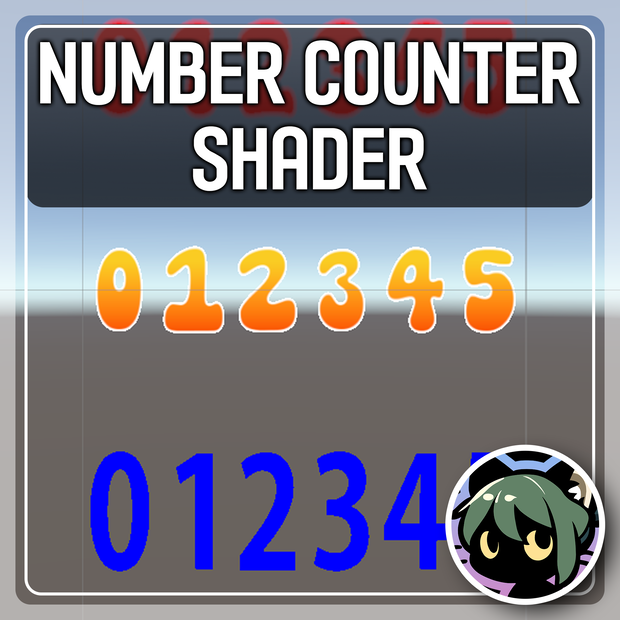
This is a simple shader for displaying numbers in Unity.
以下のリンクからVCCを通じたインポートもサポートしています:
Import via VCC is also supported from the following link:
다음 링크로부터 VCC를 통한 임포트 또한 지원합니다:
https://hisacat.github.io/Unity-NumberCounterShader
Github: https://github.com/hisacat/Unity-NumberCounterShader
💘はじめに
これはUnityで数字を表示するためのシンプルなシェーダーです。
・最大6桁の数字を表示可能
・パフォーマンスを最適化した軽量シェーダー
・`Particle System`と完全互換
・7種類のデフォルトフォントテクスチャを提供
このシェーダーは手動でコーディングされており、パフォーマンス面で非常に軽量です。
メインロジックは "NumberCounter.cginc" に記載されていますので、興味のある方はご確認ください。
📜使用方法
"HisaCat/Number Counter/Sample Scene" をご参照ください。
使用するには、"HisaCat/Number Counter Unlit Cutout" や "HisaCat/Number Counter Unlit Alpha Blended" シェーダーをQuad meshに適用します。
プロパティ:
・Color: 最終的に掛け合わせる色です。
・Sprite Sheet: 数字0〜9が含まれたテクスチャです。(5列2行)
・Display Length: 表示する桁数です。
・Value: 表示する値です。
・Align: 数値の配置方法。
・Align-Fill Zeros: 数字を右揃えにし、空いた左の桁を「0」で埋めます。
・Align-Left: 数字を左揃えにします。
・Align-Right: 数字を右揃えにします。
💘소개
이것은 숫자를 표시하기 위한 간단한 Unity용 Shader 입니다.
・최대 6자리의 숫자를 표시 가능
・직접 작성된 쉐이더로 매우 가벼움
・Particle System과 완벽 호환
・7여종의 텍스처 폰트가 기본적으로 제공
이 쉐이더는 코드를 통해 직접 작성었되으며, 퍼포먼스 측면에서 매우 가볍습니다.
메인 로직은 "NumberCounter.cginc" 에 작성되어 있으니 궁금하시다면 확인해보세요!
📜사용법
"HisaCat/Number Counter/Sample Scene" 을 참고하세요.
기본적으로 Quad mesh에 "HisaCat/Number Counter Unlit Cutout", "HisaCat/Number Counter Unlit Alpha Blended"등의 Shader를 적용한 Material을 할당하면 됩니다.
Properties:
・Color: 최종적으로 곱해질 색상입니다.
・Sprite Sheet: 0~9까지의 숫자가 포함된 텍스처입니다. (5 Columns 2 Rows)
・Display Length: 표시될 숫자의 자릿수입니다.
・Value: 표시될 값입니다.
・Align: 값의 표시 방법입니다.
・Align - Fill Zeros: 숫자를 오른쪽으로 정렬하고 빈 왼쪽 자리를 "0"으로 채웁니다.
・Align - Left: 숫자를 왼쪽으로 정렬합니다.
・Align - Right: 숫자를 오른쪽으로 정렬합니다.
💘Introduction
This is a simple shader for displaying numbers in Unity.
・Displays up to 6 digits
・Lightweight shader with optimized performance
・Fully compatible with Particle System
・Comes with 7 default font textures
This shader is manually coded and optimized for performance.
The core logic is located in "NumberCounter.cginc" if you’re interested in exploring the code.
📜How to Use
Refer to the "Assets/HisaCat/Number Counter/Sample Scene" for examples.
To use, simply apply materials with shaders like "HisaCat/Number Counter Unlit Cutout" or "HisaCat/Number Counter Unlit Alpha Blended" to a Quad mesh.
Properties:
・Color: - The final color to be multiplied.
・Sprite Sheet: A texture containing digits 0–9 (5 Columns 2 Rows).
・Display Length: - Number of digits to display.
・Value: The value to display.
・Align: Alignment of the displayed value.
・Align - Fill Zeros: - Right-align with empty spaces filled with "0".
・Align - Left: Left-aligns the number.
・Align - Right: Right-aligns the number.
📃利用規約・이용약관・Terms of Use
このプロジェクトにクレジットを付ける義務はありませんが、付けていただけると嬉しいです!
プロジェクトを気に入っていただけたら、ぜひご支援をお願いいたします。 <3
이 프로젝트를 사용함에 따른 라이센스 표기는 당신의 자유입니다!
제 프로젝트가 마음에 드신다면 서포트를 부탁드립니다. <3
There’s no requirement to credit this project, though it is appreciated!
If you enjoy my project, please consider supporting it. <3
👑Mirror (Source code)
https://github.com/hisacat/Unity-NumberCounterShader
📫問合せ・문의・Contact
HisaCat
・Booth: https://hisacat.booth.pm/
・Twitter: https://twitter.com/ahisacat
・Discord: https://discord.com/users/295816286213242880
・Github: https://github.com/hisacat
모든 리뷰
더보기리뷰 등록
리뷰를 작성하려면 로그인이 필요합니다.
로그인하고 리뷰 쓰기